Programme d’exemple 5 : MM_S5_Viz_SetBranch
Introduction du programme
Description |
Le robot déclenche l’exécution du projet Mech-Viz, définit le port de sortie pour l’étape Branch by Msg dans le projet Mech-Viz, puis obtient la trajectoire planifiée pour la prise et le dépôt. |
||
Chemin de fichier |
Vous pouvez accéder au répertoire d’installation de Mech-Vision et Mech-Viz et trouver le fichier en utilisant le chemin |
||
Projet |
projets Mech-Vision et Mech-Viz
|
||
Prérequis |
|
| Ce programme d’exemple est fourni à titre de référence uniquement. Avant d’utiliser le programme, veuillez le modifier en fonction du scénario réel. |
Description du programme
Cette partie décrit le programme d’exemple MM_S5_Viz_SetBranch.
| La seule différence entre le programme d’exemple MM_S5_Viz_SetBranch et le programme d’exemple MM_S2_Viz_Basic est que MM_S5_Viz_SetBranch peut définir le port de sortie de l’étape Branch by Msg dans le projet Mech-Viz (le code correspondant à cette fonction est en gras). Par conséquent, les fonctionnalités du programme principal similaires à celles de MM_S2_Viz_Basic ne sont pas décrites dans cette partie. Pour plus d’informations sur ces fonctionnalités, voir Programme d’exemple 2 : MM_S2_Viz_Basic. |
DEF  MM_S5_Viz_SetBranch ( )
;---------------------------------------------------
; FUNCTION: trigger Mech-Viz project then set
; branch and get planned path
; Mech-Mind, 2023-12-25
;---------------------------------------------------
   ;set current tool no. to 1
   BAS(#TOOL,1)
   ;set current base no. to 0
   BAS(#BASE,0)
   ;move to robot home position
PTP HOME Vel=100 % DEFAULT
   ;initialize communication parameters (initialization is required only once)
   MM_Init_Socket("XML_Kuka_MMIND",873,871,60)
   ;move to image-capturing position
LIN camera_capture Vel=1 m/s CPDAT1 Tool[1] Base[0]
   ;trigger Mech-Viz project
   MM_Start_Viz(2,init_jps)
   ;set branch, "MM_Set_Branch(Branch_Num,Exit_Num)"
   MM_Set_Branch(1,1)
   ;get planned path, 1st argument (1) means getting pose in JPs
   MM_Get_VizData(1,pos_num,vis_pos_num,status)
   ;check whether planned path has been got from Mech-Viz successfully
   IF status<> 2100 THEN
      ;add error handling logic here according to different error codes
      ;e.g.: status=2038 means no point cloud in ROI
      halt
   ENDIF
   ;save waypoints of the planned path to local variables one by one
   MM_Get_Jps(1,Xpick_point1,label[1],toolid[1])
   MM_Get_Jps(2,Xpick_point2,label[2],toolid[2])
   MM_Get_Jps(3,Xpick_point3,label[3],toolid[3])
   ;follow the planned path to pick
   ;move to approach waypoint of picking
PTP pick_point1 Vel=50 % PDAT1 Tool[1] Base[0]
   ;move to picking waypoint
PTP pick_point2 Vel=10 % PDAT2 Tool[1] Base[0]
   ;add object grasping logic here, such as "$OUT[1]=TRUE"
   halt
   ;move to departure waypoint of picking
PTP pick_point3 Vel=50 % PDAT3 Tool[1] Base[0]
   ;move to intermediate waypoint of placing
PTP drop_waypoint CONT Vel=100 % PDAT2 Tool[1] Base[0]
   ;move to approach waypoint of placing
LIN drop_app Vel=1 m/s CPDAT3 Tool[1] Base[0]
   ;move to placing waypoint
LIN drop Vel=0.3 m/s CPDAT4 Tool[1] Base[0]
   ;add object releasing logic here, such as "$OUT[1]=FALSE"
   halt
   ;move to departure waypoint of placing
LIN drop_app Vel=1 m/s CPDAT3 Tool[1] Base[0]
   ;move back to robot home position
PTP HOME Vel=100 % DEFAULT
END
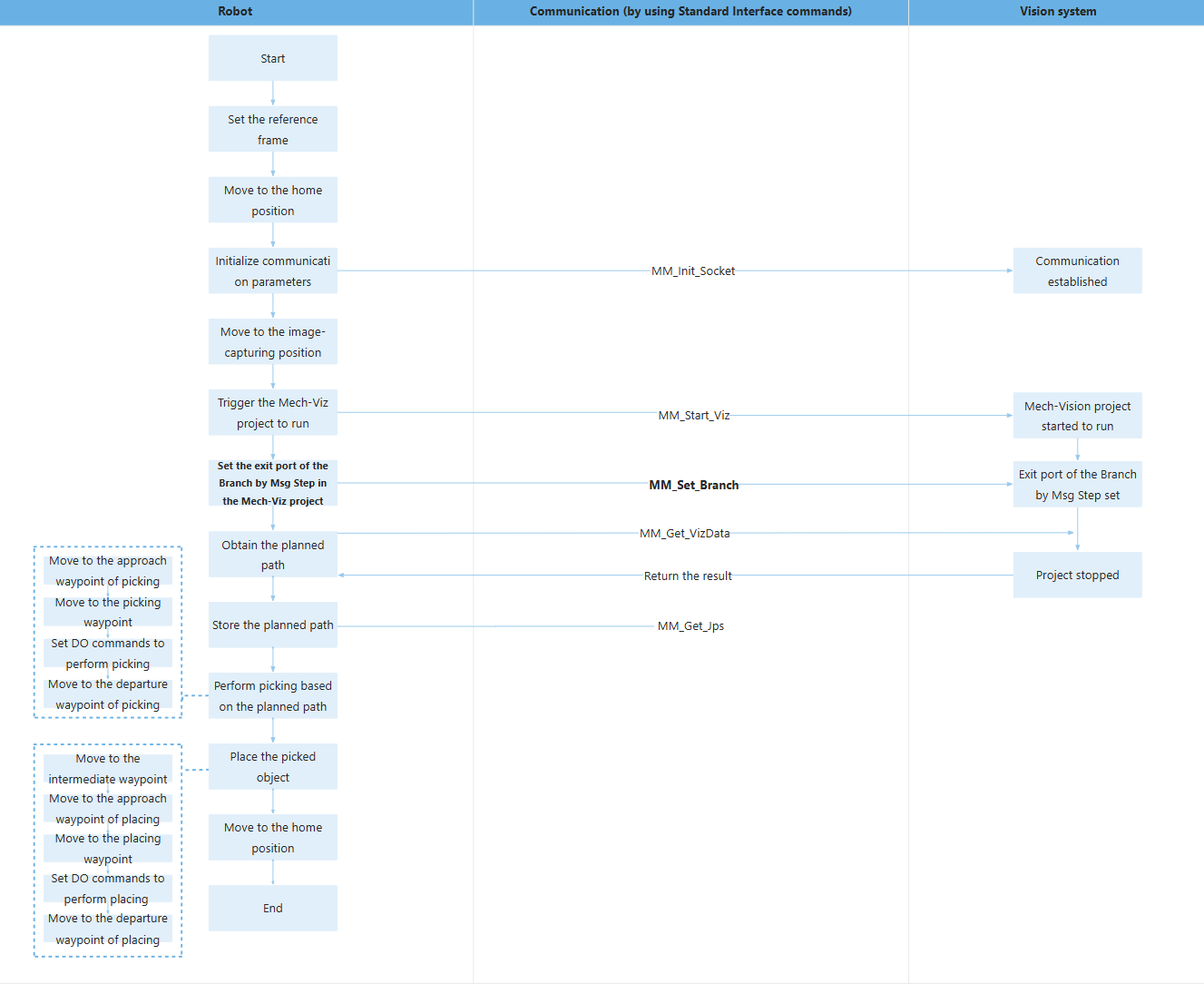
Le flux de travail correspondant au code du programme d’exemple ci-dessus est illustré dans la figure ci-dessous.
Le tableau ci-dessous décrit le processus de définition du port de sortie de l’étape Branch by Msg dans le projet Mech-Viz. Vous pouvez cliquer sur le lien hypertexte du nom de la commande pour consulter sa description détaillée.
| Fonctionnalité | Code et description |
|---|---|
Définir le port de sortie pour l’étape Branch by Msg dans Mech-Viz |
Dans l’ensemble de l’instruction, le projet Mech-Viz avec un ID de 1 prend le port 0 de l’étape Branch by Msg, comme illustré dans la figure suivante. 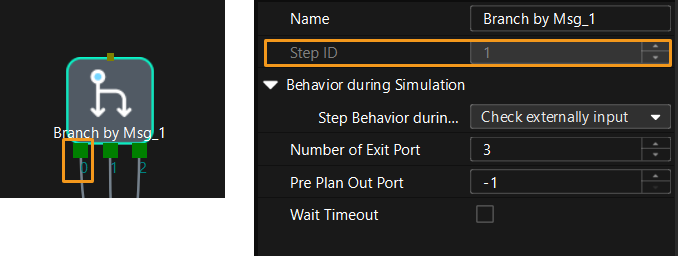
|