Pick Anything V2
Function
This Step performs surface segmentation on the input depth map and color image based on the Pick Anything V2 Model Package. It identifies each individual pickable surface and overlapped surface and outputs a list of masks sorted by picking priority. The results can be used to generate pick points in subsequent Steps.
|
To use the Pick Anything V2 Step, please contact Mech-Mind sales to obtain a software license that supports this feature. After updating the software license, you can access this feature. |
Usage Scenario
This Step is suitable for generalized object picking and high-speed sorting applications. It typically follows image processing and frame transformation Steps, and precedes point cloud extraction and pose adjustment Steps.
|
Go to Download Center to get the Pick Anything V2 deep learning model package. |
Input and Output
Input
| Input port | Data type | Description |
|---|---|---|
Camera Depth Map |
Image/Depth |
Original depth map of the object. |
Camera Color Image |
Image/Color |
Original color image of the object. |
Output
| Output port | Data type | Description |
|---|---|---|
Visualization Output |
Image/Color |
Visualized results. |
Sorted Mask Images |
Image/Color/Mask [] |
List of segmented surface mask images, sorted first by pickable priority (pickable surfaces before overlapped surfaces), and then by area from largest to smallest within each category. |
Pickable Flags |
Bool [] |
List of pickable flags for segmented surface masks, in one-to-one correspondence with the sorted mask list. true means the surface is pickable, and false means the surface is overlapped. |
System Requirements
The following system requirements need to be met when using this Step.
-
CPU: needs to support the AVX2 instruction set and meets any of the following conditions:
-
IPC or PC without any discrete graphics card: Intel i5-12400 or higher.
-
IPC or PC with a discrete graphics card: Intel i7-6700 or higher, with the graphics card not lower than GeForce GTX 1660.
This Step has been thoroughly tested on Intel CPUs but has not been tested on AMD CPUs yet. Therefore, Intel CPUs are recommended.
-
-
GPU: GeForce GTX 1660 or above (if with a discrete graphics card).
Parameter Description
Model Package Settings
| Parameter | Description |
|---|---|
Model Manager Tool |
Parameter description: This parameter is used to open the deep learning model package management tool and import the deep learning model package. The model package file is a “.dlkpack” file exported by Mech-DLK.
|
Model Name |
Parameter description: This parameter is used to select the model package that has been imported for this Step.
|
Release Original Model Package After Switching |
Parameter description: This parameter determines whether to release the resources occupied by the original model package immediately when the model package is switched.
|
Model Package Type |
Parameter description: Once a Model Name is selected, the DI Algo Type Translated String will be filled automatically. |
Input Batch Size |
Parmeter description: The number of images processed during each inference. |
GPU ID |
Parameter description: This parameter is used to select the device ID of the GPU that will be used for the inference.
|
Pre-Process
| Parameter | Description | ||||
|---|---|---|---|---|---|
ROI File |
Parameter description: This parameter is used to set or modify the ROI of the input image. Tuning instruction: Once the deep learning model is imported, a default ROI will be applied. If you need to edit the ROI, click Open the editor. Edit the ROI in the pop-up Set ROI window, and fill in the ROI name.
|
Post-Process
| Parameter | Description |
|---|---|
Inference Configuration |
Parameter description: This parameter is used to configure parameters related to Pick Anything model package inference. You can click Open the editor to open the inference configuration window.
|
Visualization Settings
| Parameter | Description |
|---|---|
Draw Segmentation Mask on Image |
Parameter description: This parameter is used to display the segmentation mask on the image. Tuning instructions: Select this option to enable visualization. The segmentation masks are displayed directly on the image, as shown below: 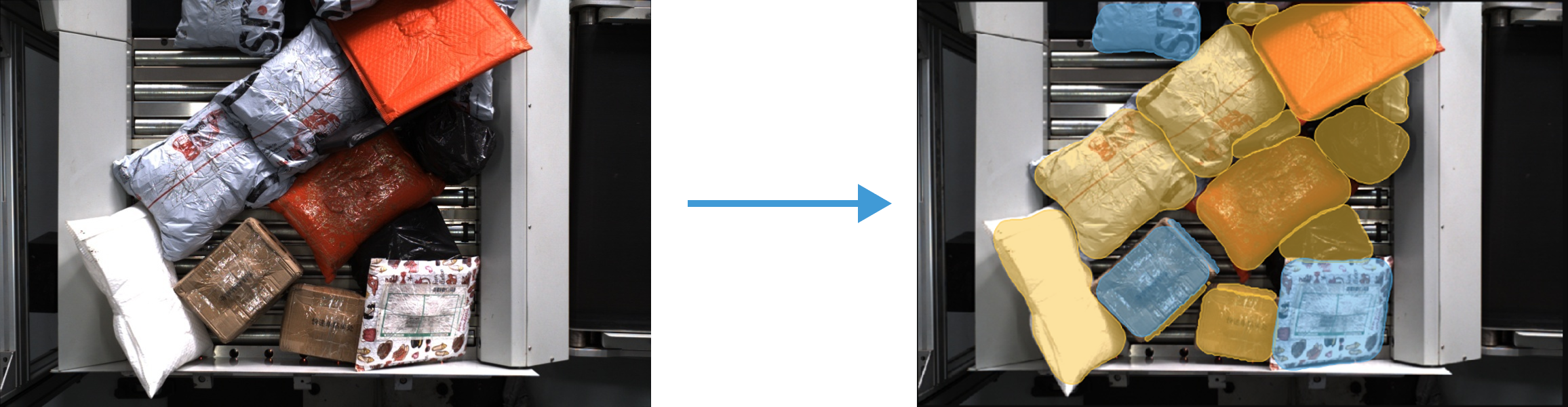
|