Convert Poses 2D to 3D According to Orthographic Projection
Function
This Step converts 2D poses generated based on the Orthographic Projection Step to 3D poses.
Usage Scenario
This Step is generally used for measurement and follows the Orthographic Projection Step. It converts the poses in the 2D image output from Orthographic Projection into 3D poses. This Step usually follows Steps such as Orthographic Projection and Detection.
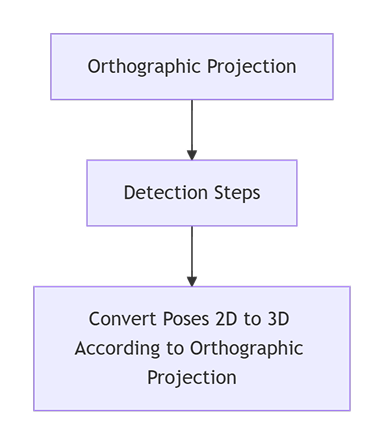
In practical project applications, the connection method of this Step can refer to the following example:
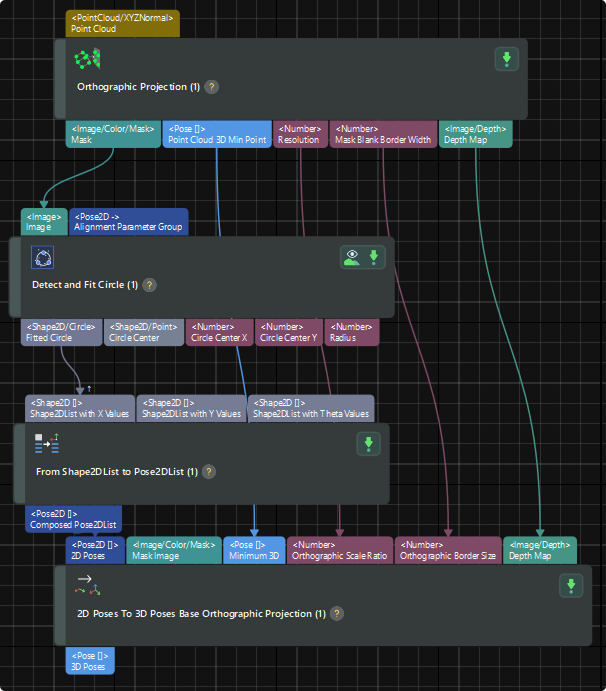
Input and Output
Input
| Input port | Data type | Description |
|---|---|---|
2D Poses |
Pose2D[] |
2D poses generated based on Orthographic Projection |
Mask Image |
Image/Color/Mask |
Masks converted from 3D orthographic projections to 2D |
Minimum 3D |
Pose[] |
This Step takes the minimum values of X, Y, and Z in the 3D coordinates of all points in the point cloud and combines them into a new 3D coordinate. |
Orthographic Scale Ratio |
Number |
Scale of Orthographic Projection |
Orthographic Border Size |
Number |
Border width of masks generated based on Orthographic Projection |
Depth Map |
Image/Depth |
Depth map corresponding to objects in the mask generated based on Orthographic Projection |
Parameter Description
| Parameter | Description |
|---|---|
Neighboring Depth Search Kernel Size |
Description: This parameter is used to calculate the Z coordinates of the 2D poses. The Z value is calculated from the average depths of points within the neighborhood. Kernel size specifies the maximum radius (in pixels) of the local area where the depth value is calculated.
|