3D Bin Recognition
Function
This Step integrates vision processing capabilities such as point cloud preprocessing, 3D matching, and deep learning to quickly complete bin recognition.
Usage Scenario
This Step is suitable for picking scenarios where the bin position changes. This Step usually follows the Capture Images from Camera Step and is followed by the pose adjustment Step.
-
Scenario 1
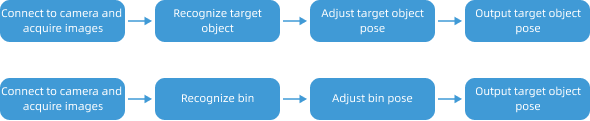
The bin position changes during the incoming-material stage, but the bin remains stationary during target object picking. In this case, recognition is required only once when each bin arrives for the first time, without repeated recognition, thereby effectively improving the cycle time.
In this scenario, target object recognition and bin recognition can be performed separately in two independent vision projects, as shown in the following figure.
-
Scenario 2
The bin may move during target object picking, or the bin point cloud may interfere with target object recognition. In this case, both target object recognition and bin recognition need to be performed at the same time to update the bin pose in real time and avoid interference from the bin point cloud during the matching process, thereby improving the stability of target object recognition.
In this scenario, bin recognition and target object recognition can be performed in the same vision project at the same time, as shown in the following figure.

Input and Output
Input
| Input port | Data type | Description |
|---|---|---|
Camera Depth Map |
Image/Depth |
Original depth map of the bin. |
Camera Color Image |
Image/Color |
Original color image of the bin. |
Output
| Output port | Data type | Description |
|---|---|---|
Bin Pose |
Pose[] |
Pose of the bin. |
Bin Name |
String[] |
Name of the bin. |
Bin Dimensions |
Size3D[] |
Dimensions of the bin. |
Bin Interior Depth Map |
Image[] |
Depth map inside the bin.
|
Bin Interior Color Image |
Image[] |
Color image inside the bin.
|
Bin Interior Surface Point Cloud |
PointCloud/XYZNormal[] |
Surface point cloud inside the bin.
|
Bin Interior Edge Point Cloud |
PointCloud/XYZNormal[] |
Edge point cloud inside the bin.
|
Parameter Description
| Parameter | Description |
|---|---|
Select Target Object |
Parameter description: Select a target object to recognize from the drop-down list. The target object should be added in advance via the config wizard.
|
|
After selecting “Trigger Control Flow Given No Output” for the “3D Bin Recognition” Step, the control flow will still be triggered even if the output of the Step is empty. Note that the "Trigger Control Flow Given Output" feature will always take effect. |