Find 2D Contour at Specified Inner-Outer Level
Usage Scenario
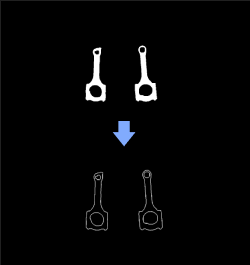
This Sep is a general 2D image contour extraction Step. It can be used between Steps Orthographic Projection and Orthographic Projection Inverse to obtain object contours in a 3D point cloud.
Parameter Description
Contour Retrieval Settings
| Parameter | Description |
|---|---|
Contour Retrieval Mode |
Parameter description: Contour retrieval mode.
Default value: CV_RETR_EXTERNAL |
Min Contour Size |
Parameter description: Lower limit of contour pixel size. Contour with a pixel size smaller than this value will be discarded. Default value: 20 px |
Max Contour Size |
Parameter description: Upper limit of contour pixel size. Contour with a pixel size larger than this value will be discarded. Default value: 1000000 px |
Specified Hierarchy |
Parameter description: This parameter sets the required contour of the specified hierarchy levels. The hierarchy increases from the outer layer to the inner layer. The outermost layer hierarchy is 1. In addition, 0 indicates the contours of all layers, and -1 indicates the innermost layer. This parameter needs to be set when "Contour Retrieval Mode" is CVRETRTREE. Default value: 0 |
Merge Contours |
Parameter description: Draw all contours into one mask. Default value: Selected |