Object Detection
Function
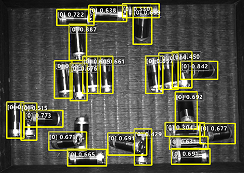
Use the Object Detection model package to run inference on the input image. The model package detects the positions of all target objects, classifies them, and outputs their classes.
This model is suitable for scenarios such as counting target objects, and detecting and extracting target object regions.
Input and Output
After importing the model package in the Deep Learning Model Package Inference Step, the following input and output ports will be displayed.
Input
| Input port | Data type | Description |
|---|---|---|
Image |
Image/Color |
Image input to this port will be used for deep learning model package inference. |
Output
| Output port | Data type | Description |
|---|---|---|
Visualization Output |
Image/Color |
Visualized results. |
Object Bounding Boxes |
Shape2D/Contour[] |
Bounding box for detection results. |
Object Images |
Image/Color |
Image captured from the input image by the detection result bounding box. |
Object Confidences |
Number[] |
Confidence of the detection result. |
Object Labels |
String[] |
The label of the inspection result. |
Object Bounding Box Masks |
Image/Color/Mask[] |
Mask of the object bounding box. Non-zero pixel values are masks. |
Parameter Description
The following parameters need to be adjusted when the object detection model package is imported into this Step.
Model Package Settings
| Parameter | Description |
|---|---|
Model Manager Tool |
Parameter description: This parameter is used to open the deep learning model package management tool and import the deep learning model package. The model package file is a “.dlkpack” file exported by Mech-DLK.
|
Model Name |
Parameter description: This parameter is used to select the model package that has been imported for this Step.
|
Release Original Model Package After Switching |
Parameter description: This parameter determines whether to release the resources occupied by the original model package immediately when the model package is switched.
|
Model Package Type |
Parameter description: Once a Model Name is selected, the DI Algo Type Translated String will be filled automatically. |
Input Batch Size |
Parmeter description: The number of images processed during each inference. |
GPU ID |
Parameter description: This parameter is used to select the device ID of the GPU that will be used for the inference.
|
Pre-Process
| Parameter | Description | ||||
|---|---|---|---|---|---|
ROI File |
Parameter description: This parameter is used to set or modify the ROI of the input image. Tuning instruction: Once the deep learning model is imported, a default ROI will be applied. If you need to edit the ROI, click Open the editor. Edit the ROI in the pop-up Set ROI window, and fill in the ROI name.
|
Post-Process
| Parameter | Description |
|---|---|
Inference Configuration |
Parameter description: This parameter is used to configure parameters related to object detection model package inference. You can click Open the editor to open the inference configuration window.
|
Class Display Mode |
Parameter description: Select to display classes in the output results by name or by index. |
Visualization Settings
| Parameter | Description |
|---|---|
Draw result on image |
Parameter description: Once enabled, the detection result will be displayed on the image.
|
Customize Font Size |
Parameter description: This parameter determines whether to customize the font size in the visualized outputs. Once this option is selected, you should set the Font Size (0–10).
|
Font Size (0–10) |
Parameter description: This parameter is used to set the font size in the visualized outputs.
|