Fill Holes

You are currently viewing the documentation for the latest version (2.2.0). To access a different version, click the "Switch version" button located in the upper-right corner of the page.

■ If you are not sure which version of the product you are currently using, please feel free to contact Mech-Mind Technical Support.

Function

This Step is used to fill the holes in the non-zero pixel regions in the input binary image.

  • The binary image means that each pixel on the image has only two possible values. Common binary images include black and white images and monochrome images.

  • In this step, the non-zero pixel is a pixel with a pixel value of 255.

Usage Scenario

This step is usually used for image segmentation. It obtains a complete image of the target area and avoids interference caused by missing images in the hole section.

Input and Output

Input

Input port Data type Description

Binary image

Image/Color/Mask

The binary image input at this port will have its holes in non-zero pixel regions filled.

Output

Output port Data type Description

Image

Image/Color/Mask

Binary image with holes in non-zero pixel regions filled.

Parameter Description

Parameter Description

Hole Type

Description: This parameter is used to select the type of holes to be filled.

Options: CompleteHoles, AllHoles.

  • CompleteHoles: Only the complete holes surrounded by non-zero pixels will be filled.

  • AllHoles: Both the complete holes surrounded by non-zero pixels and incomplete holes that are not entirely surrounded by non-zero pixels will be filled.

Default setting: CompleteHoles.

Instruction: Select the type of hole according to the actual situation.

Tuning Examples

Fill Complete Holes

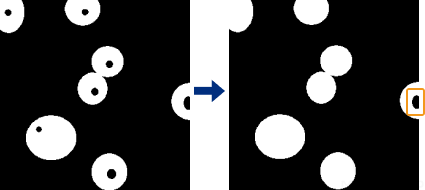
The effect of filling complete holes is shown in the right figure below. Only complete holes surrounded by non-zero pixels are filled, and incomplete holes at the edge of the image (as shown in the yellow frame) that are not entirely surrounded by non-zero pixels are not filled.

fill holes fill complete hole

Fill All Holes

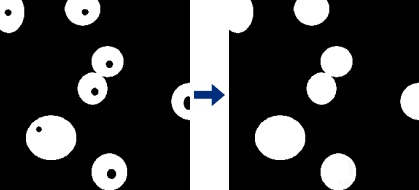
The effect of filling all holes is shown in the right figure below. Both complete holes surrounded by non-zero pixels and incomplete holes at the edge of the image that are not entirely surrounded by non-zero pixels are filled.

fill holes fill all hole

Is this page helpful?

You can give a feedback in any of the following ways:

We Value Your Privacy

We use cookies to provide you with the best possible experience on our website. By continuing to use the site, you acknowledge that you agree to the use of cookies. If you decline, a single cookie will be used to ensure you're not tracked or remembered when you visit this website.