Global Variable
Description
A global variable can be accessed and used by all projects under the same solution. It enables data sharing across different projects for consistent data management and transfer.
Workflow
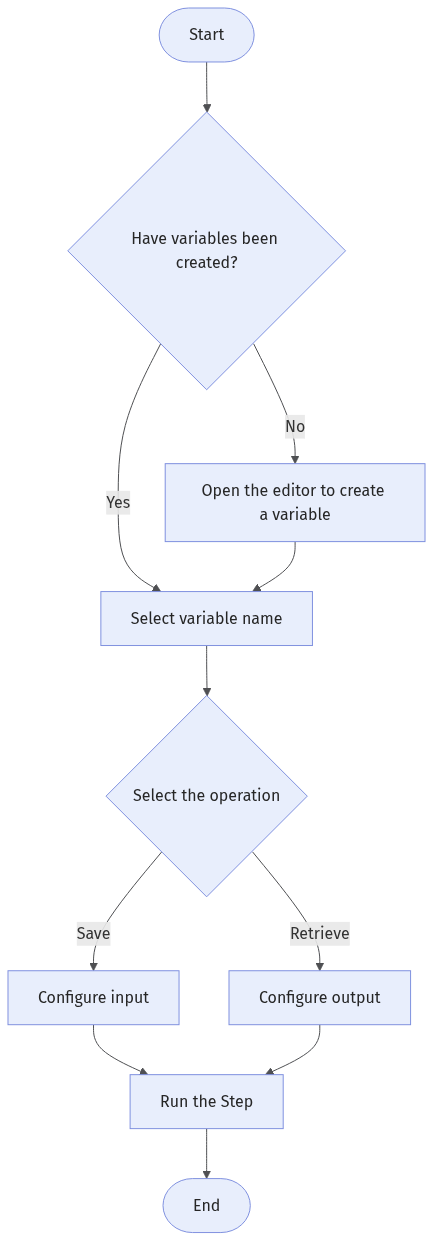
The process of configuring this Step is as follows:
-
Confirm that variables have been created. If not, open the Global Variable Management window to create one.
-
Select the variable name.
-
Select the operation to perform on the global variable: Save or Retrieve.
-
Configure the ports to form a data flow.
Input and Output Description
The Step’s input and output ports depend on the selected operation type:
-
When Save is selected, the Step displays the Data to Save input port. The output of other Steps can be connected to this port to save data to variables.
-
When Retrieve is selected, the Step displays the Retrieved Data output port. The data output by this port can be connected to the input ports of other Steps to retrieve data from variables.
Parameter Description
| Parameter | Description |
|---|---|
Variable Name |
The variable name is the unique identifier of the global variable. Click the Open the editor button to manage global variables in Global Variable Management under the current solution by performing operations such as adding and deleting. To save data to a new variable, open the editor and add a variable first. To retrieve data from an existing variable, select an existing variable. |
Operation |
Select whether to save data to the variable or retrieve data from the variable.
|
Retrieve All |
When not selected, retrieves the oldest data item stored in the variable. When selected, retrieves all data stored in the variable at once. Only visible when the operation type is Retrieve and the variable mode is Queue. |
Read Only |
When selected, reads all data stored in the variable without removing it from the queue. This parameter is available only when Retrieve All is selected. |
Troubleshooting
|