Configure Custom Communication Service - Siemens S7 Client
This section describes how to configure a custom communication service of the Siemens S7 Client type in Mech-MSR.
Configuration Process
| Before configuring, click Communication Configuration on the software toolbar and confirm that the software is currently using the custom communication mode. |
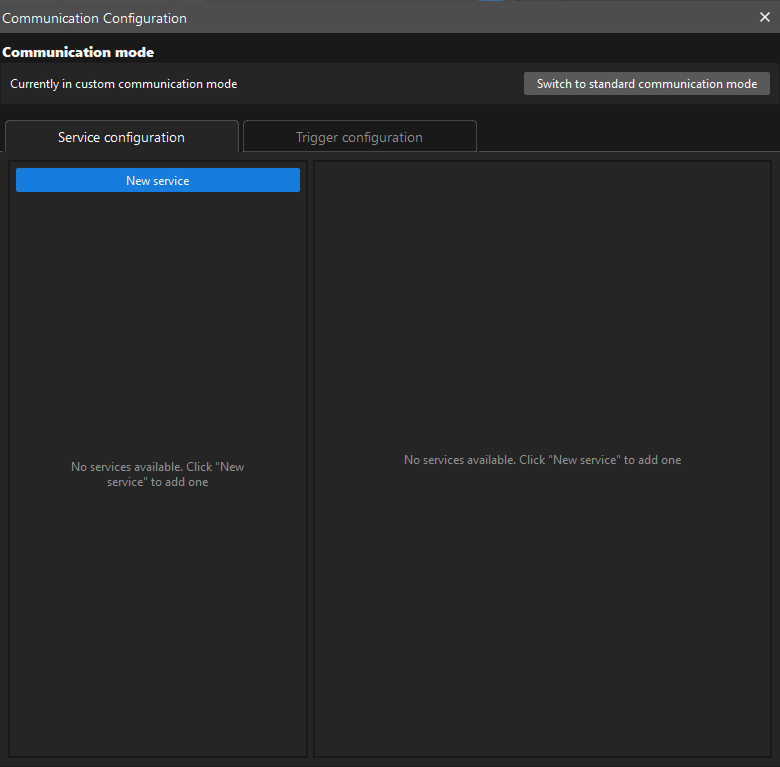
To configure a custom communication service of the Siemens S7 Client type, perform the following steps:
-
On the Service configuration tab of Communication Configuration, click New service.
-
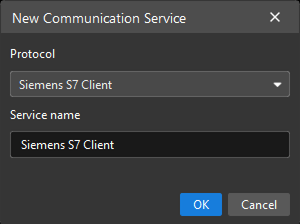
In the New Communication Service dialog box, set Protocol to Siemens S7 Client, specify Service name, and then click OK.
-
In the service list on the left, click the newly created service. Its configuration interface is displayed on the right.
-
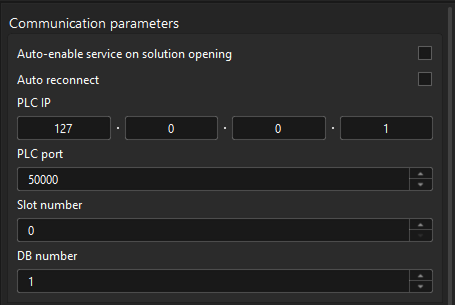
In the Communication Parameters area, set parameters as needed.
-
Auto-enable the service when opening the solution: If you want the software to automatically enable the service the next time the solution is opened, select this option.
-
Auto reconnect: When this option is enabled, the service automatically attempts to reconnect after the connection to the S7 PLC is lost. Enable it as needed.
-
PLC IP: Specifies the IP address of the remote S7 PLC. Make sure that the S7 PLC IP address is correctly configured and reachable. The PLC IP address and the IPC IP address must be on the same subnet.
-
PLC port: Specifies the port of the remote S7 PLC. The default value is 50000. Adjust it according to the actual port of the S7 PLC.
-
Slot number: Set this parameter according to the correspondence between slot numbers and Siemens S7 series models.
Model Slot Number S7-300
2
S7-1200
0 or 1
S7-1500
0 or 1
Other models
0
-
DB block number: The DB block number is the number corresponding to the interface file
MM MSR Interface.dborMM MSR Interface Supporting String.dbin the PLC project. The configured number must be consistent with the PLC side to ensure correct communication.
-
-
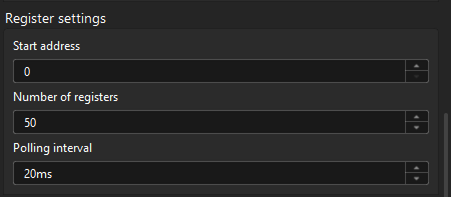
In the Register Settings area, set parameters as needed.
-
Start address: Specifies the register address in the PLC from which data read and write operations start. After this parameter is set, S7 Client starts from this address and accesses subsequent registers. The default value is 0.
-
Number of registers: Specifies the number of consecutive registers to read or write in each communication operation. For example, if this parameter is set to 10, S7 Client starts from the start address and accesses 10 consecutive registers. The default value is 50. A maximum of 2000 registers is supported.
-
Polling interval: Specifies the time interval at which S7 Client sends data read or write requests to the PLC, in milliseconds. The default value is 20 ms. A shorter polling interval updates data faster but increases system load. A longer polling interval updates data more slowly but reduces system load. Adjust it as needed.
-
-
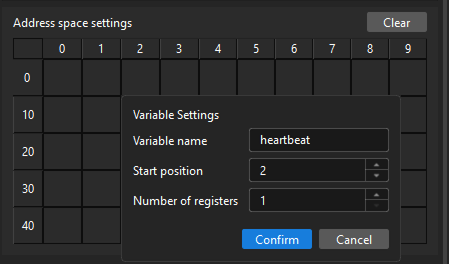
In the Address Space Settings area, bind registers to variables for specific functions, such as the heartbeat variable used for heartbeat checks:
-
Select a target register, and then click the edit icon.
-
In the Variable Settings dialog box, specify Variable name, Start position, and Number of registers, and then click Confirm.
-
The address spaces occupied by any two register variables must not overlap.
-
To modify the settings of a register variable, click the edit icon again, and then modify the settings in the Variable Settings dialog box.
-
To delete the settings of a register variable, select the space occupied by the register variable, and then click the delete icon. Deleting a register variable also deletes the trigger configurations associated with it.
-
-
-
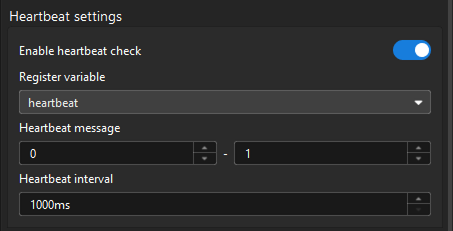
In the Heartbeat Settings area, enable heartbeat checks as needed, and configure heartbeat parameters.
-
Register variable: Specifies the register variable used to store heartbeat signals. Make sure that this variable is configured correctly and allows write operations. S7 Client periodically writes heartbeat messages to this variable.
-
Heartbeat message: Specifies the values alternately written to the register variable during heartbeat checks. These are usually two different integers, such as 1 and 0. S7 Client alternately writes these two values in each heartbeat cycle. The PLC can determine whether communication is normal by detecting changes to this variable.
-
Heartbeat interval: Specifies the time interval between two heartbeat message writes, in milliseconds (ms). Set it according to actual communication requirements. The default value (1000 ms) is recommended. A shorter interval detects disconnections sooner but increases communication frequency.
-
After the configuration is complete, you can start the communication service.
For a custom communication service of the Siemens S7 Client type, the service attempts to establish a connection to the PLC when it starts. If the connection cannot be established, the communication service cannot start. Troubleshoot according to the error dialog box.