Measure Edge-to-Edge Width
Description
Use this Step to detect a pair of edge points in the image and measure the distance between them as the edge-to-edge width.
Usage Scenario
This Step is mainly used in scenarios where precise measurement of distances within objects or between multiple parts is required, such as detecting component gaps and measuring package dimensions.
Workflow
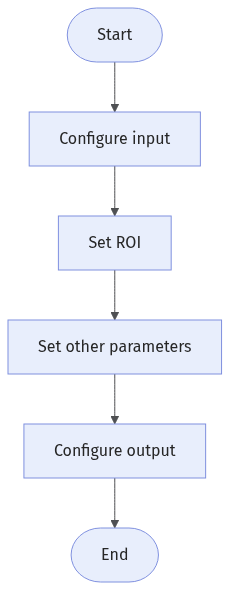
The process of configuring this Step is shown below:
-
Configure the input. Connect the Step ports in the graphical programming workspace or select the input under Input in the parameter configuration panel.
-
Complete the ROI Settings.
-
Set other parameters.
-
Confirm the output items in the Output section.
-
Run the Step, and view output.
Input Description
| Input Item | Description |
|---|---|
Image |
The image used for detecting edge point pairs. |
Alignment Parameter Group |
Used to adjust the ROI’s pose in sync with the target object’s pose changes. |
Parameter Description
| Parameter | Description |
|---|---|
ROI Settings |
You can draw a rectangular ROI, and the system will extract multiple columns of pixels according to the caliper settings. The detected edge point pairs in each column of pixels will be used for width measurement. See 2D ROI Settings to learn more about ROI. |
Filter Window Size |
Specify the window size to be used when filtering a column of pixels in its direction. Filtering can reduce noise and improve the stability of edge detection results. |
Gray Value Change Threshold |
In the extracted column of pixels, edge points are detected only if the gray value change between adjacent pixels at an edge is greater than or equal to this threshold. |
Expected Edge-to-Edge Width |
This parameter specifies the expected distance between two edge points. When there are multiple eligible edge point pairs, the edge point pair closest to the expected width is selected to calculate the final edge-to-edge width. |
Upper Edge Polarity / Lower Edge Polarity |
This parameter specifies the direction of the gray value change at the edge. Value list:
|
Output Description
Select the output item(s) to add the output port(s) to the Step, and the corresponding data will be output after the Step is run. You can select the output according to the actual measurement requirements.
| If you select an expandable output item, you must expand it by clicking ▶, and then set the Lower Limit and Upper Limit values to determine the acceptable range. If the output value falls within the acceptable range, the measurement item is judged as OK; otherwise, it is judged as NG. |
| Output Item | Description |
|---|---|
Edge-to-Edge Line |
A line connecting the detected pair of edge points, oriented from the upper edge to the lower edge. |
Edge-to-Edge Width |
The distance between the detected pair of edge points. |
Troubleshooting
|
CV-W8501
Inappropriate ROI settings.
Possible cause: The size of the ROI is too large, more than twice the size of the image.
Solution: Reset the ROI to ensure that it is of a proper size.
CV-W8502
Error: The “Filter Window Size” value is outside of the valid range.
Solution: Make sure the parameter value is within 0–100.
CV-W8503
Error: The “Gray Value Change Threshold” is outside of the valid range.
Solution: Make sure the parameter value is within 0–255.
CV-W8507
Error: The set “Upper Edge Polarity” is invalid.
Solution: Select a valid upper edge polarity from the drop-down list.