Detect Edge Point
Description
This Step is used to detect a qualifying edge point along the longitudinal centerline of the specified region in the input image.
Workflow
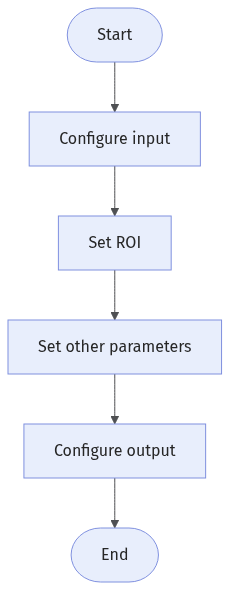
The process of configuring this Step is shown below:
-
Configure the input. Connect the Step ports in the graphical programming workspace or select the input under Input in the parameter configuration panel.
-
Complete the ROI Settings.
-
Set other parameters.
-
Confirm the output items in the Output section.
-
Run the Step, and view output.
Input Description
| Input Item | Description |
|---|---|
Image |
The image used for detecting an edge point. |
Alignment Parameter Group |
This Step is used to adjust the pose of the ROI synchronously based on the pose transformation of the target object. |
Parameter Description
| Parameter | Description |
|---|---|
ROI Settings |
You can draw a rectangular ROI, and a column of pixels from its center is extracted for edge point detection. See 2D ROI Settings to learn how to set and adjust the ROI. |
Filter Window Size |
This parameter specifies the window size used for filtering along the direction of the extracted column of pixels . Filtering can reduce noise and improve the stability of edge detection results. |
Gray Value Change Threshold |
An edge point is detected in an extracted pixel column only if the gray value change between adjacent pixels at the edge is greater than or equal to this threshold. A properly set parameter filters out weak edges and noise. |
Edge Polarity |
This parameter specifies the direction of the gray value change at the edge. Value list:
|
Output Description
Select the output item(s) to add the output port(s) to the Step, and the corresponding data will be output after the Step is run. You can select the output according to the actual measurement requirements.
| If you select an expandable output item, you must expand it by clicking ▶, and then set the Lower Limit and Upper Limit values to determine the acceptable range. If the output value falls within the acceptable range, the measurement item is judged as OK; otherwise, it is judged as NG. |
| Output Item | Description |
|---|---|
Edge Point |
The detected edge point. |
Edge Point X |
The X coordinate of the edge point. |
Edge Point Y |
The Y coordinate of the edge point. |
Troubleshooting
|
CV-W8501
Error: Invalid ROI settings.
Possible cause: The size of the ROI is too large, more than twice the size of the image.
Solution: Reset the ROI to ensure that it is of a proper size.
CV-W8502
Error: The set “Filter Window Size” value is outside of the valid range.
Solution: Make sure the parameter value is within 0–100.