Distortion Calibration
Introduction
Distortion calibration is the process of correcting geometric distortions that occur during the imaging process of a 2D camera lens. Due to the optical characteristics of the lens and mounting errors, captured images typically exhibit varying degrees of distortion, causing straight lines in the real world to appear curved in the image, or causing deviations between the apparent and actual positions of objects.
Through distortion calibration, the distortion parameters of the camera can be calculated, and the images can be corrected based on these parameters to eliminate or reduce distortion effects, making the geometric relationships in the image closer to reality. Distortion calibration can also provide a more accurate image data basis for subsequent positioning, measurement, and hand-eye calibration.
Preparation before Calibration
Before distortion calibration, you need to complete the following preparations:
Prepare the Materials Required for Calibration
2D camera distortion calibration needs to use the calibration board. Please ensure that the circles of the calibration board are clearly visible and without obvious scratches, and the board does not suffer from deformations.
Check the Image Quality of the Calibration Board
| The image quality of the calibration board will affect the accuracy of distortion calibration. The calibration process includes the step of checking the image quality of the calibration board. You can also check the image quality of the calibration board before starting the calibration to save time. |
-
Place the calibration board horizontally at the center of the working plane within the camera’s field of view.
-
In the 2D Camera Management tool, connect the camera and adjust camera parameters to ensure that the overall 2D image of the calibration board is not too dark, and each calibration circle is clearly visible.
If the on-site ambient lights are not ideal, you can use shading or supplemental light to reduce the impact of ambient light on 2D images.
Normal Overexposed Underexposed 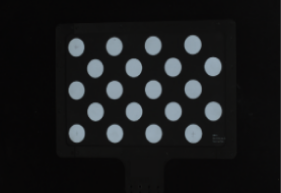
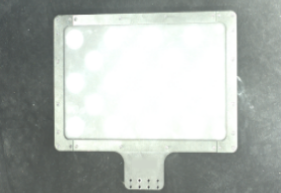
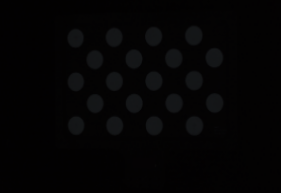
Check the Relative Position between the Calibration Board and the Camera
To ensure that the distortion calibration result can be effectively applied to the actual picking scenario, before distortion calibration, the relative position between the calibration board and the camera should be consistent with the relative position between the camera and the plane where the objects to be picked are located in the actual picking scenario. For example, the camera shooting angle, height, and other conditions during distortion calibration should be as consistent as possible with those in the actual picking scenario.
Perform Calibration
The following figure shows the general process of distortion calibration.

-
Connect to camera: Connect the camera to acquire image data for calibration.
-
Select calibration board: Select the calibration board type and set parameters for feature point detection.
-
Calculate distortion parameters: Calculate the distortion parameters of the camera based on the feature points of the calibration board.
The following sections introduce the process in detail.
Connect to Camera
-
Connect the camera.
In the Connect to camera step, you can select a connected camera from the drop-down list.
If no camera is available in the list, click the 2D Camera Management button, connect the camera in the 2D Camera Management tool, and then return to select the corresponding camera.
-
Confirm that the camera can acquire images properly.
After connecting the camera, you can click the Acquire continuously or Acquire once button and check the acquired images in the Image viewer panel on the right.
When acquiring images, ensure that the overall image of the calibration board is not too dark, too bright, or unevenly lit, and each calibration circle is clearly visible. If the image quality does not meet the requirements, adjust the Exposure time and Gain to improve the image quality.
After connecting the camera and confirming that the image quality meets the requirements, click the Next button in the bottom bar.
Select Calibration Board
-
Select the calibration board model.
-
If you are using a standard calibration board, select the Standard calibration board model.
-
If you are using another calibration board, select the Calibration board type and set the Feature point spacing.
-
-
Check the calibration board position and image quality.
Click the Acquire continuously button to check the calibration board position in the Image View panel on the right. The calibration board should be placed at the position of the target object.You can also check the image quality in the Image viewer panel on the right to ensure the accuracy and reliability of the calibration results.
After selecting the calibration board and confirming that the calibration board position and image quality meet the requirements, click the Next button in the bottom bar.
Calculate Distortion Parameters
-
Select the distortion type.
Select the distortion type to calibrate. The following options are supported: Lens and perspective distortion, Lens distortion, and Perspective distortion.
-
Lens distortion: Image deformation caused by the optical characteristics of the camera lens, often making straight lines in the image appear curved (e.g., barrel or pincushion distortion).
-
Perspective distortion: Proportional distortion caused by the tilt or distance between the camera and the object, often making closer objects appear larger and farther objects appear smaller.
-
-
Calculate distortion parameters.
Click the Calculate distortion parameters button to calculate the distortion parameters.
-
Preview distortion correction result.
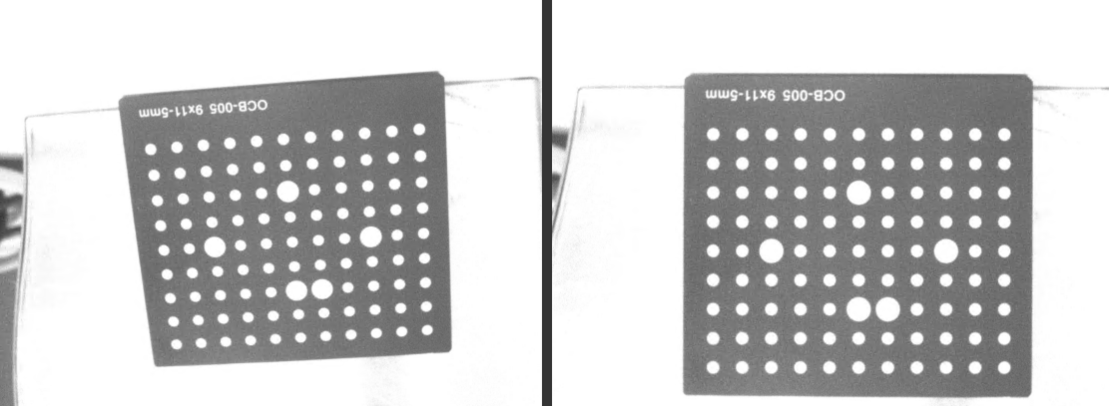
Click the Acquire image button, and check the distortion-corrected image in the Image viewer panel on the right.
As shown in the following figure, the left image is the original image, and the right image is the distortion-corrected image.
-
Save the distortion calibration result.
Click the Save button to save the calibration result to the "calibration" folder of the project. The distortion calibration result can be used in the 2D Camera Step.
This completes the distortion calibration process.