Configure Custom Communication Trigger Rules
This section describes how to configure custom communication trigger rules in Mech-MSR.
Custom trigger rules define when a custom communication service triggers the execution of the specified project. When a custom communication service meets the configured trigger condition, the software automatically triggers the corresponding custom communication project.
For example, when using the custom communication mode, you usually need to configure a separate custom communication project in Mech-MSR. This project is used to parse received data, execute logic judgments, and control other measurement projects. You can configure custom communication trigger rules to trigger the custom communication project.
Supported Matching Methods
Mech-MSR supports the matching methods described in the following table.
| Matching Method | Applicable Communication Services | How to Configure the Trigger Condition |
|---|---|---|
Any match
|
All types of custom communication services |
Select Any match in the Trigger condition column. |
Contains match
|
Custom communication services of the TCP Server/TCP Client type |
Select Contains match in the Trigger condition column, and specify the trigger value. |
Exact match
|
PLC-type custom communication services |
Select Exact match in the Trigger condition column, and specify the trigger value. |
Range match
|
PLC-type custom communication services |
Select Range match in the Trigger condition column, and specify the range of the trigger value. |
|
Configure Custom Communication Trigger Rules (TCP Server/TCP Client)
For a custom communication service of the TCP Server or TCP Client type, perform the following steps to configure trigger rules:
-
On the Trigger configuration tab of Communication Configuration, click Add trigger rule.
-
In the newly added configuration item, specify the configured custom communication service in the Communication service column, select the matching method in the Trigger condition column (if you select Contains match, specify the trigger value), and specify the project to be triggered in the Project to trigger column.
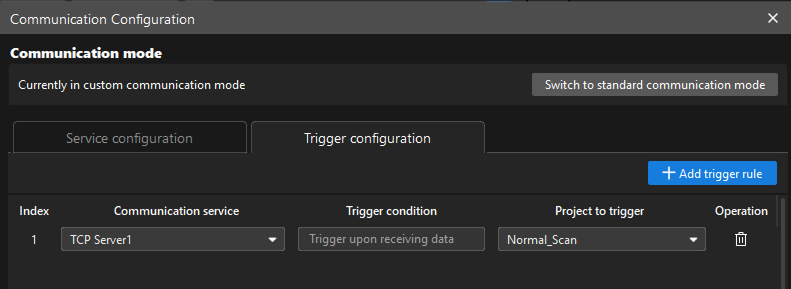
For a custom communication service of the TCP Server or TCP Client type, trigger conditions support Any match and Contains match. For details, see Supported Matching Methods.
Configure Custom Communication Trigger Rules (PLC-Type Services)
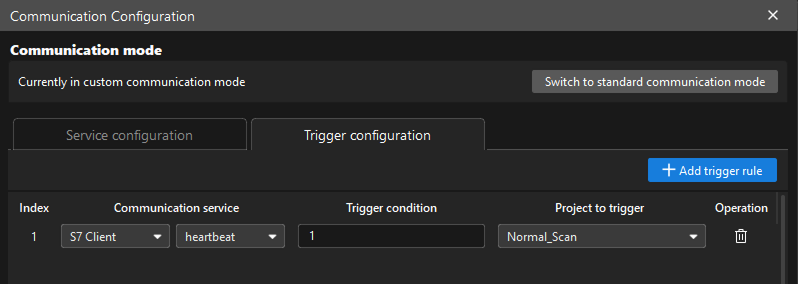
For a PLC-type custom communication service, perform the following steps to configure trigger rules:
-
On the Trigger configuration tab of Communication Configuration, click Add trigger rule.
-
In the newly added configuration item, specify the configured custom communication service and the register variable used to trigger the project in the Communication service column, select the matching method in the Trigger condition column (if you select Exact match, specify the trigger value; if you select Range match, specify the range of the trigger value), and then specify the project to be triggered in the Project to trigger column.
-
For a PLC-type custom communication service, trigger conditions support Any match, Exact match, and Range match. For details, see Supported Matching Methods.
-
A PLC-type trigger rule supports reading only the lower 16-bit registers of the variable. Therefore, the trigger value range is -32768 to 32767.
-