Remove Surface Form
Description
This Step is used to remove the overall surface form, such as tilt and curvature, from surface data while preserving local height variations for subsequent feature extraction and measurement.
Usage Scenario
This Step is applicable when subsequent Steps need to focus on local height variations. It can reduce the impact of background forms, such as overall tilt and curvature, on feature extraction and measurement results.
Workflow
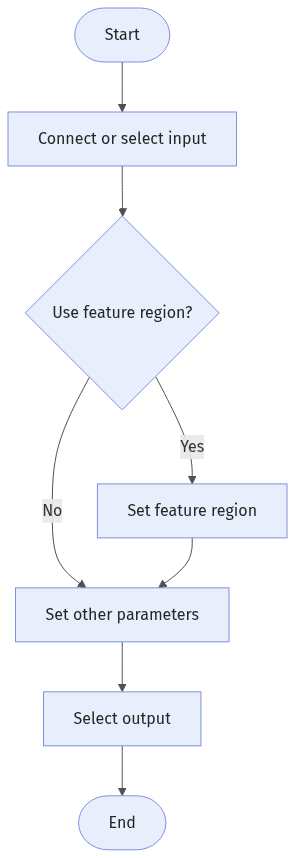
The process of configuring this Step is as follows:
-
Configure the input. Connect the corresponding Step port in the graphical programming workspace, or select the corresponding input under Input in the parameter configuration panel.
-
Determine whether to use a feature region. See Feature Region to learn about the related settings.
-
Set other parameters under Parameters.
-
Under Output, select the Surface Data output item (selected by default).
Input Description
| Input Item | Description |
|---|---|
Surface Data |
Surface data from which the form is to be removed. |
Alignment Parameter Group |
Optional input. When this input is provided, the pose of the feature region is adjusted according to the pose transformation of the target object. |
Parameter Description
Common Parameters
| Parameter | Description |
|---|---|
Use Feature Region |
Determines whether to use a feature region to limit the surface data involved in processing. When this parameter is selected, the Step processes only the data inside the feature region. |
Feature Region |
Visible only when Use Feature Region is selected. See Set Feature Region to learn how to set and adjust a feature region. |
Remove Outliers |
When enabled, removes extremely low and high values based on the low and high percentiles. This is suitable when the input surface contains burrs, flying points, isolated noise points, or abnormally deep pits, and reduces the impact of outliers on subsequent form removal and filtering.
|
Short-Wave Cutoff Wavelength |
Sets the cutoff wavelength for short-wave filtering. Variations shorter than this wavelength are treated as short-wave variations and filtered out to remove high-frequency noise. The recommended value is 3–5 times the input image resolution. |
Long-Wave Cutoff Wavelength |
Sets the cutoff wavelength for long-wave filtering. It is used to remove waviness, curvature, and other large-scale background variations. |
Advanced Parameters
In most cases, retain the default values of the advanced parameters. If obvious distortion occurs at the boundaries, the background form is not sufficiently removed, or local features are excessively weakened, adjust the advanced parameters.
| Parameter | Description |
|---|---|
Gap Filling Method |
Selects how to fill gaps or invalid points in the surface.
|
Polynomial Fitting |
When enabled, uses Polynomial Order and Sampling Step to fit the overall form.
|
Boundary Handling Method |
Selects how to handle surface boundaries during filtering to reduce distortion caused by missing neighboring data.
|
Long-Wave Filter Model |
Selects the model used for long-wave filtering. Long waves usually correspond to background variations with a large lateral span, such as waviness or curvature. Two filtering models are supported: Gaussian and Isotropic spline. |
Output Description
The output of this Step is surface data with the overall form removed, which can be used for subsequent feature extraction and measurement.
Troubleshooting
|
CV-W4601
Error: The value of "Low Percentile" is outside the valid range [0, 0.05].
Possible cause: Low Percentile is set too low or too high, causing the threshold for removing extremely low values to exceed the allowed range.
Solution: Reset Low Percentile and ensure that it is within the valid range.
CV-W4602
Error: The value of "High Percentile" is outside the valid range [0.95, 1].
Possible cause: High Percentile is set too low or too high, causing the threshold for removing extremely high values to exceed the allowed range.
Solution: Reset High Percentile and ensure that it is within the valid range.
CV-W4603
Error: The value of "Gap Filling Method" is invalid.
Possible cause: The selected filling method is not a Gap Filling Method supported by the current Step.
Solution: Select a valid Gap Filling Method as needed, such as Linear interpolation filling or Min value filling.
CV-W4604
Error: The value of "Polynomial Order" is outside the valid range [1, 9].
Possible cause: Polynomial Order is set too low or too high and cannot be used to fit the overall form.
Solution: Reset Polynomial Order and ensure that it is within the valid range.
CV-W4605
Error: The value of "Boundary Handling Method" is invalid.
Possible cause: The selected method is not a Boundary Handling Method supported by the current Step.
Solution: Select a valid Boundary Handling Method as needed, such as Remove boundary data, Zero padding (ZPA), Linear extrapolation (LEX), Line-symmetric reflection (LSR), or Point-symmetric reflection (PSR).
CV-W4606
Error: The value of "Short-Wave Cutoff Wavelength" is outside the valid range [0.001, 100].
Possible cause: Short-Wave Cutoff Wavelength is set too low or too high and cannot be used for short-wave filtering.
Solution: Reset Short-Wave Cutoff Wavelength and ensure that it is within the valid range.
CV-W4607
Error: The value of "Long-Wave Cutoff Wavelength" is outside the valid range [0.001, 100].
Possible cause: Long-Wave Cutoff Wavelength is set too low or too high and cannot be used for long-wave filtering.
Solution: Reset Long-Wave Cutoff Wavelength and ensure that it is within the valid range.
CV-W4608
Error: The feature region is invalid.
Possible cause: The feature region is empty or contains no valid surface data.
Solution: Reset the feature region and ensure that it is within the valid surface data range.
CV-W4609
Error: The value of "Sampling Step" is outside the valid range [1, 9].
Possible cause: Sampling Step is set too low or too high and cannot be used for sampling during polynomial fitting.
Solution: Reset Sampling Step and ensure that it is within the valid range.
CV-W4610
Error: The value of "Long-Wave Filter Model" is invalid.
Possible cause: The selected filtering model is not a Long-Wave Filter Model supported by the current Step.
Solution: Select a valid Long-Wave Filter Model as needed, such as Gaussian or Isotropic spline.
CV-W4611
Error: The feature region is too small, or the Short-Wave/Long-Wave Cutoff Wavelength is too large for the current data range.
Possible cause: The feature region covers too small a data range, resulting in insufficient valid data points for processing; or the Short-Wave/Long-Wave Cutoff Wavelength is set too large relative to the current data range, preventing a valid filtering result.
Solution: Adjust the feature region to ensure that it contains sufficient valid surface data, or decrease Short-Wave Cutoff Wavelength and Long-Wave Cutoff Wavelength.
CV-W4612
Error: The value of "Long-Wave Cutoff Wavelength" must be greater than the value of "Short-Wave Cutoff Wavelength".
Possible cause: The Long-Wave Cutoff Wavelength and Short-Wave Cutoff Wavelength settings are invalid, preventing the long-wave filtering range from covering the short-wave filtering range.
Solution: Increase Long-Wave Cutoff Wavelength or decrease Short-Wave Cutoff Wavelength to ensure that the long-wave cutoff wavelength is greater than the short-wave cutoff wavelength.
CV-W4613
Error: The value of "Low Percentile" must not be greater than the value of "High Percentile".
Possible cause: The Low Percentile and High Percentile settings are invalid, resulting in an invalid outlier removal range.
Solution: Decrease Low Percentile or increase High Percentile to ensure that the low percentile is lower than the high percentile.