Light Source
Description
This Step is used to connect and configure the light source controller to manage the light source’s operating mode and output intensity.
| Before using this Step, add and enable a device in the Light Source Management window. |
Currently only the following brands and models of light source controllers are supported:
| Light source controller brand | Light source controller model |
|---|---|
CSTLightSource |
CST-DPS2460B-4TD |
J1LightSource |
JL-DCV-6024-4-B |
PPXLightSource |
PPX-DCP2410-4G |
Usage Scenario
This Step is used for applications requiring precise control of light sources in industrial cameras or machine vision systems.
Basic Concepts
-
Light source controller
The light source controller is a hardware module that manages and adjusts light source equipment in industrial automation, controlling the on/off state, brightness, and operation mode.
-
Channel
Channels are individual output lines on the light source controller used to independently control different light source groups (such as multiple LED groups). Each channel can be individually enabled/disabled and configured for intensity.
Workflow
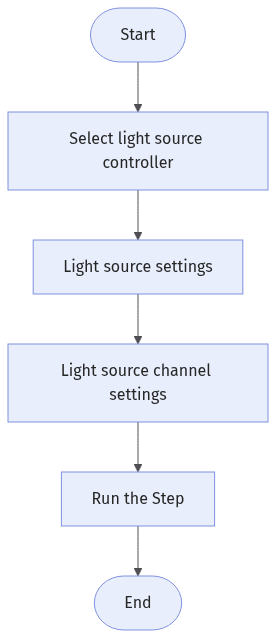
The process of configuring this Step is shown below:
-
Select a connected light source controller.
-
Configure Light Source Settings.
-
Configure Channel Settings.
-
Run the Step for precise light source control.
Triggering Instructions
This Step has no input or output items and must be triggered by a control flow to turn the light source on or off.
Parameter Description
Light Source Controller
| Parameter | Description |
|---|---|
Select Device |
Select the light source from the drop-down menu. Click the Device management button to open the Light Source Management window and manage available light sources and their parameters. |
Device Brand |
Specifies the brand of the light source controller. For display only. Modification not supported. |
Light Source Settings
| Parameter | Description | ||
|---|---|---|---|
Operating Mode |
Specifies the operation method of the light source. Select Continuous on or Timed off.
|
||
Trigger Delay |
The time delay before the light source turns on. Only visible in the Timed Off mode. |
||
Light-On Duration |
The time the light source remains on after being turned on. Only visible in the Timed Off mode.
|
Light Source Channel Settings
The number of channels is determined by the specific device model. Set the enable status and brightness parameters for each channel according to the actual light source wiring.
| Parameter | Description |
|---|---|
Enable |
Settings for this channel take effect only when this option is enabled. |
Intensity |
Sets the intensity of the light source for this channel. A higher value makes the light brighter. Effective only when the channel is enabled. |
Troubleshooting
|
For common errors, see Error Code List. If the error code is inconsistent with the error message, please contact Technical Support for help. |
CV-E0208
Error: Failed to connect to the light source controller.
Possible causes:
-
Incorrect communication parameters settings.
-
Abnormal cable connection.
-
The selected COM port is occupied.
Solutions:
-
Verify that the device communication parameters are correctly configured.
-
Check whether the cable connection is normal.
-
Ensure that the selected COM port is not occupied.
If the issue persists after the above checks, please contact Technical Support.