Build Communication and Measurement Projects
This section describes how to build Mech-MSR projects to implement communication data processing and measurement logic.
Project-Building Guidelines
You can build one or multiple Mech-MSR projects to implement communication data processing and measurement logic.
Building communication and measurement projects can be divided into several functional parts:
| Part | Description |
|---|---|
Communication data processing part |
Receives custom communication data, parses data, and triggers measurements through logical judgment |
Measurement part |
Executes specific measurement logic, processes measurement results, and stores results in global variables. |
Data sending |
Assembles data and sends it to external communication devices. |
The following content uses a multi-project Mech-MSR solution as an example to explain the project-building approach.
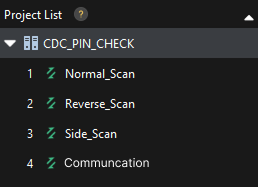
This solution contains the following projects:
-
Communication project: Used to receive custom communication data, parse data, and trigger measurements through logical judgment.
-
Projects 1-3: Measurement projects for executing specific measurement logic. After all measurement projects finish, results are assembled and sent to external communication devices.
In this example, no separate data-sending project is built. Instead, data assembly and data sending steps are added in Measurement Project 3 to send all measurement results to external communication devices.
Communication Data Processing Part
The communication data processing part is mainly responsible for receiving custom communication data, parsing data, and triggering measurements through logical judgment. You can build this part within a Mech-MSR project, or build a dedicated Mech-MSR project for communication data processing logic and interact with measurement projects through global variables.
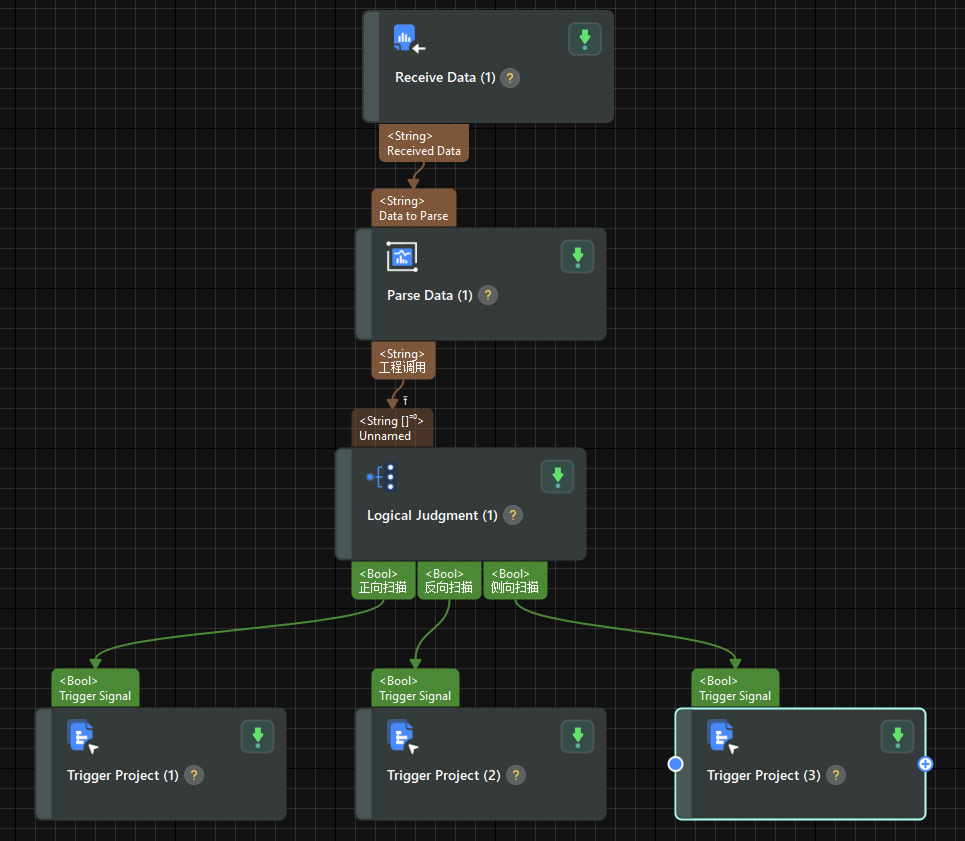
The recommended approach for building the communication data processing part is as follows:
-
Add the Receive Data step to receive data from a custom communication service.
You need to specify a custom communication service for this step. Select a configured custom communication service.
-
Add the Parse Data step to parse required measurement trigger conditions and measurement parameters according to the communication data format.
Based on the negotiated communication data format, choose an appropriate parsing method and configure corresponding parsing parameters.
-
Add the Logical Judgment step to add logical judgment rules based on parsed measurement trigger conditions and determine whether measurement conditions are met.
Configure corresponding logical judgment rules according to measurement requirements.
-
Add the Trigger Project step to trigger measurement projects to execute measurement logic when measurement conditions are met.
Measurement Part
The measurement part contains actual measurement logic and measurement result processing. You can build this part in one or multiple Mech-MSR projects and interact with the data-sending part through global variables.
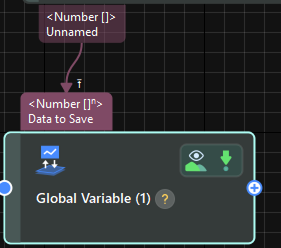
The build approach for the measurement part in custom communication is similar to that of common measurement projects. You only need to add the Global Variable step at the end of the measurement logic to store measurement results in global variables for the data-sending part.
For more information about building measurement projects, see Typical Practices for 3D Measurement and Inspection.
Data-Sending Part
The data-sending part is mainly responsible for sending measurement results to external communication devices. You can append data-sending logic in measurement projects, or build a dedicated Mech-MSR project for data-sending logic. The data-sending part interacts with measurement results through global variables.
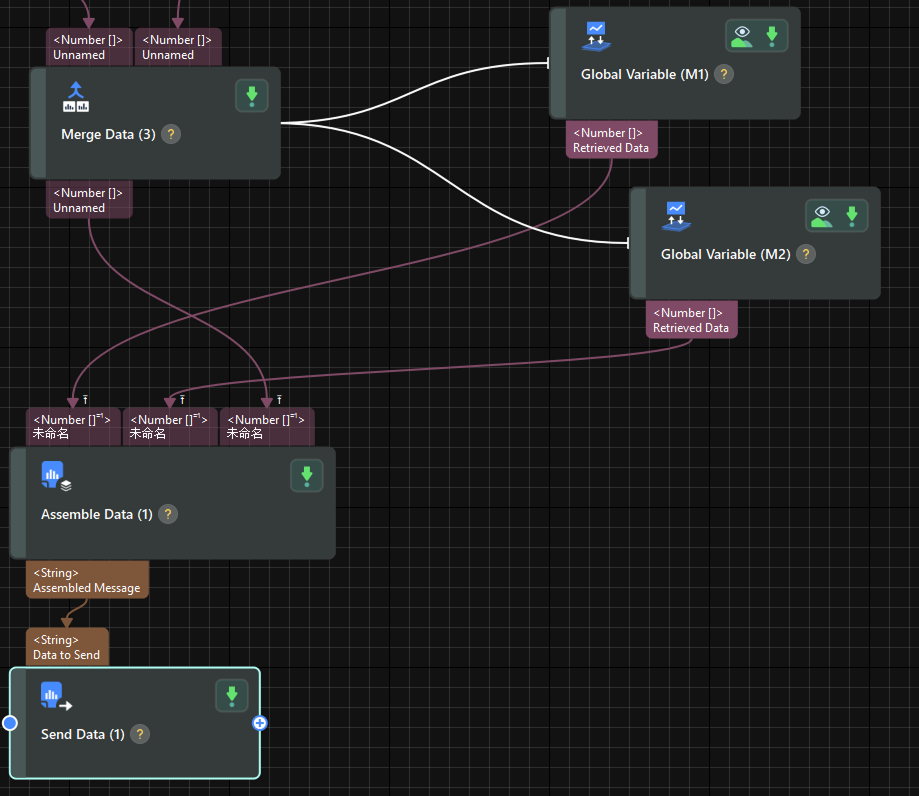
The recommended approach for building the data-sending part is as follows:
-
Add one or multiple Global Variable steps to read multiple measurement results.
For each measurement result, add one global variable step, select the corresponding global variable, and set Operation Type to Get.
-
Add the Assemble Data step to assemble data to be sent.
According to the negotiated return data format, add custom input ports, connect global variable steps, and configure Assembly Method and Separator parameters.
-
Add the Send Data step to send assembled data to external communication devices.
You need to specify a custom communication service for this step. Select a configured custom communication service.