Multiple Model Packages
Function
Use multiple model packages for inference of input images. The Multi-Model Package integrates multiple sub-models (such as Image Classification, Object Detection, and Defect Segmentation) and executes them collaboratively based on predefined combination logic: series, parallel, or series-parallel. It outputs the results of each sub-model along with the overall validation status.
Applicable to complex quality inspection scenarios. It effectively reduces the number of projects, avoids repetitive model configuration, and improves the efficiency of model usage and on-site maintenance.
Input and Output
After you import the model package in the Deep Learning Model Package Inference Step, the following input and output ports are displayed.
Input
| Input Port | Data Type | Description |
|---|---|---|
Image |
Image/Color |
Image input to this port will be used for deep learning model package inference. Displays when the Input Data Type is 2D image. |
Surface Data |
Surface |
Surface data input to this port will be used for deep learning model package inference. Displays when the Input Data Type is Surface data. |
Output
| Output Port | Data Type | Description |
|---|---|---|
Comprehensive Validation Result |
Bool |
The comprehensive validation result of multiple model inferences. Outputs True if all inferences pass validation; otherwise, outputs False. |
Classification |
DLResult/Classification |
Model package inference result. |
Fast Positioning |
DLResult/FastLocating |
Model package inference result. |
Text Detection |
DLResult/TextDetection |
Model package inference result. |
Unsupervised Segmentation |
DLResult/UnsupSegmentation |
Model package inference result. |
Defect Segmentation |
DLResult/DefectSegmentation |
Model package inference result. |
Object Detection |
DLResult/ObjectDetection |
Model package inference result. |
Instance Segmentation |
DLResult/InstanceSegmentation |
Model package inference result. |
Text Recognition |
DLResult/TextRecognition |
Model package inference result. |
Parameter Description
The following parameters need to be adjusted when the multiple model package is imported into this Step.
Model Package Settings
| Parameter | Description |
|---|---|
Model Manager Tool |
Description: This parameter is used to open the deep learning model package management tool and import the deep learning model package. The model package file is a .dlkpack file exported by Mech-DLK.
|
Model Name |
Description: After a Deep Learning Model Package is imported, this parameter is used to select the imported model package for this step.
|
Release Original Model Package After Switching |
Description: Controls whether the resources used by the original model package are released upon the switch.
|
Model Package Type |
Description: Once a Model Name is selected, the Model Package Type will be filled automatically. |
Input Data Type |
Description: This parameter is used to specify the type of input data. The corresponding input ports will be displayed after the parameter is selected. It supports 2D image and surface data input. |
GPU ID |
Description: This parameter is used to select the device ID of the GPU that will be used for the inference.
|
Preprocessing
| Parameter | Description | ||||
|---|---|---|---|---|---|
ROI File |
Description: This parameter is used to set or modify the ROI of the input image. Tuning instruction: Once the deep learning model is imported, a default ROI will be applied. If you need to edit the ROI, click the Open the editor button. Edit the ROI in the pop-up Set ROI window, and fill in the ROI name. Instructions for Setting ROI: Hold down the left mouse button and drag to select an ROI, and then click the left mouse button again to confirm. If you need to re-select the ROI, please click the left mouse button and drag again. The coordinates of the selected ROI will be displayed in the ROI Properties section. Click the OK button to save and exit.
|
Postprocessing
| Parameter | Description |
|---|---|
Inference Configuration |
Parameter description: Configures the inference settings for a multi-model package. Click Open the editor to open the inference configuration window.
|
Class Display Mode |
Parameter description: Selects whether to display classes by name or by index in the output results. |
Visualization Settings
| Parameter | Description |
|---|---|
Draw Result on Image |
Parameter description: Once enabled, the detection results will be displayed on the image.
|
Visualization Method for Results |
Parameter description: This parameter is used to specify the way to visualize the output results.
|
Customize Font Size |
Parameter description: This parameter determines whether to customize the font size in the visualized outputs. Once this option is selected, you should set the Font Size (0–10). The default value is 1.5.
|
Examples
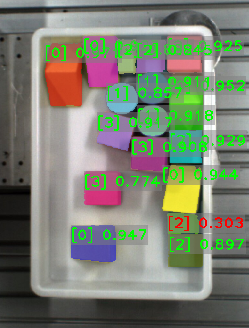
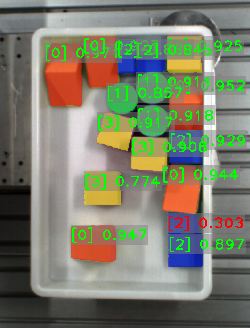
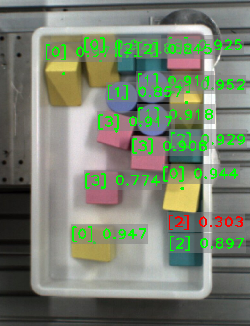
Visualization Method for Results
| Visualization Method for Results | Description | Illustration |
|---|---|---|
Display each instance |
Visualizes each instance with a unique color. |
|
Display instances by class |
Visualizes instances by class, with instances of the same class sharing the same color. |
|
Display instance center points |
Visualizes instance center points, with the instance color related to Confidence threshold. |
|