Channel Merging or Splitting
Description
This Step is used to split a color image into three single-channel images, or merge three single-channel images into one color image.
Usage Scenario
This Step is applicable for converting between three-channel and single-channel images. For example, you can split a three-channel image into three single-channel images for viewing or processing the information of each channel separately, or you can merge the three single-channel images into one three-channel image for unified display or subsequent processing.
It can be used with Steps that perform functions related to image capturing, image reading, image enhancement, or segmentation.
Basic Concepts
-
Image Channel
It refers to different components of each pixel in an image. Three-channel images usually consist of three channels, which can represent different color or feature components, such as three components in the color space of RGB, HSI, and HSV. Therefore, three-channel images are usually color images. A single-channel image only contains data from one channel, usually a grayscale image.
-
Channel Merge
Group three single-channel images into one three-channel image in sequence for subsequent overall processing or display.
-
Channel Split
Decompose one three-channel image into three single-channel images for independent analysis, processing, or feature extraction of each channel.
Workflow
The process of configuring this Step is shown below:
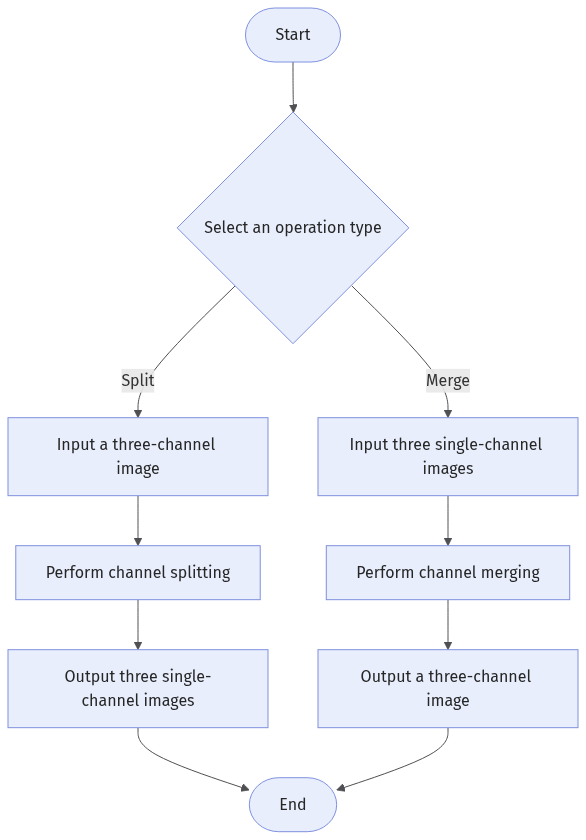
-
Select the channel operation (Merge or Split).
-
Input the corresponding image according to the operation type:
-
Merge: Input three single-channel images.
-
Split: Input a three-channel image.
-
-
Run the Step and view the output.
Input Description
| Operation | Input Description |
|---|---|
Merge |
Input three single-channel images (grayscale images). Each pixel of each image contains only one grayscale value. |
Split |
Input a three-channel image (color image) containing three color channel values per pixel. |
Parameter Description
| Parameter | Description |
|---|---|
Channel Operation |
Select the operations to be performed, including Merge and Split:
|
Output Description
| Operation | Output Description |
|---|---|
Merge |
Outputs a three-channel image (color image) containing three color channel values per pixel. |
Split |
Output three single-channel images (grayscale images). Each pixel of each image contains only one grayscale value. |
Troubleshooting
|
Unable to Split Channels
Symptom:
After the Step was run, an error message “Cannot split image channels: The input image is not a three-channel image”.
Possible Cause:
The input images are of one channel or more than three channels, which does not satisfy the requirements of the depalletizing operation.
Solution:
Please check the input image and make sure it is a standard three-channel color image (such as RGB).
Unable to Merge Channels
Symptom:
After the Step is run, the following error message appears: "Unable to merge channels..."
Possible cause:
The input three single-channel images are of different sizes, and thus the channels cannot be merged.
Solution:
Please check the input three single-channel images and make sure they are of the same size.