Unsupervised Segmentation
Function
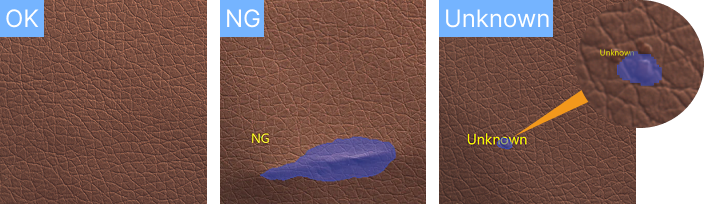
Use the unsupervised segmentation model package for inference of input images. The model learns normal patterns exclusively from OK samples, eliminating the need for defect annotation. It automatically classifies images as OK, NG, or Unknown and generates heatmaps and masks for defect regions.
This model is suitable for industrial quality inspection scenarios where defect shapes, positions, and sizes are unpredictable, but OK images exhibit minimal variation.
Input and Output
After importing the model package in the Deep Learning Model Package Inference Step, the following input and output ports will be displayed.
Input
| Input port | Data type | Description |
|---|---|---|
Image |
Image/Color |
Image input to this port will be used for deep learning model package inference. |
Output
| Output port | Data type | Description |
|---|---|---|
Visualization Output |
Image/Color |
Visualized results. |
Segmentation Result |
String |
The label indicating the defect. |
Segmentation Mask |
Image/Color/Mask |
Mask the segmentation result. Non-zero pixel values indicate detected defects. |
Segmentation Mask Contours |
Shape2D/Contour[] |
List of pixel coordinates of the vertices of the segmentation result mask. |
Parameter Description
The following parameters need to be adjusted when the unsupervised segmentation model package is imported into this Step.
Model Package Settings
| Parameter | Description |
|---|---|
Model Manager Tool |
Parameter description: This parameter is used to open the deep learning model package management tool and import the deep learning model package. The model package file is a “.dlkpack” file exported by Mech-DLK.
|
Model Name |
Parameter description: This parameter is used to select the model package that has been imported for this Step.
|
Release Original Model Package After Switching |
Parameter description: This parameter determines whether to release the resources occupied by the original model package immediately when the model package is switched.
|
Model Package Type |
Parameter description: Once a Model Name is selected, the DI Algo Type Translated String will be filled automatically. |
Input Batch Size |
Parmeter description: The number of images processed during each inference. |
GPU ID |
Parameter description: This parameter is used to select the device ID of the GPU that will be used for the inference.
|
Pre-Process
| Parameter | Description | ||||
|---|---|---|---|---|---|
ROI File |
Parameter description: This parameter is used to set or modify the ROI of the input image. Tuning instruction: Once the deep learning model is imported, a default ROI will be applied. If you need to edit the ROI, click Open the editor. Edit the ROI in the pop-up Set ROI window, and fill in the ROI name.
|
Post-Process
| Parameter | Description |
|---|---|
Inference Configuration |
Parameter description: This parameter is used to configure parameters related to unsupervised segmentation model package inference. You can click Open the editor to open the inference configuration window.
|
Visualization Settings
| Parameter | Description |
|---|---|
Draw result on image |
Parameter description: Once enabled, the detection result will be displayed on the image.
|
Customize Font Size |
Parameter description: This parameter determines whether to customize the font size in the visualized outputs. Once this option is selected, you should set the Font Size (0–10).
|
Font Size (0–10) |
Parameter description: This parameter is used to set the font size in the visualized outputs.
|