Unpack Data

You are currently viewing the documentation for a pre-release version (2.2.0). To access documentation for other versions, click the "Switch Version" button located in the upper-right corner of the page.

■ If you're unsure about the version of the product you are using, please contact Mech-Mind Technical Support for assistance.

Function

This Step decomposes the list and obtains the first N elements in the list. The N value can be set in Step Parameters.
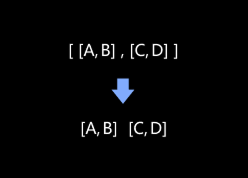
function description

Usage Scenario

This Step is widely used for dimensionality reduction. It can decompose image list, point cloud list, dimensions list and other data lists.

For example, if the input list is \[[5], [6], [7]], the output can be [5], [6], [7].

Input and Output

Input

Input ports Data type Description

Unnamed

Abstract

The data input to this port will be unpacked.

Output

Output ports Data type Description

Unnamed

Abstract

Unpacked data.

Unnamed

Abstract

Unpacked data.

Parameter Description

Parameter Description

Operation Layer

Description: This parameter is used to set the layer on which the unpacking will be performed.

Default value: 0

Instruction: The operation layers are described as follows.

  • If the Operation Layer parameter is 0, this Step is used to detach the data from the outer layer. For example, input [[1, 2]], [3, 4]], and output [1, 2], [3, 4].

  • If Operation Layer is set to 1: Operate the inner layer, detach the data in the inner layer. For example, input [[1, 2]], [3, 4]], and output 1, 2, 3, 4.

Output Size

Description: This parameter is used to set the number of output ports, which is the number of elements in the unpacked list. For example, if [A, B, C] is input, and the number of output ports is 2, output A, B will be output.
Default value: 2

Allow Unpacked Data Exceeding Output Size

Description: If this option is selected, only the first N data items will be output if the input data list is longer than the number of output ports. If this option is not selected, an error will occur directly.
Default setting: Unselected

Is this page helpful?

You can give a feedback in any of the following ways:

We Value Your Privacy

We use cookies to provide you with the best possible experience on our website. By continuing to use the site, you acknowledge that you agree to the use of cookies. If you decline, a single cookie will be used to ensure you're not tracked or remembered when you visit this website.