Easy Frame Transformation

You are currently viewing the documentation for the latest version (2.2.0). To access a different version, click the "Switch version" button located in the upper-right corner of the page.

■ If you are not sure which version of the product you are currently using, please feel free to contact Mech-Mind Technical Support.

Function

This Step transforms the input poses between the camera reference frame and the robot reference frame.

Usage Scenario

This Step is a general pose reference frame transformation Step. This Step has no fixed usage scenarios.

Input and Output

Input

Input port Data type Description

Original Poses

Pose[]

Poses input to this port will be transformed to another reference frame.

Output

Output port Data type Description

Transformed Poses

Pose[]

Poses transformed to another reference frame.

Parameter Description

Visualization Settings

Parameter Description

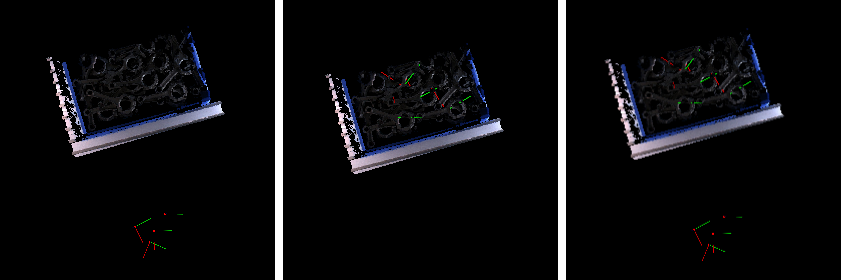
Pose Type to Visualize

Description: This parameter is used to select the pose type to visualize.
Default value: After
Value list: After, Before, and All
Instruction: Select an appropriate option according to actual needs. Please refer to the tuning example for the corresponding result.

Transformation Settings

Parameter Description

Transformation Type

Parameter description: Transformation type of reference frame.

Value list: CameraToRobot, RobotToCamera

Default value: CameraToRobot

Tuning Examples

Pose Type to Visualize

In the case of the robot reference frame, the visualized poses are as follows when the Pose Type to Visualize is set to After, Before, and All.

transform poses pose display settings

Is this page helpful?

You can give a feedback in any of the following ways:

We Value Your Privacy

We use cookies to provide you with the best possible experience on our website. By continuing to use the site, you acknowledge that you agree to the use of cookies. If you decline, a single cookie will be used to ensure you're not tracked or remembered when you visit this website.