Sort 3D Poses V2
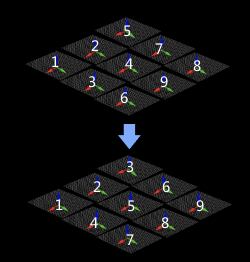
Usage Scenario
This Step sorts poses according to specified rules for subsequent pose processing or picking strategy.
Parameters
Sort by None
Parameters
| Parameter | Description |
|---|---|
Show Point Cloud in Selected Frame |
Parameter description: This parameter is used to select the reference frame that display the point cloud.
|
Sort by S shape on plane
Description
Sort the poses in rows and columns based on the given reference pose (with priority given to sorting poses according to “Row Direction”). This method is usually used for unloading neatly arranged workpieces or depalletizing.
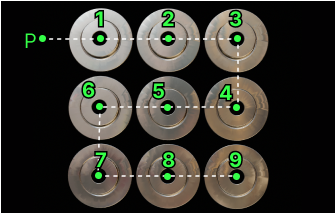
Parameters
| Parameter | Description |
|---|---|
Row direction |
Parameter description: This parameter is used to set the row direction when the poses are sorted on the plane.
|
Column direction |
Parameter description: This parameter is used to set the column direction when the poses are sorted on the plane.
|
Row Interval |
Parameter description: This parameter is used to set the interval (in mm) between rows when the poses are sorted on the plane.
|
Sort by Z shape on plane
Description
Sort the poses in rows and columns based on the given reference pose (with priority given to sorting poses according to “Row Direction”). This method is usually used for unloading neatly arranged workpieces or depalletizing.
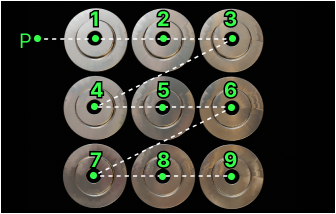
Parameters
| Parameter | Description |
|---|---|
Row direction |
Parameter description: This parameter is used to set the row direction when the poses are sorted on the plane.
|
Column direction |
Parameter description: This parameter is used to set the column direction when the poses are sorted on the plane.
|
Row Interval |
Parameter description: This parameter is used to set the interval (in mm) between rows when the poses are sorted on the plane.
|
Sort by X value of pose
Sort by Y value of pose
Sort by Z value of pose
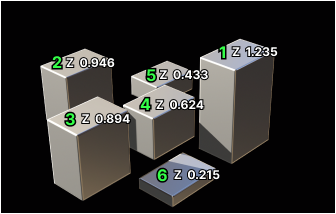
Sort by Distance from pose to reference pose
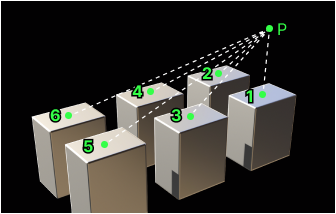
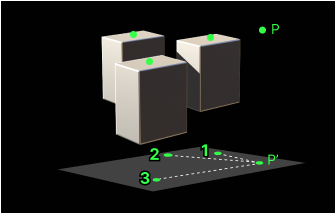
Sort by Distance from pose to reference pose on XOY plane
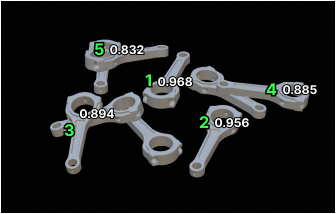
Sort by Pose confidence values
Sort by Projection of pose in reference direction
Description
Project the pose onto the axes of the reference pose, calculate the projection distance, and then sort the poses according to the distance.
Parameters
| Parameter | Description |
|---|---|
Ascending |
Parameter description: Once this option is selected, the poses will be sorted in order of projection distances from shortest to longest.
|
Reference direction |
Parameter description: This parameter is used to select the axis of the reference pose and its direction used for pose projection.
|
Sort by Cuboid diagonal lengths
Sort by Two Dimensions
Description
This sorting method sorts poses according to the information of the two dimensions. Poses are first sorted according to the primary dimension, then grouped into layers based on the interval you set. Within each layer, poses are further sorted by the secondary dimension. You can switch between ascending and descending order. The dimension values can be any numeric attributes, such as object height or angle.

Parameters
| Parameter | Description |
|---|---|
Layer Interval for Primary Dimension |
Parameter description: This parameter is used to set the interval used when grouping by the primary dimension.
|
Sort Primary Dimension in Ascending Order |
Parameter description: When selected, poses are sorted in ascending order based on the values of primary dimension.
|
Sort Secondary Dimension in Ascending Order |
Parameter description: When selected, poses within each layer are sorted in ascending order based on the values of secondary dimension.
|
Show Point Cloud in Selected Frame |
Parameter description: This parameter is used to select the reference frame that display the point cloud.
|