Reorder by Index List
Function
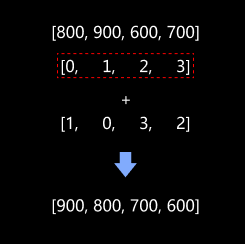
This Step reorders one or more sets of original data according to the sorted index list and outputs the adjusted data list.
Usage Scenario
This Step is suitable for scenarios where multiple relevant data (such as pick points, pick point information, and numeric labels of pick points) need to be sorted simultaneously.
Usually, this Step is preceded by a Sorting Step, followed by a Step according to the actual requirement.
Input and Output
Input
| Input port | Data type | Description |
|---|---|---|
Indices |
Index [] |
The sorted index list is input to this port. Each index corresponds to a position in the original data list. |
Unnamed |
Abstract [] |
Original data to be sorted is input to this port. If multiple sets of data need to be sorted simultaneously, multiple ports can be set, each port corresponding to a set of data to be sorted. |
Parameter Description
| Parameter | Description |
|---|---|
Port Number (1–15) |
Description: This parameter is used to set the number of datasets that can be sorted simultaneously.
|
Operation Layer |
Description: This parameter specifies the layer of the data list to be reordered.
Default value: 0 Tuning recommendation: If the data is a single-layer list, keep the default value of 0. If it is a nested structure, you can adjust it according to the actual data hierarchy. |
Top Level |
Once this option is selected, only the outermost data will be reordered, and the operation layer parameters will be hidden.
|