Find 2D Contour at Specified Inner-Outer Level
You are currently viewing the documentation for the latest version (2.2.0). To access a different version, click the "Switch version" button located in the upper-right corner of the page.

■ If you are not sure which version of the product you are currently using, please feel free to contact Mech-Mind Technical Support.

Function

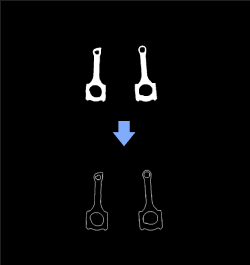
This Step sets the contours of a specified inner/outer layer in the mask image.

find2d contour at specified hierarchical level find 2d contour at specified hierarchical level 1

Usage Scenario

This Sep is a general 2D image contour extraction Step. It can be used between Steps Orthographic Projection and Orthographic Projection Inverse to obtain object contours in a 3D point cloud.

Input and Output

Input

Input port Data type Description

Mask Image

Image/Color/Mask

Mask input to this port will have contours of a specified inner/outer layer extracted.

Output

Output port Data type Description

Mask Image

Image/Color/Mask[]

Masks of contours of a specified inner/outer layer.

Parameter Description

Contour Retrieval Settings

Parameter Description

Contour Retrieval Mode

Parameter description: Contour retrieval mode.

  • CV_RETR_EXTERNAL: Retrieves only the extreme outer contours.

  • CV_RETR_LIST: Retrieves all of the contours without establishing any hierarchical relationships.

  • CV_RETR_CCOMP: Retrieves all of the contours and organizes them into a two-level hierarchy.

  • CV_RETR_TREE: Retrieves all of the contours and reconstructs a full hierarchy of nested contours.

Default value: CV_RETR_EXTERNAL

Min Contour Size

Parameter description: Lower limit of contour pixel size. Contour with a pixel size smaller than this value will be discarded.

Default value: 20 px

Max Contour Size

Parameter description: Upper limit of contour pixel size. Contour with a pixel size larger than this value will be discarded.

Default value: 1000000 px

Specified Hierarchy

Parameter description: This parameter sets the required contour of the specified hierarchy levels. The hierarchy increases from the outer layer to the inner layer. The outermost layer hierarchy is 1. In addition, 0 indicates the contours of all layers, and -1 indicates the innermost layer. This parameter needs to be set when "Contour Retrieval Mode" is CVRETRTREE.

Default value: 0

Merge Contours

Parameter description: Draw all contours into one mask.

Default value: Selected

Contour Drawing Settings

Parameter Description

Line Thickness

Parameter description: Thickness of lines the contours are drawn with. If it is negative, the contour interiors will be filled.

Default value: 1 px

Is this page helpful?

You can give a feedback in any of the following ways:

We Value Your Privacy

We use cookies to provide you with the best possible experience on our website. By continuing to use the site, you acknowledge that you agree to the use of cookies. If you decline, a single cookie will be used to ensure you're not tracked or remembered when you visit this website.