Calc Normals of Point Cloud and Filter It
Usage Scenario
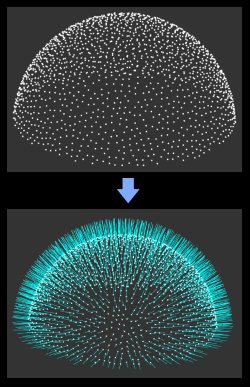
This Step is used to add normals to the original point cloud and remove outliers. It usually follows Steps Capture Images from Camera and From Depth Map to Point Cloud.
Input and Output
Parameter Description
This Step provides three methods to calculate and filter the normals of the point cloud:
-
CloudPreprocessingGPU: Calculate the normals of the point cloud and then convert the input ordinary point cloud to the point cloud with normals. When there is a GPU and you need to calculate the normals, it is recommended to adopt this method.
-
CloudXYZToCloudNormal: Convert the input ordinary point cloud to point cloud with normals without calculating normals.
-
NormalEstimation: a regular method. Calculate the normals of the point cloud, and then convert the input ordinary point cloud to the point cloud with normals. When there is no GPU on the IPC and you need to calculate the normals of the point cloud, it is recommended to adopt this method.
The following sections introduce the parameters for the three methods.
| Parameter | Description |
|---|---|
Min Depth of Valid Points |
Description: This parameter is used to set the minimum depth value of points in the point cloud. Points with depth values smaller than this value will be removed. |
CloudPreprocessingGPU
Calculation Settings
| Parameter | Description |
|---|---|
Calc in Batches |
Description: When performing GPU calculations, split large point clouds into multiple batches to reduce the amount of data loaded at once.
|
Search Radius |
Parameter description: For point cloud processing, points within a circle whose radius is the value of the Search Radius parameter will be used to calculate the normals. The unit is millimeters (mm). A larger radius produces smoother normals but may lose some details; a smaller radius preserves more details but is susceptible to noise. Default: 15.000 mm
|
Concave and Convex Point Removal Settings
| Parameter | Description |
|---|---|
Remove Concave and Convex Points |
Once this option is selected, abnormally raised or depressed points will be removed according to the set search radius and threshold.
|
Outlier Removal Search Radius |
Parameter description: Concave and convex points within the search radius will be detected and removed.
|
Concave Threshold |
Points with depressions greater than this value within the search radius will be removed.
|
Convex Threshold |
Points with convexity greater than this value within the search radius will be removed.
|
Outlier Removal Settings
| Parameter | Description |
|---|---|
Remove Sparse |
Once this option is selected, isolated points with insufficient neighbors will be removed according to the set search radius and threshold.
|
Sparse Point Removal Search Radius |
Parameter description: Points within the search radius will be used to detect and remove outliers.
|
Outlier Threshold |
Description: Take the current point as the center, and if the number of points in the search radius is smaller than this value, the current point is outlier.
|
Number of iterations |
Description: This parameter is used to set the number of times to repeatedly remove the outlier.
|
NormalEstimation
| Parameter | Description |
|---|---|
Search Radius |
Parameter description: Within the kernel, points with distances to the center point less than the search radius will be used to calculate the normals.
|
Half Kernel Size |
Parameter description: Within the kernel, points with distances to the center point less than the search radius will be used to calculate the normals.
|