Configure Solution Switching Rules
Mech-Vision supports the Solution Switching Management feature, which can automatically switch solutions based on the received solution ID. Each switching rule defines the mapping between a solution ID and a solution path. Mech-Vision allows you to configure up to 32 switching rules.
The Solution Switching Management feature works only in the standard communication mode.
Add Solution Switching Rules
To add solution switching rules, perform the following steps:
-
In the software menu bar, select .
-
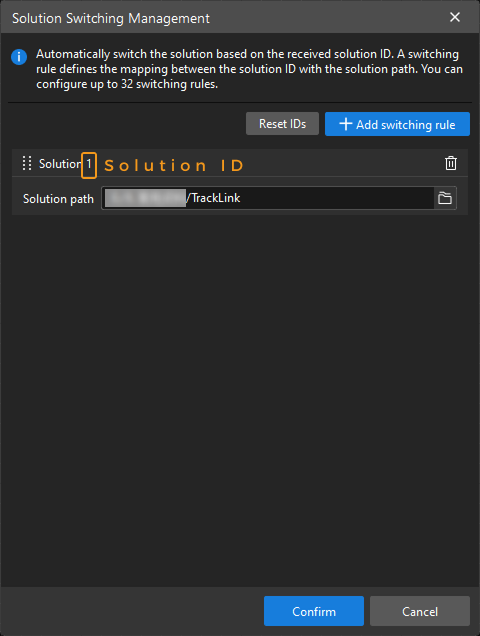
In the pop-up Solution Switching Management window, click Add switching rule.
-
In the newly added rule configuration, specify the Solution path parameter.
-
Solution ID: When a switching rule is added, the software automatically generates an ID for the solution specified by the solution path. When an external device sends the "Switch Mech-Vision solution" command (104) to Mech-Vision through the standard interface, the solution ID in the command must be set to the Solution ID here.
-
Solution path: Specifies the path of the solution to switch to.
-
Reset Solution IDs
If multiple solution switching rules are configured, perform the following steps to adjust solution IDs:
-
In the switching rule list, drag solutions to adjust their order.
-
Click Reset IDs to regenerate an ID for each solution according to the current order.
| After solution IDs are adjusted, the external device needs to modify the solution ID in the "Switch Mech-Vision solution" command accordingly. |