Cluster Point Clouds and Output Eligible Point Clouds

You are currently viewing the documentation for the latest version (2.2.0). To access a different version, click the "Switch version" button located in the upper-right corner of the page.

■ If you are not sure which version of the product you are currently using, please feel free to contact Mech-Mind Technical Support.

Function

This Step performs clustering operation on point clouds, and output the point clouds that conform to the set rules in the clustering result.
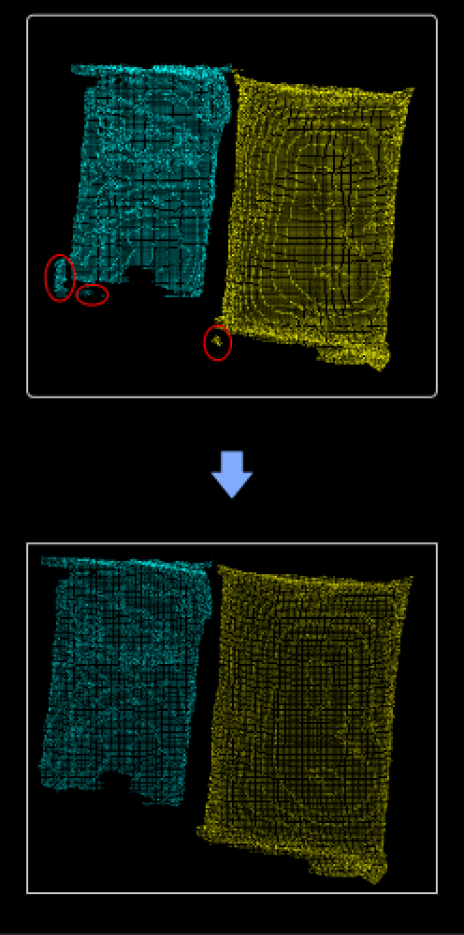
function description

Usage Scenario

This Step is usually used to denoise point clouds of individual objects.

Input and Output

Input

Input port Data type Description

Point Clouds

PointCloud/XYZNormal[]

Point clouds input by this port will be clustered.

Labels

String[]-

The labels of the point clouds.

Scores

Number[]-

The matching scores of the point clouds or the confidences of the point clouds.

Output

Output port Data type Description

Processed Point Clouds

PointCloud/XYZNormal[]

Point clouds that conform to the set rules.

Labels

String[]-

The labels of the valid point clouds.

Scores

Number[]-

The matching scores of the valid point clouds or the confidences of the valid point clouds.

Parameter Description

Parameter Description

Max Distance between Neighboring Points

Description: This parameter is used to set the maximum distance between points in the cluster. When this parameter is increased, points that are farther apart will be grouped into the same cluster. When it is decreased, points that are closer together will be grouped into different clusters.
Default value: 5.000 mm

Min Number of Points

Description: This parameter is used to filter the clustering results. The point cloud will be output only when the number of points in the cluster is greater than this value.
Default value: 800

Min Ratio of Largest Cluster (0–1.0)

Description: This parameter is used to further filter all retained cluster results. Only the classes with the percentage of points to the total number of input points above this threshold will be output.
Default value: 0.8000

Is this page helpful?

You can give a feedback in any of the following ways:

We Value Your Privacy

We use cookies to provide you with the best possible experience on our website. By continuing to use the site, you acknowledge that you agree to the use of cookies. If you decline, a single cookie will be used to ensure you're not tracked or remembered when you visit this website.