Visibility of the Components in the Vision Result
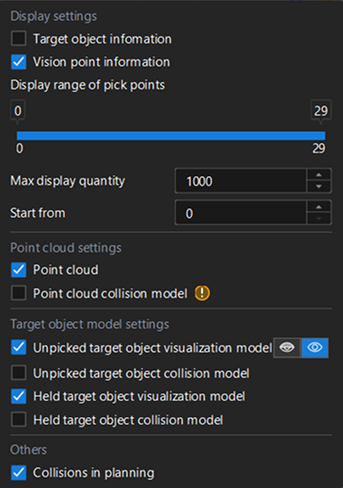
Display settings |
When Target object information or Vision point information is selected, corresponding information will appear in the 3D simulation area as tags when vision results are received successfully. Double-click the information tag to view corresponding Vision Result Details. |
|---|---|
“Max display quantity” limits the number of information tags shown simultaneously in the 3D Simulation area. After setting the “Start value,” only the specified number of tags starting from that value will be displayed. For instance, if the “Max display quantity” is 10, and the “Start from” value is 5, then only information of from the 5th to the 14th vision points will be displayed. |
|
Point cloud settings |
When the checkboxes are selected, the point cloud and the point cloud collision model will be visualized in the 3D simulation area. Displaying the point cloud collision model consumes considerable system resources, so it is not recommended to enable it during project execution, as it may cause system lag. |
Target object model settings |
The settings allow you to choose which models can be displayed. You can click icons on the right to adjust the transparency of the model. |
Others |
When the Collisions in planning is selected, any detected collisions will be highlighted. |