Estimate Point Cloud Edges by 2D Method
Function
This Step extracts the edges of the input point cloud.
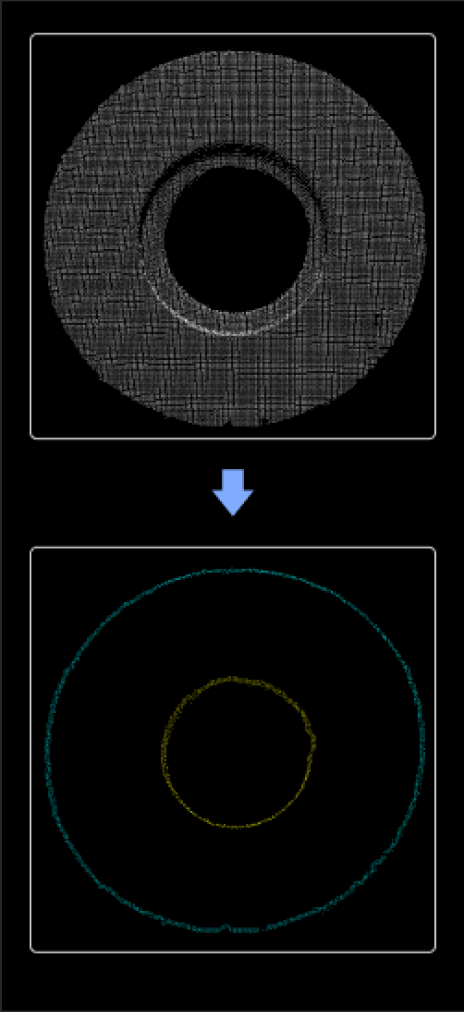
|
This Step projects the input 3D point cloud into a 2D image and generates the corresponding mask. Then, the contour detection and morphological processing is performed on the mask. Finally, the detected 2D contour is mapped back to the 3D point cloud and the edge of the point cloud is output. |
Usage Scenario
This Step is usually used in the loading scenarios of flat workpieces to extract the point cloud edges of flat target objects. It is usually used with Steps related to 3D matching. This Step is faster than 3D Edge Extraction. It is recommended to use it for projects requiring short cycle times, with large quantities of 3D point cloud interference, and only requiring extracting the outermost edge points of the target object point clouds.
Parameter Description
Contour Settings
| Parameter | Description |
|---|---|
2D Line Width |
Description: This parameter is used to set the line width when extracting the contour on the mask. The larger the value, the thicker the generated 2D profile, and the more points it contains after being mapped to the edge of the 3D point cloud.
|
Contour Search Method |
Description: This parameter specifies the retrieval method of the contours and determines the contour range and hierarchy used for edge extraction, thus affecting the integrity of the generated edge point cloud and its contour structure. Value list: CV_RETR_EXTERNAL, CV_RETR_LIST, CV_RETR_CCOMP, CV_RETR_TREE
Default value: CV_RETR_EXTERNAL |
Min Length |
Description: This parameter is used to set the minimum number of pixels in the mask of the contour that is considered valid. Only contours with point count values greater than this value will be retained.
|
Merge Contours in the Same Point Cloud |
Description: This parameter is used to determine whether to merge multiple profiles belonging to the same point cloud into one profile. After merging, the edge structure can be simplified; otherwise, all individual contours will be retained.
|
Custom Contour Hierarchy |
Description: This parameter specifies the contour hierarchy to be extracted. This parameter should be set when the “Contour Search Method” is set to “CV_RETR_TREE”. The hierarchy grows from outer to inner layers. The outermost layer is 1. In addition, 0 indicates the contours of all layers, and -1 indicates the innermost layer.
|
Morphological Operation Settings
| Parameter | Description |
|---|---|
Dilate Kernel Size |
Description: This parameter is used to set the range for dilation. It can fill small holes in masks or connect noise-induced separation areas. The larger the value, the more obvious the expansion effect.
|
Erode Kernel Size |
Description: This parameter is used to set the size of the erosion range, which can shrink the mask area and remove isolated noise or small protrusions. The larger the value, the more obvious the contraction effect.
|