Estimate Point Cloud Edges by 3D Method
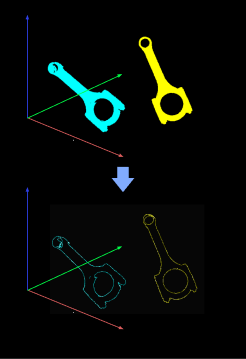
Extract Point Cloud Edges
The workflow of this Step is as follows:
-
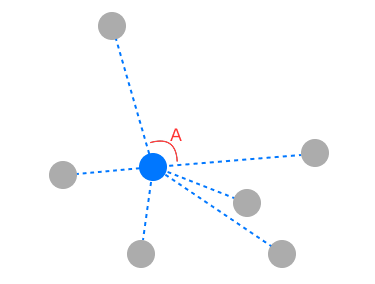
Search for several neighboring points around a given point using the specified Nearest Neighbour Search Type, and connect the point to the other points.
-
Compare the maximum angle formed by adjacent lines with the set Angle Threshold. If the maximum angle exceeds the Angle Threshold, the point is considered an edge point.
As shown in the figure below, the blue point is a point in space, and the gray points are the neighboring points found. In this case, the Angle Threshold is set to 90°. ∠A is the maximum angle formed by the adjacent connecting lines, and if ∠A > 90°, the blue point is considered an edge point.
The following sections will describe the parameters related to the above process.
Parameter Description
Boundary Estimation Settings
| Parameter | Description |
|---|---|
Angle Threshold |
Parameter description: This parameter is used to determine whether a certain point is an edge point. If the maximum angle formed by two adjacent lines among the connections between the point and several searched points exceeds this value, the point will be considered an edge point.
|
Neighbour Search Settings
| Parameter | Description |
|---|---|
Nearest Neighbour Search Type |
Parameter description: This parameter is used to select the method for searching neighboring points. Value list: KNN, Radius
Default value: KNN Tuning recommendation: It is recommended to use the default value. |