Classify Point Clouds by Dimensions
Function
This Step judges whether the input point cloud is eligible based on the reference dimensions. If the deviation between the dimensions of an input point cloud and the reference dimensions is within the threshold range, the point cloud is eligible; otherwise, it is not eligible.
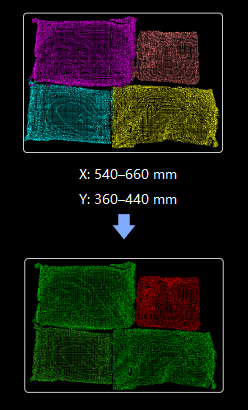
Usage Scenario
This Step is usually used in sack depalletizing scenarios. This Step can determine whether the sack point clouds from previous Steps are eligible, acting as an error-proofing mechanism to filter out inaccurate recognitions from deep learning.
This Step is usually used with such Steps as Apply Masks to Point Cloud and Get Highest Layer Clouds.
Input and Output
Input
| Input port | Data type | Description |
|---|---|---|
Point Clouds |
PointCloud/XYZNormal[] |
Point clouds input to this port will be judged. |
Reference Dimensions |
Size3D[] |
Reference dimensions of the object. |
Shape Information |
Shape3D[] - |
List of shape information corresponding to each point cloud. |
Labels |
String[] - |
The labels of the input clouds. |
Scores |
Number[] - |
Confidence list for input point cloud list. |
Point Cloud Heights |
Number[] - |
The heights of the input clouds. If this port is not activated, the height of the point clouds will equal the Z value of the point cloud center minus the reference height. |
Output
| Output port | Data type | Description |
|---|---|---|
Qualified Point Clouds |
PointCloud/XYZNormal[] |
Qualified point cloud. |
Unqualified Point Clouds |
PointCloud/XYZNormal[] |
Unqualified point cloud. |
Shape Information |
Shape3D[] |
The shape information of the qualified point clouds. |
Labels |
String[] |
The labels of the qualified point clouds. |
Scores |
Number[] |
The scores of the qualified point clouds. |
Shape Information |
Shape3D[] |
The shape information of the unqualified point clouds. |
Labels |
String[] |
The labels of the unqualified point clouds. |
Scores |
Number[] |
The scores of the unqualified point clouds. |
Visualization Point Cloud |
PointCloud/XYZRGB |
Color point cloud for visualization. |
Parameter Description
Length Difference Threshold Settings
|
Length Difference = Point Cloud Length - Reference Length Deviation Ratio = Length Difference / Reference Length |
| Parameter | Description | ||
|---|---|---|---|
Lower/Upper Ratio Threshold |
Description: This parameter is used to set the allowable deviation ratio of the point cloud length relative to the reference length. If the deviation ratio falls between the Lower Ratio Threshold and Upper Ratio Threshold, the point cloud is qualified; otherwise, it is unqualified. Default value: -0.2500/0.2500 Value range: -1–0/0–1 Suggestion: Set the parameter according to your actual requirements. The larger the absolute value of the thresholds, the greater the allowable variation in point cloud dimensions.
|
Width Difference Threshold Settings
|
Width Difference = Point Cloud Width - Reference Width Deviation Ratio = Width Difference / Reference Length |
| Parameter | Description | ||
|---|---|---|---|
Lower/Upper Ratio Threshold |
Description: This parameter is used to set the allowable deviation ratio of the point cloud width relative to the reference width. If the deviation ratio falls between the Lower Ratio Threshold and Upper Ratio Threshold, the point cloud is qualified; otherwise, it is unqualified. Default value: -0.2500/0.2500 Value range: -1–0/0–1 Suggestion: Set the parameter according to your actual requirements. The larger the absolute value of the thresholds, the greater the allowable variation in point cloud dimensions.
|
Height Difference Threshold Settings
|
Height Difference = Point Cloud Height - Reference Height Deviation Ratio = Height Difference / Reference Height |
| Parameter | Description | ||
|---|---|---|---|
Lower/Upper Ratio Threshold |
Description: This parameter is used to set the allowable deviation ratio of the point cloud height relative to the reference height. If the deviation ratio falls between the Lower Ratio Threshold and Upper Ratio Threshold, the point cloud is qualified; otherwise, it is unqualified.
|
||
Reference Height |
Description: This parameter is used to set the reference height (in mm). This parameter only takes effect when the “Point Cloud Heights” port is not connected. If the input point cloud height is empty, the point cloud height = Z value of the point cloud pose - reference height. Default value: 1000.000 Suggestion: Set the parameter according to your actual requirements.
|
Aspect Ratio Settings
|
Aspect Ratio = Point Cloud Length/Point Cloud Width |
| Parameter | Description | ||
|---|---|---|---|
Aspect Ratio Threshold |
Description: This parameter is used to set the acceptable range for the aspect ratio of the point cloud. Default value: 1000000.0000 Suggestion: Set the parameter according to your actual requirements.
|