Convert 2D Point to 3D Pose
Function Description
This step converts workpiece 2D poses or 2D shapes recognized by a 2D camera into 3D workpiece poses in the robot coordinate system, based on camera extrinsic calibration data and taught poses.
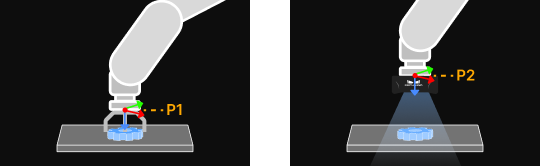
In the figure, the left side is the taught reference picking pose (P1), and the right side is the taught flange pose at image capture (P2).
Usage Scenario
This step is suitable for scenarios where workpieces are positioned by 2D vision and the positioning results are used for robot picking, assembly, and similar applications. It is usually preceded by localization/recognition steps such as 2D Matching and 2D Blob Analysis, and followed by Output or Pose Correction (Assembly).
Input and Output
Parameter Description
| Parameter | Description |
|---|---|
Input Type |
Description: Specifies input data type, including two types: workpiece 2D poses and workpiece 2D shapes. |
Select Camera Step |
Description: Selects a 2D camera step with completed extrinsic calibration, ensuring calibration data is correctly applied in the current step. |
Reference Workpiece 2D Pose |
Description: The 2D pose recognized for the reference workpiece at image capture, typically obtained from the data flow output by the previous step to this input port. |
Reference Picking Pose |
Description: Flange pose when the robot picks the reference workpiece. This pose is the flange pose in the robot coordinate system read from the teach pendant. |
Flange Pose at Image Capture |
Description: In Eye in Hand scenarios, flange pose when the robot captures images of the reference workpiece at the capture point. This pose is the flange pose in the robot coordinate system read from the teach pendant. |
Get Flange Pose from Parameters |
Description: After communication service is enabled, this function is automatically disabled and the input robot flange pose is not used. Adjustment instruction: If you need to re-enter the robot flange pose, disable communication service and then re-enable this function. |
Flange Pose at Image Capture |
Description: Inputs the actual robot flange pose at image capture. |
Robot Service Name in Communication Component |
Description: Enter the robot model, which must be consistent with the robot model connected in the communication component. |