Create and Manage Snapshots
This section introduces how to create a snapshot that helps users quickly save key data and interface status during measurement for subsequent analysis and management.
Snapshot Description
In the inline measurement system, the snapshot function is used to record key data and interface status during measurement. You can save the current measurement result, parameters or interface information at any time during the measurement process to facilitate subsequent data analysis, problem tracing and comparison. The snapshots can restore historical measurement scenarios, improving the efficiency of troubleshooting and quality traceability.
Create and Manage Snapshots
Create Snapshot
-
On the right of the 3D viewer interface, click the Snapshot icon
 .
. -
Click Create Snapshot.
-
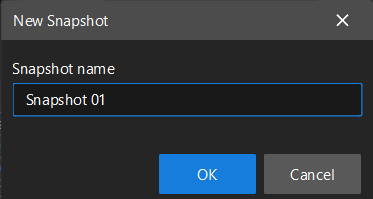
In the pop-up New Snapshot window, enter a name for the snapshot, and then click OK.
Manage Snapshots
Edit Snapshot
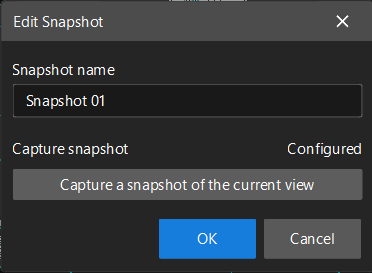
Select the target snapshot in the Snapshot list, and click the settings icon next to the Snapshot. The Edit Snapshot dialog box will appear.
In the pop-up window, you can modify the snapshot name, and choose whether to click Capture a snapshot of the current view to recapture the current view. After confirming, click OK to finish editing.