Edit Feature ID
This section introduces how to edit a feature ID.
|
Follow these steps to edit the feature ID:
-
In the Mech-Metrics configuration interface, right-click one or more features in the Resource tree's Feature area and select Edit Feature ID.
-
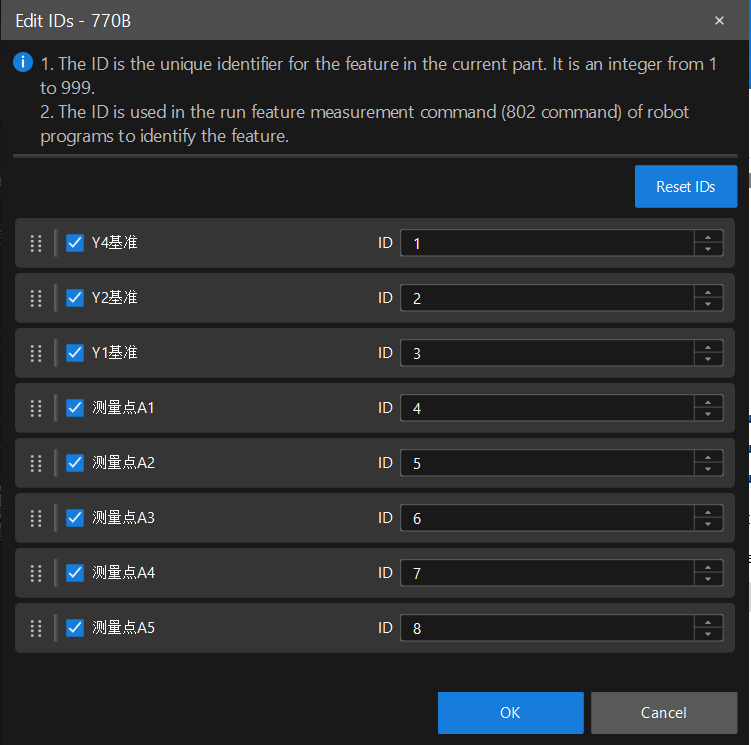
In the Edit IDs dialog box, you can:
-
Select or deselect features: Selected features will be involved in the ID assignment.
-
Manually enter ID: Enter the ID directly in the ID column to the right of the feature. Duplicate IDs are not allowed. If a duplicate ID is entered, the software will prompt that the ID is already in use.
-
Drag Sorting: Drag the icons on the left of the features to adjust the feature order.
-
Reset IDs: Click Reset IDs, and the software will automatically reassign IDs for all selected features according to the current feature order.
You can adjust the measurement priority of features by drag sorting and resetting the IDs. For example, if there are currently three features (A, B, and C), click Reset IDs and then the IDs will be 1, 2, and 3. If you want to focus on Feature B, drag Feature B to the front so that the order becomes B, A, C. Then, click Reset IDs to make the IDs become B=1, A=2, and C=3.
-
-
Click OK.