Test Dynamic Repeatability
This section introduces how to test dynamic repeatability.
|
Factors Affecting Dynamic Repeatability
Factors affecting dynamic repeatability:
Compared with semi-dynamic testing, dynamic testing only adds the step of repeated clamping with the fixture. Therefore, the factors affecting dynamic repeatability are as follows:
-
Repeated clamping accuracy of the fixture.
-
Degree of part deformation during each clamping.
Troubleshooting:
When a large difference appears between dynamic and semi-dynamic accuracy during on-site implementation, check the fixture’s repeated clamping accuracy and the part’s deformation during each clamping.
Test Dynamic Repeatability
Follow these steps to test dynamic repeatability:
-
In the Configuration interface of Mech-Metrics, go to the Analysis and Compensation tab and click Dynamic Repeatability.
-
On the Dynamic Repeatability Testing page, select the Part to be tested as the currently clamped part, choose the Type as Dynamic, select the Data source as Real-time data, set the Repeat times to 20, and then click Start testing.
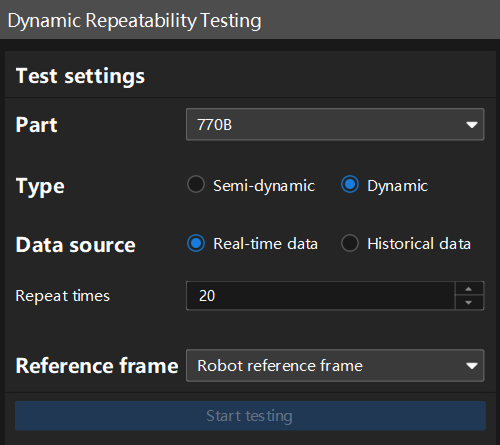
The recommended repeat times are between 20 and 50.
-
Run the robot program 20 times on the robot side.
-
After the testing is complete, view the test results on the right side of this page.
If an error occurs, follow the prompts provided by the software to troubleshoot.
In this software, the default dynamic pass threshold is a repeatability range (R) ≤ 0.20mm. If the project has different pass threshold requirements, you can contact technical support for modifications.