样例程序3:MM_S3_Vis_Path

您正在查看预发布版本(V2.2.0)的文档。如果您想查阅其他版本的文档,可以点击页面右上角“切换版本”按钮进行切换。

■ 如果您不确定当前使用的产品是哪个版本,请随时联系梅卡曼德技术支持

程序简介

功能说明

机器人触发Mech-Vision工程运行,然后获取规划路径,进而执行抓取和放置操作。

文件路径

Mech-Vision和Mech-Viz软件安装目录下Communication Component/Robot_Interface/TOPSTAR/MM_S3_Vis_Path

所需工程

Mech-Vision工程

Mech-Vision工程需包含路径规划步骤,且输出步骤的端口类型参数需要设置为“预定义(机器人路径)”。

使用前提

  1. 已完成标准接口通信配置

  2. 已完成自动标定

此样例程序仅是示例程序。用户需根据实际情况在此基础上进行修改,请勿直接使用该程序。

程序解读

以下为MM_S3_Vis_Path样例程序的代码及相关解释说明。

    — This is a LUA program.
    require("MM_Module")
    IP_Address = "192.168.1.8"
    Server_Port = 50000
    Time_Out = 60
    --initialize communication parameters (initialization is required only once)
    MM_Init_Socket(IP_Address,Server_Port,Time_Out)
    --close socket connection
    MM_Close_Socket()
    --open socket connection
    MM_Open_Socket()
    --switch recipe of NO.1 Mech-Vision project
    TOP_Status=MM_Switch_Model(1,1)
    print("Vision system status code:",TOP_Status)
    --check whether the recipe is switched successfuly
    if TOP_Status ~= 1107 then
      print("Abnormal vision system status!!!",TOP_Status)
      Pause()
    end
    TOP_Status = MM_Start_Vis(1,0,1,JP[100])
    print("Vision system status code:",TOP_Status)
    --Status code judgment
    if TOP_Status ~= 1102 then
      print("Abnormal vision system status!!!",TOP_Status)
      Pause()
    end
    --get planned path from NO.1 Mech-Vision project
    TOP_Status,TOP_Last_Data,TOP_Pos_Num,TOP_VisPosNum = MM_Get_VisPath(1,1)
    print("Planned path from Mech-Vision:",TOP_Status,TOP_Last_Data,TOP_Pos_Num,TOP_VisPosNum)
    --check whether planned path has been got from Mech-Vision successfully
    if TOP_Status ~= 1103 then
      print("Abnormal vision system status!!!",TOP_Status)
      Pause()
    end
    --save waypoints of the planned path to local variables one by one
    MM_Get_JPR(1,10,20,30)
    MM_Get_JPR(2,11,21,31)
    MM_Get_JPR(3,12,22,32)
    --move to approach waypoint of picking
    MovJ(JPR[10],{cnt = -1})
    --move to picking waypoint
    MovJ(JPR[11],{cnt = -1})
    --add object grasping logic here, such as
    Pause()
    --move to departure waypoint of picking
    MovJ(JPR[12],{cnt = -1})

上述样例程序代码对应的流程如下图所示。
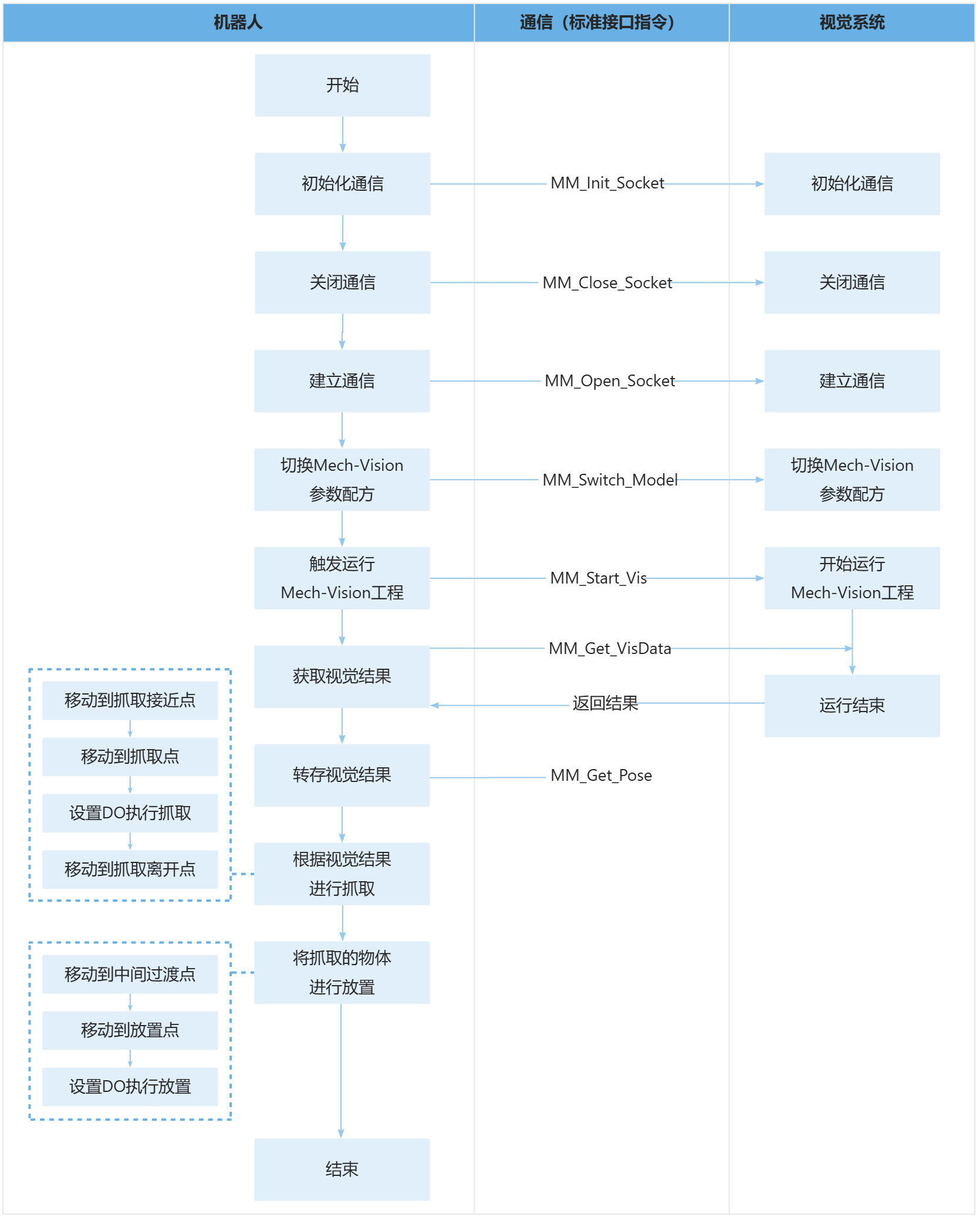
sample1

下表为上述程序的逻辑解读。用户单击指令名称的超链接便可查看该指令的详细说明。

流程 代码及说明

导入MM_Module头文件

  -- This is a LUA program.
  require("MM_Module")

初始化和连接通信

  IP_Address = "192.168.1.8"
  Server_Port = 50000
  Time_Out = 60
  --initialize communication parameters (initialization is required only once)
  MM_Init_Socket(IP_Address,Server_Port,Time_Out)
  --close socket connection
  MM_Close_Socket()
  --open socket connection
  MM_Open_Socket()
  • MM_Init_Socket:初始化通信的指令。

  • MM_Close_Socket:关闭通信的指令。

  • MM_Open_Socket:连接通信的指令。

  • '50000':机器人的端口号。

  • '192.168.1.8':工控机的IP地址。

  • 60:通信超时等待时间为60秒。

先关闭通信再重新连接确保没有连接中的工程。

切换Mech-Vision参数配方

  --switch recipe of NO.1 Mech-Vision project
  TOP_Status=MM_Switch_Model(1,1)
  • MM_Switch_Model:切换Mech-Vision参数配方的指令。

  • 第一个1:表示Mech-Vision的工程编号。

  • 第二个1:表示Mech-Vision工程中参数配方的编号。

打印状态码并验证

  print("Vision system status code:",TOP_Status)
  ---check whether the recipe is switched successful
  if TOP_Status ~= 1107 then
    print("Abnormal vision system status!!!",TOP_Status)
    Pause()
  end

触发运行Mech-Vision工程

  --trigger NO.1 Mech-Vision project
  TOP_Status = MM_Start_Vis(1,1,1,JP[100])
  print("Vision system status code:",TOP_Status)
  • MM_Start_Vis:触发运行Mech-Vision工程的指令。。

  • 第一个1:表示Mech-Vision的工程编号

  • 第二个1:表示期望Mech-Vision工程返回所有视觉点。。

  • 第三个1:将机器人的当前法兰位姿传入Mech-Vision工程

  • JP[100]:用户自定义的关节角数据,此样例中该关节角数据无实际用处,但必须设定该关节角数据。

打印状态码并验证

    print("Vision system status code:",TOP_Status)
    --Status code judgment
    if TOP_Status ~= 1102 then
      print("Abnormal vision system status!!!",TOP_Status)
      Pause()
    end

获取Mech-Vision工程规划的路径

    --get planned path from NO.1 Mech-Vision project
    TOP_Status,TOP_Last_Data,TOP_Pos_Num,TOP_VisPosNum = MM_Get_VisPath(1,1)
  • MM_Get_VisPath:触发获取Mech-Vision规划路径的指令。

  • 第一个1:指定Mech-Vision的工程编号为1

  • 第二个1:指定获取路径点的位姿形式为关节角。

整条指令表示机器人获取Mech-Vision工程1返回的规划路径。

打印视觉结果并验证

    print("Planned path from Mech-Vision:",TOP_Status,TOP_Last_Data,TOP_Pos_Num,TOP_VisPosNum)
    --check whether planned path has been got from Mech-Vision successfully
    if TOP_Status ~= 1103 then
      print("Abnormal vision system status!!!",TOP_Status)
      Pause()
    end

转存规划路径

    --save waypoints of the planned path to local variables one by one
    MM_Get_JPR(1,10,20,30)
    MM_Get_JPR(2,11,21,31)
    MM_Get_JPR(3,12,22,32)
  • MM_Get_JPR:转存规划路径的指令。 以第一条为例

  • 1:将转存第一个路径点。

  • 10:第一条路径的关节角将保存至位置寄存器JPR[10]

  • 20:标签将保存至数值寄存器HR[20]

  • 30:移动速度被保存至数值寄存器HR[30]

整条指令表示将第一个视觉点的工具位姿、标签和末端工具编号分别转存至指定寄存器。

移动到抓取接近点

    --move to approach waypoint of picking
    MovJ(JPR[10],{cnt = -1})

移动到抓取点

    --move to picking waypoint
    MovJ(JPR[11],{cnt = -1})

机器人从抓取接近点移动到抓取点。

设置DO执行抓取

  --add object grasping logic here, such as "setdo DO_1, 1;"
  Pause()

机器人移动到抓取点后,通过设置DO指令(例如“setdo DO_1, 1”),控制末端工具进行抓取。用户需根据实际场景增加设置DO的操作。

PAUSE表示停止程序的执行。用户如果已添加设置DO的语句,此处可以删除PAUSE语句。

移动到放置接近点

    --move to departure waypoint of picking
    MovJ(JPR[12],{cnt = -1})

机器人移动到抓取点上方的某处,即到达抓取离开点。

增加抓取离开点可防止机器人在移动过程中与场景物体(例如料筐)发生碰撞。用户可根据实际场景修改此处的Z轴负方向偏移量(JPR[n]值),保证离开过程无碰撞。

该页面是否有帮助?

可以通过以下方式反馈意见:

我们重视您的隐私

我们使用 cookie 为您在我们的网站上提供最佳体验。继续使用该网站即表示您同意使用 cookie。如果您拒绝,将使用一个单独的 cookie 来确保您在访问本网站时不会被跟踪或记住。