样例程序5:MM_S5_Viz_SetBranch
程序解读
以下为MM_S5_Viz_SetBranch样例程序的代码及相关解释说明。
| 与MM_S2_Viz_Basic样例相比,本样例仅新增了设置Mech-Viz消息分支出口的功能(加粗部分的代码)。因此,下文不再重复解释与MM_S2_Viz_Basic样例相同部分的代码(详情请参考MM_S2_Viz_Basic样例说明)。 |
   1:  !-------------------------------- ;
   2:  !FUNCTION: trigger Mech-Viz ;
   3:  !project then set branch and get ;
   4:  !planned path ;
   5:  !Mech-Mind, 2023-12-25 ;
   6:  !-------------------------------- ;
   7:   ;
   8:  !set current uframe NO. to 0 ;
   9:  UFRAME_NUM=0 ;
  10:  !set current tool NO. to 1 ;
  11:  UTOOL_NUM=1 ;
  12:  !move to robot home position ;
  13:J P[1] 100% FINE    ;
  14:  !initialize communication ;
  15:  !parameters(initialization is ;
  16:  !required only once) ;
  17:  CALL MM_INIT_SKT('8','127.0.0.1',30000,5) ;
  18:  !move to image-capturing position ;
  19:L P[2] 1000mm/sec FINE    ;
  20:  !trigger Mech-Viz project ;
  21:  CALL MM_START_VIZ(2,10,53) ;
  22:  !check whether viz project has ;
  23:  !been triggered successfully ;
  24:  IF (R[53]<>2103),JMP LBL[99] ;
  25:  !set branch, "MM_SET_BCH ;
  26:  !(Branch_Num,Exit_Num)" ;
  24:  CALL MM_SET_BCH(1,1,53) ;
  27:  !check whether viz branch has ;
  28:  !been set successfully ;
  29:  IF (R[53]<>2105),JMP LBL[99] ;
  30:  !get planned path, 1st argument ;
  31:  !(1) means getting pose in JPs ;
  32:  CALL MM_GET_VIZ(1,51,52,53) ;
  33:  !check whether planned path has ;
  34:  !been got from Mech-Viz ;
  35:  !successfully ;
  36:  IF R[53]<>2100,JMP LBL[99] ;
  37:  !save waypoints of the planned ;
  38:  !path to local variables one ;
  39:  !by one ;
  40:  CALL MM_GET_JPS(1,60,70,80) ;
  41:  CALL MM_GET_JPS(2,61,71,81) ;
  42:  CALL MM_GET_JPS(3,62,72,82) ;
  43:  !follow the planned path to pick ;
  44:  !move to approach waypoint ;
  45:  !of picking ;
  46:J PR[60] 50% FINE    ;
  47:  !move to picking waypoint ;
  48:J PR[61] 10% FINE    ;
  49:  !add object grasping logic here, ;
  50:  !such as "DO[1]=ON" ;
  51:  PAUSE ;
  52:  !move to departure waypoint ;
  53:  !of picking ;
  54:J PR[62] 50% FINE    ;
  55:  !move to intermediate waypoint ;
  56:  !of placing ;
  57:J P[3] 50% CNT100    ;
  58:  !move to approach waypoint ;
  59:  !of placing ;
  60:L P[4] 1000mm/sec FINE Tool_Offset,PR[2]    ;
  61:  !move to placing waypoint ;
  62:L P[4] 300mm/sec FINE    ;
  63:  !add object releasing logic here, ;
  64:  !such as "DO[1]=OFF" ;
  65:  PAUSE ;
  66:  !move to departure waypoint ;
  67:  !of placing ;
  68:L P[4] 1000mm/sec FINE Tool_Offset,PR[2]    ;
  69:  !move back to robot home position ;
  70:J P[1] 100% FINE    ;
  71:  END ;
  72:   ;
  73:  LBL[99:vision error] ;
  74:  !add error handling logic here ;
  75:  !according to different ;
  76:  !error codes ;
  77:  !e.g.: status=2038 means no ;
  78:  !point cloud in ROI ;
  79:  !e.g.: status=3099 means ;
  80:  !failed to open socket ;
  81:  PAUSE ;
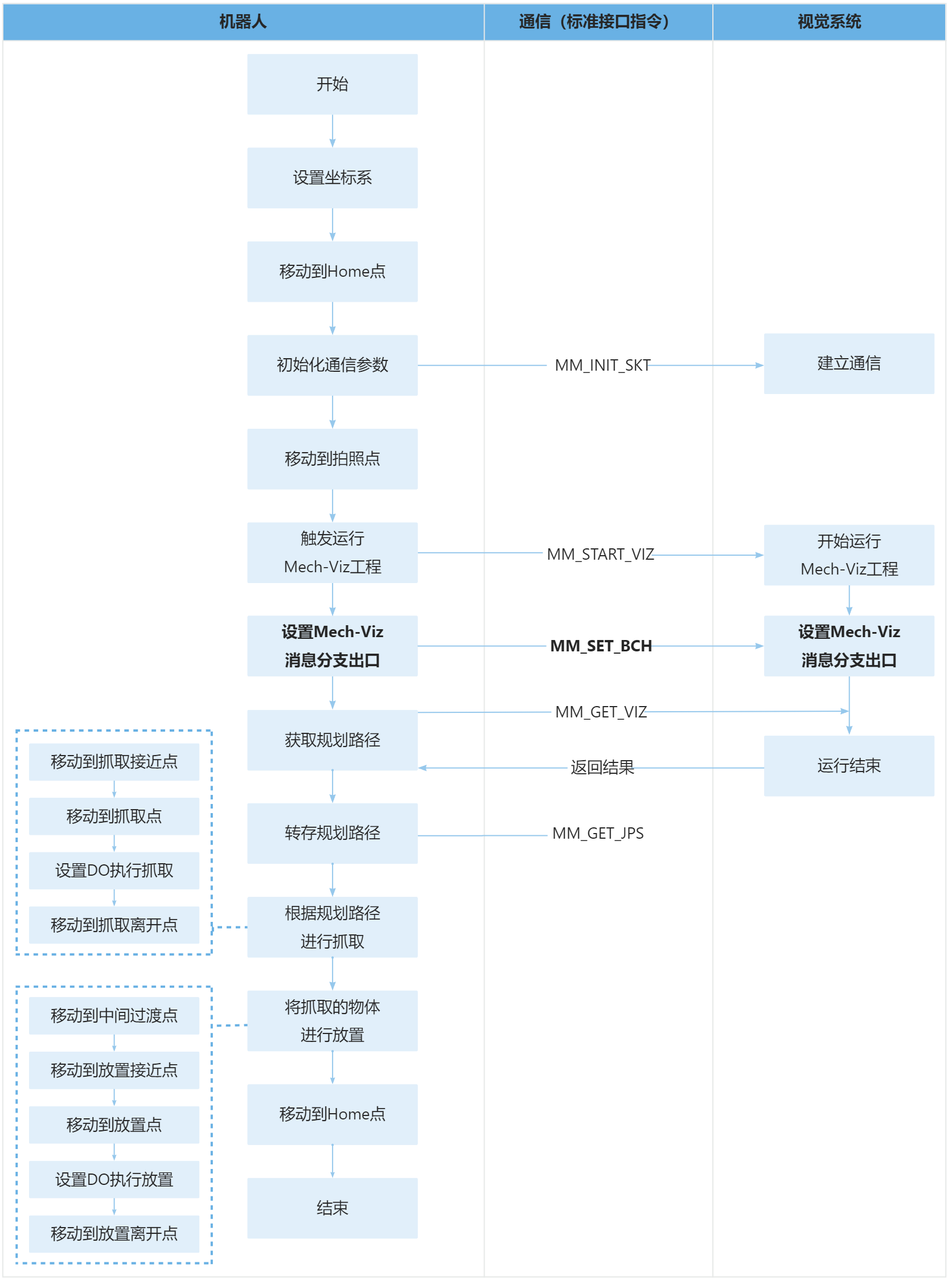
上述样例程序代码对应的流程如下图所示。
下表为设置Mech-Viz消息分支出口的逻辑解读。用户单击指令名称的超链接便可查看该指令的详细说明。
| 流程 | 代码及说明 |
|---|---|
设置Mech-Viz消息分支出口 |
因此,整条指令表示Mech-Viz工程在编号为1的“消息分支”步骤处将沿出口0继续执行,如下图所示。 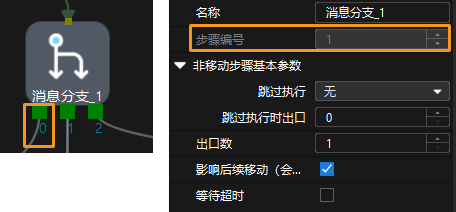
因此,上述语句表示,当状态码R[53]为2105时,则机器人成功设置Mech-Viz消息分支出口;否则视觉系统发生异常,程序跳转到LBL[99]处执行。以下为LBL[99]处的代码。 |