샘플 프로그램 21: MM_S21_1Robot_3IPC_Sequentially
프로그램 소개
기능 설명 |
하나의 로봇은 여러 개의 IPC를 연결합니다. 즉, 하나의 로봇이 여러 개의 비전 시스템을 제어할 수 있습니다. |
||
파일 경로 |
Mech-Vision 및 Mech-Viz의 설치 디렉토리로 이동하여 |
||
필요한 프로젝트 |
Mech-Vision와 Mech-Viz 프로젝트
|
||
사용 전제 조건 |
|
| 이 샘플 프로그램은 참고용으로 제공됩니다. 사용자는 실제 상황에 맞춰 이 내용을 바탕으로 수정해야 하며, 해당 프로그램을 그대로 사용하지 않도록 하십시오. |
프로그램 설명
다음에는 MM_S21_1Robot_3IPC_Sequentially 샘플 프로그램의 코드와 관련 설명입니다.
| 분 예시는 주로 하나의 로봇이 여러 개의 IPC를 연렬하는 방법에 대해 설명합니다. 각 IPC에서 비전 시스템이 실행되는 방식에 대한 자세한 내용은 MM_S5_Viz_SetBranch 샘플 프로그램 설명을 참조할 수 있습니다.(MM_S5_Viz_SetBranch 샘플 프로그램 설명을 참조하십시오.) |
   1:  !-------------------------------- ;
   2:  !FUNCTION: set up communication ;
   3:  !between 1Robot and 3IPC ;
   4:  !Sequentially ;
   5:  !Mech-Mind, 2024-4-25 ;
   6:  !-------------------------------- ;
   7:   ;
   8:  !set current uframe NO. to 0 ;
   9:  UFRAME_NUM=0 ;
  10:  !set current tool NO. to 1 ;
  11:  UTOOL_NUM=1 ;
  12:  LBL[10] ;
  13:   ;
  14:  !initialize communication ;
  15:  !parameters(initialization is ;
  16:  !required once change IPC tcp ;
  17:  !service ;
  18:  CALL MM_INIT_SKT('6','192.168.1.20',30000,5) ;
  19:  !trigger Mech-Viz project ;
  20:  CALL MM_START_VIZ(0,60,53) ;
  21:  !check whether viz project has ;
  22:  !been triggered successfully ;
  23:  IF (R[53]<>2103),JMP LBL[99] ;
  24:  WAIT    .20(sec) ;
  25:  !set branch, "MM_SET_BCH ;
  26:  CALL MM_SET_BCH(1,1,53) ;
  27:  !check whether viz branch has ;
  28:  !been set successfully ;
  29:  IF (R[53]<>2105),JMP LBL[99] ;
  30:   ;
  31:  !initialize communication ;
  32:  !parameters(initialization is ;
  33:  !required once change IPC tcp ;
  34:  !service ;
  35:  CALL MM_INIT_SKT('7','192.168.1.200',30000,5) ;
  36:  !trigger Mech-Viz project ;
  37:  CALL MM_START_VIZ(0,61,53) ;
  38:  !check whether viz project has ;
  39:  !been triggered successfully ;
  40:  IF (R[53]<>2103),JMP LBL[99] ;
  41:  WAIT    .20(sec) ;
  42:  !set branch, "MM_SET_BCH ;
  43:  CALL MM_SET_BCH(1,2,53) ;
  44:  !check whether viz branch has ;
  45:  !been set successfully ;
  46:  IF (R[53]<>2105),JMP LBL[99] ;
  47:   ;
  48:  !initialize communication ;
  49:  !parameters(initialization is ;
  50:  !required once change IPC tcp ;
  51:  !service ;
  52:  CALL MM_INIT_SKT('8','192.168.1.50',30000,5) ;
  53:  !trigger Mech-Viz project ;
  54:  CALL MM_START_VIZ(0,62,53) ;
  55:  !check whether viz project has ;
  56:  !been triggered successfully ;
  57:  IF (R[53]<>2103),JMP LBL[99] ;
  58:  WAIT    .20(sec) ;
  59:  !set branch, "MM_SET_BCH ;
  60:  CALL MM_SET_BCH(1,2,53) ;
  61:  !check whether viz branch has ;
  62:  !been set successfully ;
  63:  IF (R[53]<>2105),JMP LBL[99] ;
  64:   ;
  65:  !initialize communication ;
  66:  !parameters(initialization is ;
  67:  !required once change IPC tcp ;
  68:  !service ;
  69:  CALL MM_INIT_SKT('6','192.168.1.20',30000,5) ;
  70:  !get planned path, 1st argument ;
  71:  !(1) means getting pose in JPs ;
  72:  CALL MM_GET_VIZ(1,51,52,53) ;
  73:  !check whether planned path has ;
  74:  !been got from Mech-viz ;
  75:  !successfully ;
  76:  IF (R[53]<>2100),JMP LBL[99] ;
  77:  !save the first waypoint of the ;
  78:  !planned path to local variables ;
  79:  !one by one ;
  80:  CALL MM_GET_JPS(1,70,71,72) ;
  81:   ;
  82:  !initialize communication ;
  83:  !parameters(initialization is ;
  84:  !required once change IPC tcp ;
  85:  !service ;
  86:  CALL MM_INIT_SKT('7','192.168.1.200',30000,5) ;
  87:  !get planned path, 1st argument ;
  88:  !(2) means getting pose in TCP ;
  89:  CALL MM_GET_VIZ(2,54,55,56,53) ;
  90:  !check whether planned path has ;
  91:  !been got from Mech-viz ;
  92:  !successfully ;
  93:  IF (R[53]<>2100),JMP LBL[99] ;
  94:  !save the first waypoint of the ;
  95:  !planned path to local variables ;
  96:  !one by one ;
  97:  CALL MM_GET_POS(1,71,73,74) ;
  98:   ;
  99:  !initialize communication ;
 100:  !parameters(initialization is ;
 101:  !required once change IPC tcp ;
 102:  !service ;
 103:  CALL MM_INIT_SKT('8','192.168.1.50',30000,5) ;
 104:  !get planned path, 1st argument ;
 105:  !(1) means getting pose in JPs ;
 106:  CALL MM_GET_VIZ(1,57,58,59,53) ;
 107:  !check whether planned path has ;
 108:  !been got from Mech-viz ;
 109:  !successfully ;
 110:  IF (R[53]<>2100),JMP LBL[99] ;
 111:  !save the first waypoint of the ;
 112:  !planned path to local variables ;
 113:  !one by one ;
 114:  CALL MM_GET_JPS(1,72,75,76) ;
 115:   ;
 116:  WAIT   5.00(sec) ;
 117:  JMP LBL[10] ;
 118:   ;
 119:  LBL[99:handling error] ;
 120:  !add error handling logic here ;
 121:  !according to different ;
 122:  !error codes ;
 123:  !e.g.: status=2038 means no ;
 124:  !point cloud in ROI ;
 125:  !e.g.: status=3099 means ;
 126:  !failed to open socket ;
 127:  PAUSE ;
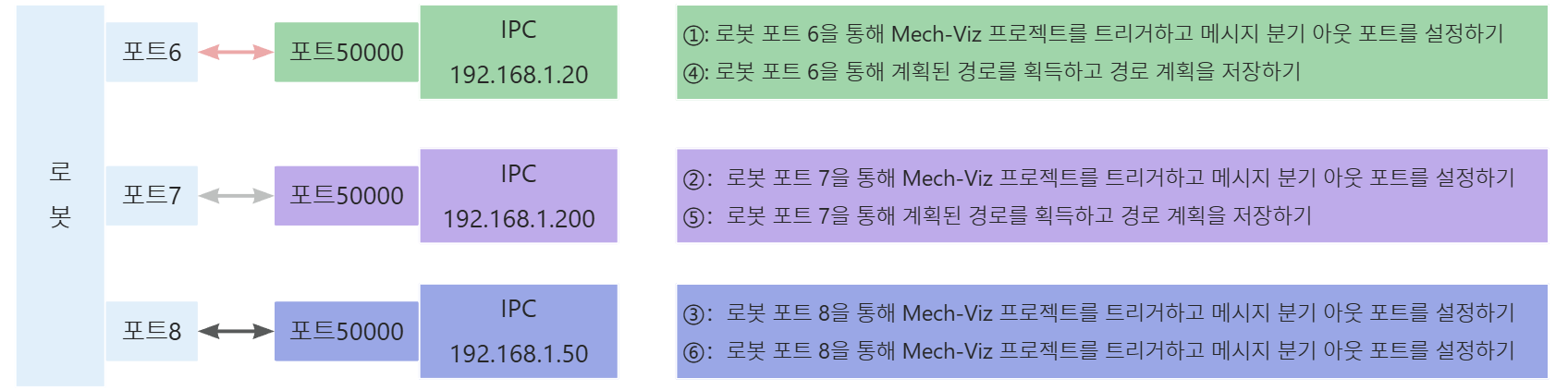
위 샘플 프로그램 코드에 해당하는 개략도는 아래에 표시되어 있습니다. 개략도 중의 ①~⑥은 프로그램이 실행되는 순서를 의미합니다.
아래 표는 위의 코드의 설명입니다. 명령어 이름의 링크를 클릭하면 해당 명령의 상세 설명을 확인할 수 있습니다.
| IPC의 IP 주소와 포트 번호 | 코드와 설명 | ||
|---|---|---|---|
192.168.1.20:30000 |
로봇 포트6과 IPC(192.168.1.20) 포트 30000 간의 통신 프로세스는 아래에 표시되어 있습니다.
|
|
FANUC 로봇 시스템 설정에는 총 8개 포트가 있습니다. 아래의 그림과 같습니다. 사용자는 MM_INIT_SKT 명령어 내에 정의되지 않은 포트를 사용할 때 컨트롤러를 다시 시작해야 합니다. 그렇지 않으면 로봇은 비전 시스템과 통신할 수 없으며 오류가 보고됩니다. 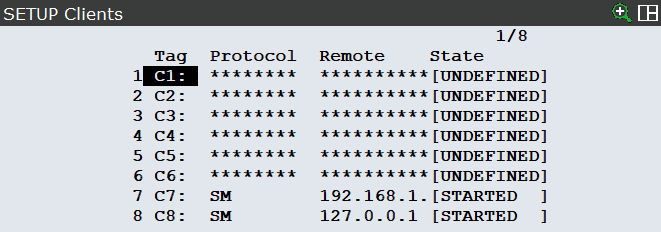
|