LNX-7000 Series Heat-Dissipation Measures
During continuous data acquisition, the data processing unit (① in the figure below) and sensor unit (② in the figure below) inside the laser profiler will generate heat. If the laser profiler cannot dissipate heat effectively, excessively high temperatures may cause the laser profiler to malfunction.
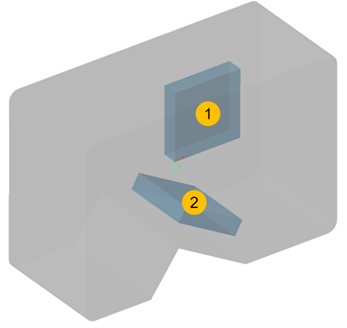
This topic introduces how to evaluate whether the integrated laser profiler (LNX-7000 series) can dissipate heat effectively and provides specific measures to improve heat dissipation.
Evaluate Heat-Dissipation Conditions
When any of the following conditions cannot be met, the laser profiler cannot dissipate heat effectively through its own enclosure. Please refer to the next section to improve heat-dissipation measures.
-
The highest ambient temperature is below 40°C.
-
The laser profiler is in an open space where the air can flow.
-
No heat sources such as high-power or welding devices are present within a 3 m radius of the laser profiler.
-
The laser profiler’s internal temperature should be less than 75°C (LNX-7600-GLthe internal temperature should be less than 70°C) or the laser profiler’s body temperature should be less than 65°C (the LNX-7600-GLbody temperature should be less than 60°C).
| For the methods of checking the laser profiler’s body temperature, laser profiler’s internal temperature, and ambient temperature, please refer to the section Check Laser Profiler and Ambient Temperatures. |
Improved Heat-Dissipation Measures
Using the appropriate bracket or adding a fan can improve the heat-dissipation efficiency of the laser profiler, ensuring that the laser profiler’ temperature stays in the appropriate range.
Usually, using the appropriate bracket is enough for effectively improving the heat-dissipation efficiency of the laser profiler through thermal conduction. However, in the following situations, a fan must be added to further improve the heat-dissipation efficiency through thermal convection:
-
The highest ambient temperature exceeds 45°C.
-
The laser profiler is mounted in a confined space, and the appropriate bracket cannot be used.
-
After using an appropriate bracket, the internal or body temperature of the laser profiler was still too high.
Use Appropriate Bracket
Mounting the laser profiler on an appropriate bracket can effectively improve the heat-dissipation efficiency of the laser profiler through heat conduction and increasing the heat-dissipation area.
Side Mounting
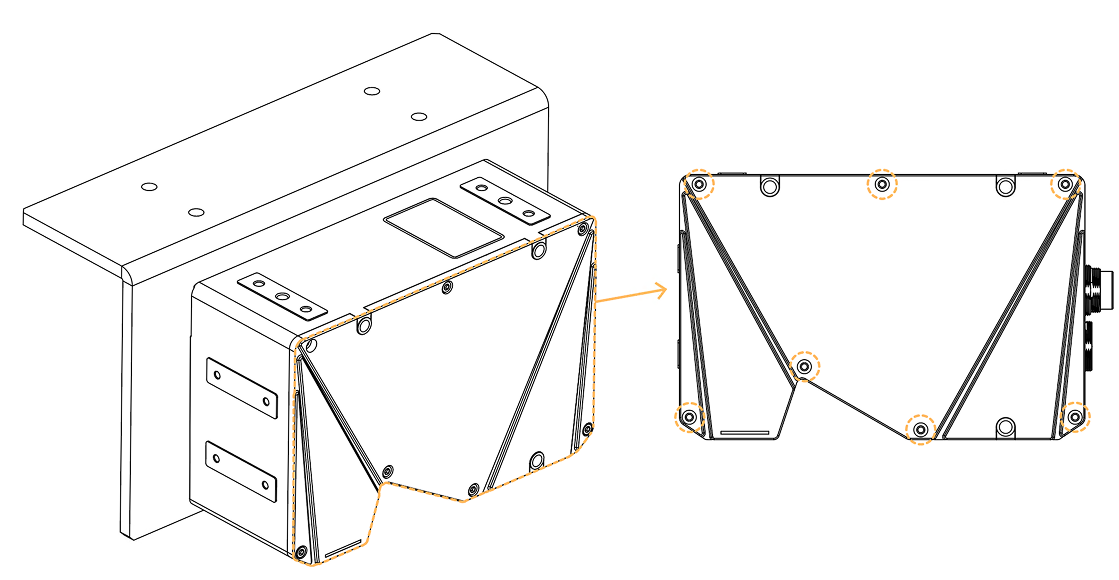
When mounting the laser profiler sideways, using a bracket that satisfies the following requirements can ensure that the laser profiler dissipates heat effectively:
-
The bracket is made of metal (highly thermally conductive aluminum is recommended) and has a thickness of at least 5 mm.
-
The laser profiler’s side with fastening screws (see figure below) is in complete contact with the surface of the bracket.
-
The surface of the bracket’s contact with the laser profiler should be at least as large as the side of the laser profiler.
-
The area of the bracket’s surface in contact with air is at least 3 times that of the laser profiler’s side surface.
|
If the bracket is made of multiple components, please ensure that:
|
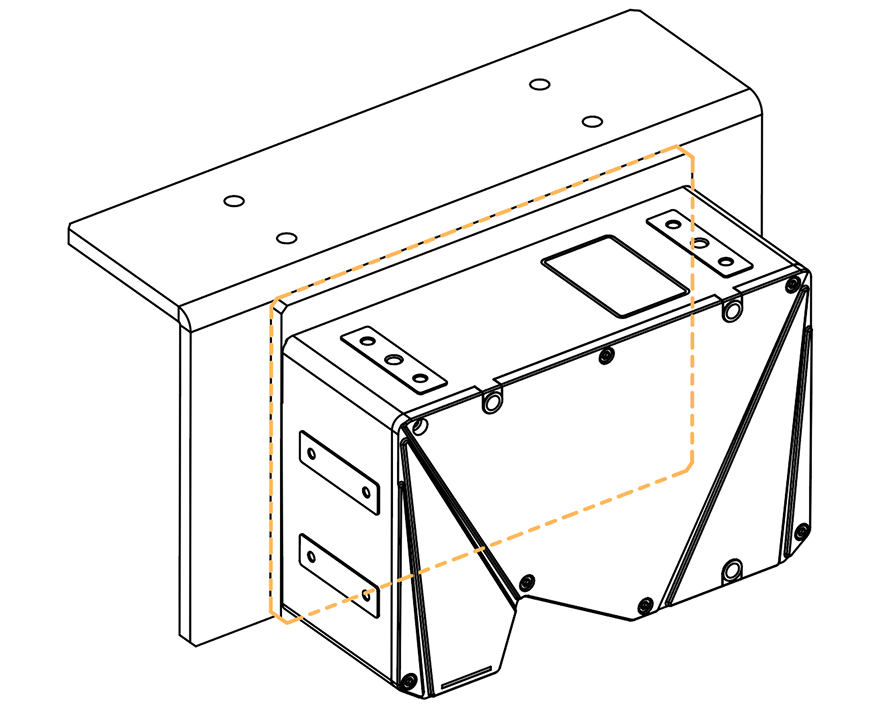
After mounting the laser profiler onto a bracket that satisfies the above requirements, please check the laser profiler temperature according to the instructions in Check Laser Profiler and Ambient Temperatures to check if the laser profiler can dissipate heat effectively.
Top Mounting
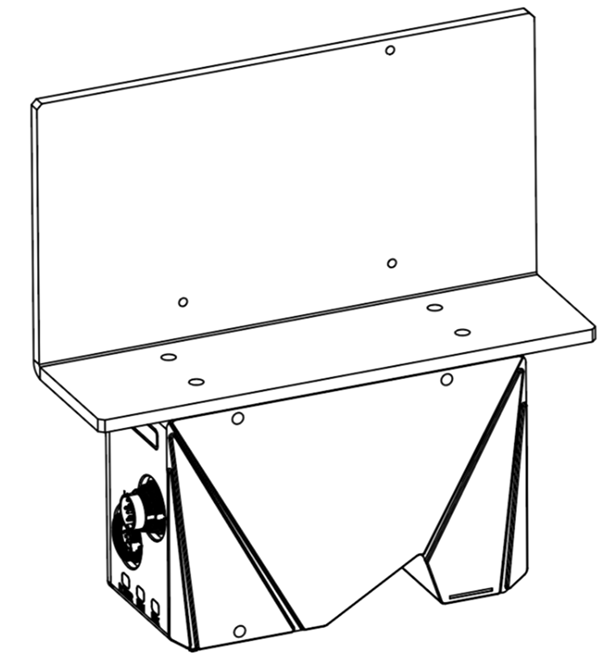
When mounting the laser profiler through its top, using a bracket that satisfies the following requirements can ensure that the laser profiler dissipates heat effectively:
-
The bracket is made of metal, and its thickness is no less than 5 mm.
-
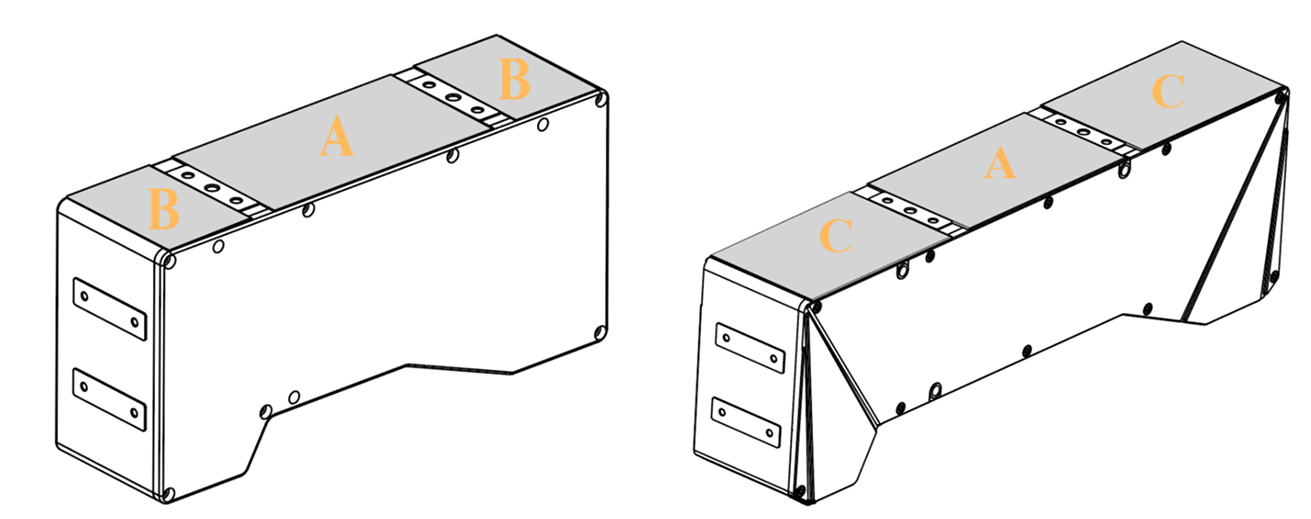
Add silicone thermal pads (0.7 mm or 0.8 mm thick) of the following dimensions between the laser profiler and the bracket to ensure that the heat generated by the laser profiler can be conducted to the bracket.
Model
Silicone thermal pads needed
Dimensions (mm)
LNX-7030-GL, LNX-7045-GL, LNX-7080-GL, and LNX-7150-GL
A
95 × 55
LNX-7300-GL
A and 2B
-
A: 95 × 55
-
B: 35 × 55
LNX-7600-GL
A and 2C
-
A: 95 × 55
-
C:85 × 55
-
-
The silicone thermal pads are in complete contact with the bracket.
-
The bracket’s surface in contact with the silicone thermal pads should be at least as large as the laser profiler’s top surface.
-
The area of the bracket’s surface in contact with air is at least 3 times that of the laser profiler’s side surface.
|
If the bracket is made of multiple components, please ensure that:
|
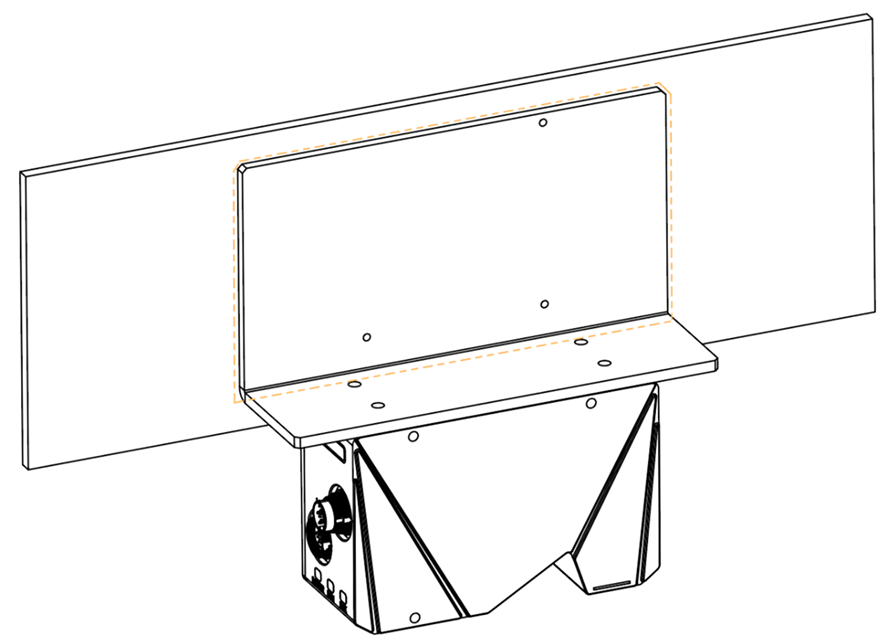
After mounting the laser profiler onto a bracket that satisfies the above requirements, please check the laser profiler temperature according to the instructions in Check Laser Profiler and Ambient Temperatures to check if the laser profiler can dissipate heat effectively.
Add Fan
In the following situations, a fan must be added to further improve the heat-dissipation efficiency through thermal convection:
-
The highest ambient temperature exceeds 45°C.
-
The laser profiler is mounted in a confined space, and the appropriate bracket cannot be used.
-
After using an appropriate bracket, the internal or body temperature of the laser profiler was still too high.
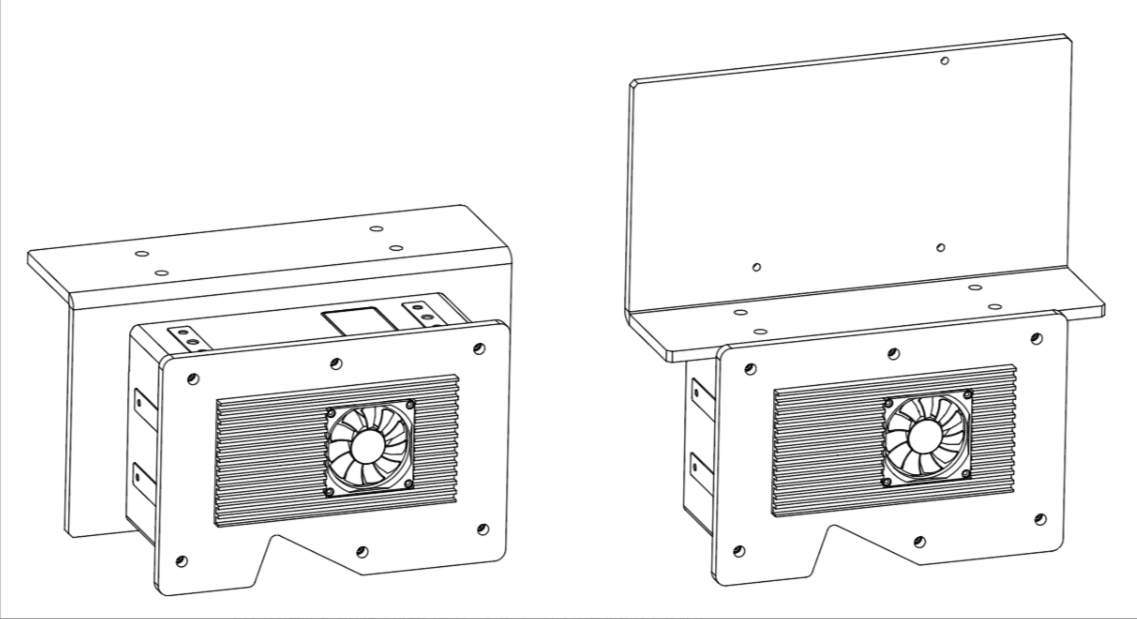
The fan should be mounted to a metal plate. The fan and metal plate should satisfy the following requirements:
-
The airflow of the fan should be no less than 5 CFM, and the recommended size should be greater than 40 × 40 mm.
-
The metal plate is at least 5 mm thick and mounted to the laser profiler’s side.
If the laser profiler is mounted on top, the metal plate should be mounted to the side of the laser profiler without securing screws.
|
After mounting the laser profiler onto a bracket that satisfies the above requirements, please check the laser profiler temperature according to the instructions in Check Laser Profiler and Ambient Temperatures to check if the laser profiler can dissipate heat effectively.
Check Laser Profiler and Ambient Temperatures
The laser profiler dissipates heat effectively when the laser profiler and ambient temperatures satisfy either of the following conditions:
-
The laser profiler’s internal temperature should be less than 75°C (the LNX-7600-GL’s internal temperature should be less than 70°C).
-
The body temperature of the laser profiler should be less than 65°C (LNX-7600-GLthe body temperature should be less than 60°C).
Please check the laser profiler’s internal temperature, laser profiler body temperature, and ambient temperature by the following methods.
| The laser profiler’s internal and body temperatures should be checked after the laser profiler has been acquiring data continuously for at least 1.5 hours. |
-
Check the internal temperature of the laser profiler:
-
Connect to the laser profiler in Mech-Eye Viewer.
-
On the right, switch to the Acquisition info tab and check the value in the Device Temperature category.
-
-
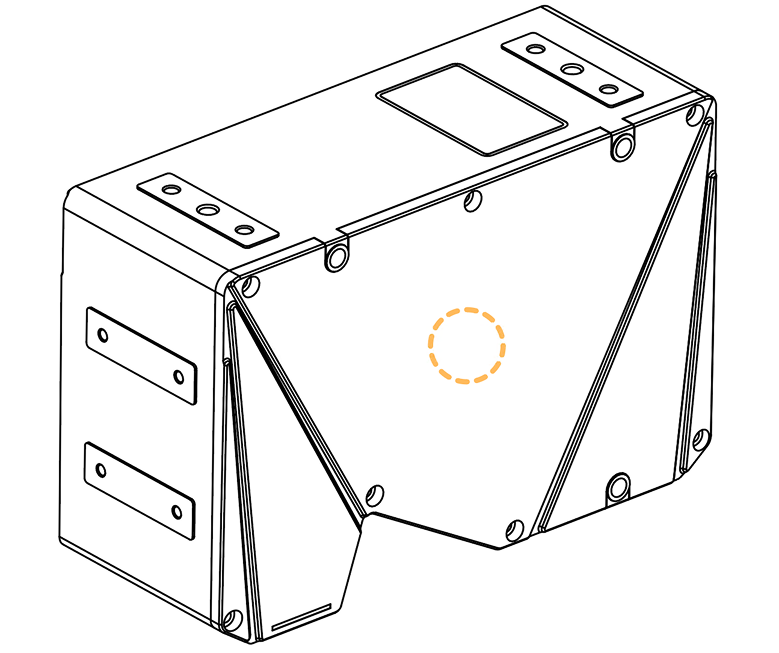
Check the body temperature of the laser profiler: Use an infrared thermometer to check the body temperature of the laser profiler according to the following steps.
-
Find the side of the laser profiler with retaining screws, as shown below.
-
Place the sensor part of the infrared thermometer 5 to 10 cm away from the center of this side and measure the temperature.
-
Repeatedly measure the temperature for at least 5 times and take the average as the laser profiler’s body temperature.
-
-
Check the ambient temperature: You can use an infrared thermometer or a mechanical/digital thermometer to check the ambient temperature.
-
Use the infrared thermometer to measure the temperature of the laser profiler’s cable as the ambient temperature. The position for measurement should be more than 30 mm away from the center of the connector. Repeatedly measure the temperature for at least 5 times and take the average.
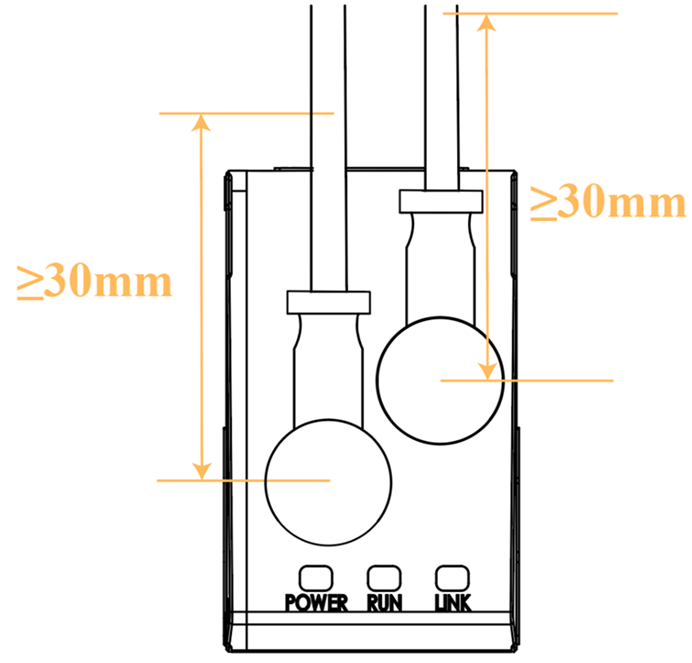
-
Read the temperature from the mechanical/digital thermometer as the ambient temperature. Place the thermometer 10 to 20 cm away from the laser profiler, and make sure that the air inlet is not blocked. Read the temperature after the thermometer is placed still for at least 20 minutes.
Mercury thermometers are not recommended, as they have relatively low accuracy.
-