Example Program 3: MM_S3_Vis_Path

You are currently viewing the documentation for a pre-release version (2.2.0). To access documentation for other versions, click the "Switch Version" button located in the upper-right corner of the page.

■ If you're unsure about the version of the product you are using, please contact Mech-Mind Technical Support for assistance.

Program Introduction

Description

The robot triggers the Mech-Vision project to run, and then obtains the planned path for picking and placing.

File Name

You can navigate to the installation directory of Mech-Vision and Mech-Viz and find the file by using the Communication Component/Robot_Interface/TOPSTAR/MM_S3_Vis_Path path.

Project

Mech-Vision project

The Mech-Vision project should contain a Path Planning Step, and the Port Type parameter of the Output Step should be set to Predefined (robot path).

Prerequisites

This example program is provided for reference only. Before using the program, please modify the program according to the actual scenario.

Program Description

This part describes the MM_S3_Vis_Path example program.

    — This is a LUA program.
    require("MM_Module")
    IP_Address = "192.168.1.8"
    Server_Port = 50000
    Time_Out = 60
    --initialize communication parameters (initialization is required only once)
    MM_Init_Socket(IP_Address,Server_Port,Time_Out)
    --close socket connection
    MM_Close_Socket()
    --open socket connection
    MM_Open_Socket()
    --switch recipe of NO.1 Mech-Vision project
    TOP_Status=MM_Switch_Model(1,1)
    print("Vision system status code:",TOP_Status)
    --check whether the recipe is switched successfuly
    if TOP_Status ~= 1107 then
      print("Abnormal vision system status!!!",TOP_Status)
      Pause()
    end
    TOP_Status = MM_Start_Vis(1,0,1,JP[100])
    print("Vision system status code:",TOP_Status)
    --Status code judgment
    if TOP_Status ~= 1102 then
      print("Abnormal vision system status!!!",TOP_Status)
      Pause()
    end
    --get planned path from NO.1 Mech-Vision project
    TOP_Status,TOP_Last_Data,TOP_Pos_Num,TOP_VisPosNum = MM_Get_VisPath(1,1)
    print("Planned path from Mech-Vision:",TOP_Status,TOP_Last_Data,TOP_Pos_Num,TOP_VisPosNum)
    --check whether planned path has been got from Mech-Vision successfully
    if TOP_Status ~= 1103 then
      print("Abnormal vision system status!!!",TOP_Status)
      Pause()
    end
    --save waypoints of the planned path to local variables one by one
    MM_Get_JPR(1,10,20,30)
    MM_Get_JPR(2,11,21,31)
    MM_Get_JPR(3,12,22,32)
    --move to approach waypoint of picking
    MovJ(JPR[10],{cnt = -1})
    --move to picking waypoint
    MovJ(JPR[11],{cnt = -1})
    --add object grasping logic here, such as
    Pause()
    --move to departure waypoint of picking
    MovJ(JPR[12],{cnt = -1})

The workflow corresponding to the above example program code is shown in the figure below.
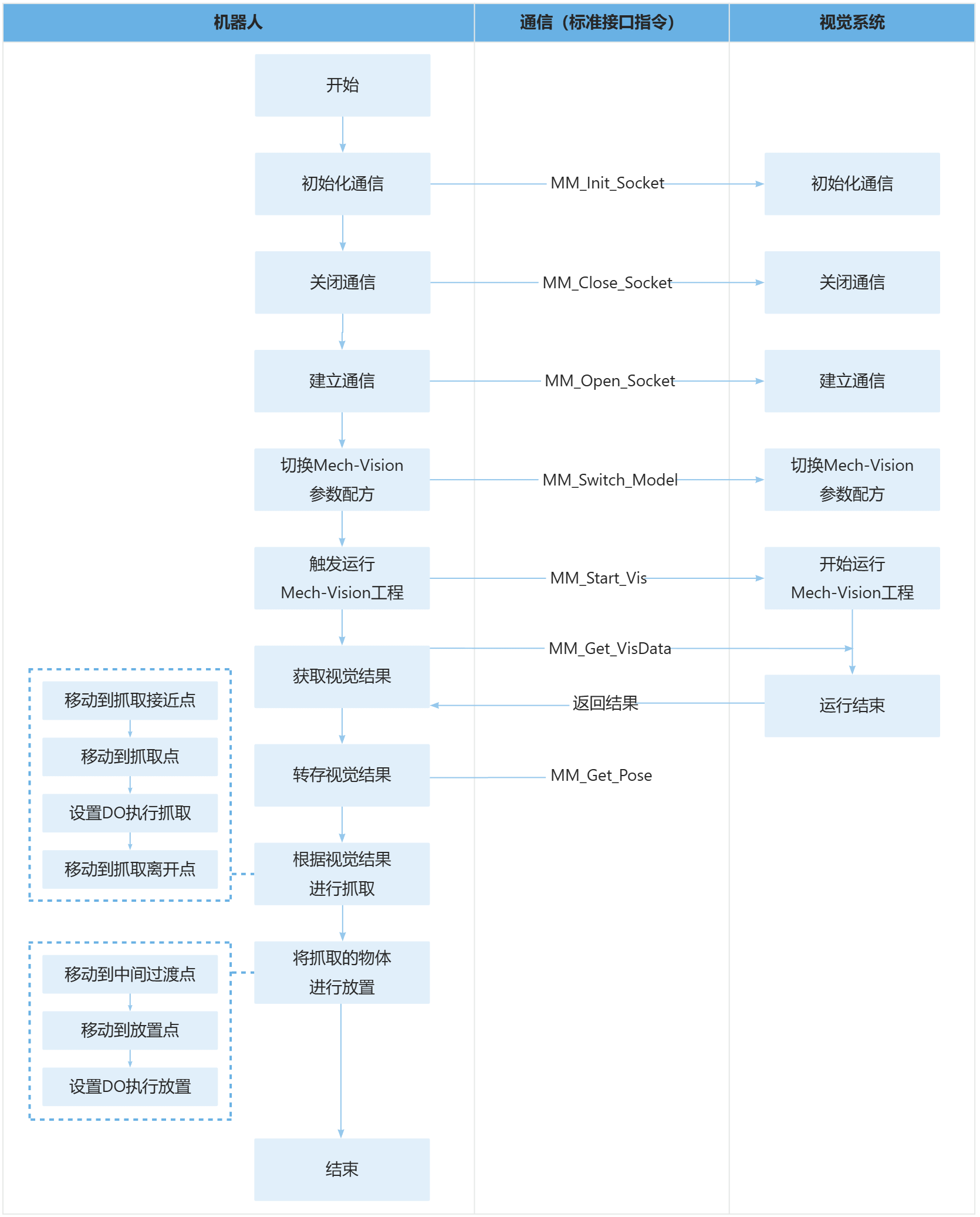
sample1

The table below explains the above program. You can click the hyperlink to the command name to view its detailed description.

Feature Code and description

Include the MM_Module header file

  -- This is a LUA program.
  require("MM_Module")

Initialize communication parameters

  IP_Address = "192.168.1.8"
  Server_Port = 50000
  Time_Out = 60
  --initialize communication parameters (initialization is required only once)
  MM_Init_Socket(IP_Address,Server_Port,Time_Out)
  --close socket connection
  MM_Close_Socket()
  --open socket connection
  MM_Open_Socket()
  • MM_Init_Socket: The command to initialize the communication.

  • MM_Close_Socket: Command to close the communication.

  • MM_Open_Socket: Command to establish the communication.

  • '50000': The port number of the robot.

  • '192.168.1.8': The IP address of the IPC.

  • '60': The communication timeout wait time is 60 seconds.

Close the communication first, then reconnect to ensure no project is currently connected.

Switch Mech-Vision Parameter Recipe

  --switch recipe of NO.1 Mech-Vision project
  TOP_Status=MM_Switch_Model(1,1)
  • MM_Switch_Model: The command to switch the Mech-Vision parameter recipe.

  • First 1: The Mech-Vision project ID.

  • Second 1: The ID of the parameter recipe in the Mech-Vision project.

Print the status code and verify

  print("Vision system status code:",TOP_Status)
  ---check whether the recipe is switched successful
  if TOP_Status ~= 1107 then
    print("Abnormal vision system status!!!",TOP_Status)
    Pause()
  end

Trigger the Mech-Vision project to run

  --trigger NO.1 Mech-Vision project
  TOP_Status = MM_Start_Vis(1,1,1,JP[100])
  print("Vision system status code:",TOP_Status)
  • MM_Start_Vis: The command to trigger the Mech-Vision project to run.

  • First 1: The Mech-Vision project ID.

  • Second 1: The ** project is expected to return all vision points.

  • Third 1:Specify that the robot flange pose must be input to the ** project.

  • JP[100]: Custom joint positions. The joint positions in this example program are of no practical use but must be set.

Print the status code and verify

    print("Vision system status code:",TOP_Status)
    --Status code judgment
    if TOP_Status ~= 1102 then
      print("Abnormal vision system status!!!",TOP_Status)
      Pause()
    end

Obtain the planned path from Mech-Vision

    --get planned path from NO.1 Mech-Vision project
    TOP_Status,TOP_Last_Data,TOP_Pos_Num,TOP_VisPosNum = MM_Get_VisPath(1,1)
  • MM_Get_VisPath: The command to obtain the planned path from Mech-Vision.

  • First 1: Specify the ** project ID.

  • Second 1: Specify the pose type of obtained waypoints as joint positions.

The entire statement indicates that the robot obtains the planned path from the Mech-Vision project that has an ID of 1.

Print the vision results and verify

    print("Planned path from Mech-Vision:",TOP_Status,TOP_Last_Data,TOP_Pos_Num,TOP_VisPosNum)
    --check whether planned path has been got from Mech-Vision successfully
    if TOP_Status ~= 1103 then
      print("Abnormal vision system status!!!",TOP_Status)
      Pause()
    end

Store the planned path

    --save waypoints of the planned path to local variables one by one
    MM_Get_JPR(1,10,20,30)
    MM_Get_JPR(2,11,21,31)
    MM_Get_JPR(3,12,22,32)
  • MM_Get_JPR: The command to store the planned path. Take the first item as an example

  • 1: Store the first waypoint.

  • 10: The joint angles of the first path will be saved to position registerJPR[10]

  • 20: The label will be saved to numeric register HR[20]

  • 30: The motion speed will be saved to numeric registerHR[30]

This instruction writes the tool pose, label, and end-effector tool number of the first vision point into the specified registers, respectively.

Move to the approach waypoint of picking

    --move to approach waypoint of picking
    MovJ(JPR[10],{cnt = -1})

Move to the picking waypoint

    --move to picking waypoint
    MovJ(JPR[11],{cnt = -1})

The robot moves to the approach waypoint of picking.

Set DO commands to perform picking

  --add object grasping logic here, such as "setdo DO_1, 1;"
  Pause()

After the robot moves to the picking waypoint, you can set a DO command (such as setdo DO_1, 1;) to control the robot to use the tool to perform picking. Please set DO commands based on the actual situation.

PAUSE indicates to stop the program execution. If you have added a statement to set a DO command, you can delete the PAUSE statement here.

Move the robot to the approach waypoint of placing

    --move to departure waypoint of picking
    MovJ(JPR[12],{cnt = -1})

The robot moves to position above the picking waypoint and reaches the departure waypoint of picking.

Adding departure waypoints of picking can prevent the robot from colliding with objects (such as bins) in the scene when moving. You can modify the Z-axis negative offset based on the actual scenario to ensure that no collision occurs during the departing process.

Is this page helpful?

You can give a feedback in any of the following ways:

We Value Your Privacy

We use cookies to provide you with the best possible experience on our website. By continuing to use the site, you acknowledge that you agree to the use of cookies. If you decline, a single cookie will be used to ensure you're not tracked or remembered when you visit this website.