Example Program 21: MM_S21_Vis_As_Uframe
Program Introduction
Description |
The robot triggers the Mech-Vision project to run, obtains the vision result, sets the vision result as the user frame, and then performs picking and placing. |
File path |
You can navigate to the installation directory of Mech-Vision and Mech-Viz, and find the file by using the |
Project |
Mech-Vision project |
Prerequisites |
|
| This example program is provided for reference only. Before using the program, please modify the program according to the actual scenario. |
Program Description
This part describes the MM_S21_Vis_As_Uframe example program.
| The only difference between the MM_S21_Vis_As_Uframe example program and the MM_S1_Vis_Basic example program is that the vision result will be used as the user frame (for example target object frame) for picking. As such, only the modification is described in the following part. For information about the parts of MM_S21_Vis_As_Uframe that are consistent with those of MM_S1_Vis_Basic, see Example Program 1: MM_S1_Vis_Basic. |
&ACCESS RVO
&REL 20
&PARAM DISKPATH = KRC:\R1\KUKA_MM\sample
DEF MM_S21_Vis_As_Uframe ( )
;---------------------------------------------------
; FUNCTION: trigger Mech-Vision project and get
; vision result
; Mech-Mind, 2026-12-29
;---------------------------------------------------
   ;set current tool no. to 1
   BAS(#TOOL,1)
   ;set current base no. to 0
   BAS(#BASE,0)
   ;move to robot home position
  ;FOLD PTP HOME Vel=100 % DEFAULT;%{PE}%R 8.3.44,%MKUKATPBASIS,%CMOVE,%VPTP,%P 1:PTP, 2:HOME, 3:, 5:100, 7:DEFAULT
$BWDSTART=FALSE
PDAT_ACT=PDEFAULT
FDAT_ACT=FHOME
BAS(#PTP_PARAMS,100)
$H_POS=XHOME
PTP XHOME
  ;ENDFOLD
   ;initialize communication parameters (initialization is required only once)
   MM_Init_Socket("XML_Kuka_MMIND",873,871,60)
   ;move to image-capturing position
;FOLD LIN camera_capture Vel=1 m/s CPDAT1 Tool[1] Base[0] ;%{PE}
;FOLD Parameters ;%{h}
;Params IlfProvider=kukaroboter.basistech.inlineforms.movement.old; Kuka.IsGlobalPoint=False; Kuka.PointName=camera_capture; Kuka.BlendingEnabled=False; Kuka.MoveDataName=CPDAT4; Kuka.VelocityPath=1; Kuka.CurrentCDSetIndex=0; Kuka.MovementParameterFieldEnabled=True; IlfCommand=LIN
;ENDFOLD
$BWDSTART = FALSE
LDAT_ACT = LCPDAT1
FDAT_ACT = Fcamera_capture
BAS(#CP_PARAMS, 1.0)

LIN Xcamera_capture
;ENDFOLD
   ;trigger NO.1 Mech-Vision project
   MM_Start_Vis(1,0,2,init_jps,status)
   IF status <> 1102 THEN
       ;add error handling logic here according to different error codes
       MM_LOG("Status ERROR")
       HALT
   ENDIF
   ;get vision result from NO.1 Mech-Vision project
   MM_Get_VisData(1,pos_num,status)
   ;check whether vision result has been got from Mech-Vision successfully
   IF status<> 1100 THEN
      ;add error handling logic here according to different error codes
      ;e.g.: status=1003 means no point cloud in ROI
      ;e.g.: status=1002 means no vision result
      halt
   ENDIF
   ;save first base point data to local variables
   MM_Get_Pose(1,XWobjpoint,label,toolid)
   ;Convert the visual points to the workpiece coordinates
   BASE_DATA[10]=XWobjpoint
   ;calculate pick approach point based on pick point
   tool_offset={X 0,Y 0,Z -100,A 0,B 0,C 0}
   Xpick_app=Xpick_point:tool_offset
   ;move to intermediate waypoint of picking
;FOLD PTP pick_waypoint CONT Vel=50 % PDAT1 Tool[1] Base[0];%{PE}
;FOLD Parameters ;%{h}
;Params IlfProvider=kukaroboter.basistech.inlineforms.movement.old; Kuka.IsGlobalPoint=False; Kuka.PointName=pick_waypoint; Kuka.BlendingEnabled=True; Kuka.MoveDataPtpName=PDAT1; Kuka.VelocityPtp=50; Kuka.CurrentCDSetIndex=0; Kuka.MovementParameterFieldEnabled=True; IlfCommand=PTP
;ENDFOLD
$BWDSTART = FALSE
PDAT_ACT = PPDAT1
FDAT_ACT = Fpick_waypoint
BAS(#PTP_PARAMS, 50.0)

PTP Xpick_waypoint C_Dis
;ENDFOLD
   ;move to approach waypoint of picking
;FOLD LIN pick_app Vel=1 m/s CPDAT2 Tool[1]:Tool1 Base[10] ;%{PE}
;FOLD Parameters ;%{h}
;Params IlfProvider=kukaroboter.basistech.inlineforms.movement.old; Kuka.IsGlobalPoint=False; Kuka.PointName=pick_app; Kuka.BlendingEnabled=False; Kuka.MoveDataName=CPDAT2; Kuka.VelocityPath=1; Kuka.CurrentCDSetIndex=0; Kuka.MovementParameterFieldEnabled=True; IlfCommand=LIN
;ENDFOLD
$BWDSTART = FALSE
LDAT_ACT = LCPDAT2
FDAT_ACT = Fpick_app
BAS(#CP_PARAMS, 1.0)
SET_CD_PARAMS (0)
LIN Xpick_app
;ENDFOLD
   ;move to picking waypoint
;FOLD LIN pick_point Vel=0.3 m/s CPDAT3 Tool[1]:Tool1 Base[10] ;%{PE}
;FOLD Parameters ;%{h}
;Params IlfProvider=kukaroboter.basistech.inlineforms.movement.old; Kuka.IsGlobalPoint=False; Kuka.PointName=pick_point; Kuka.BlendingEnabled=False; Kuka.MoveDataName=CPDAT3; Kuka.VelocityPath=0.3; Kuka.CurrentCDSetIndex=0; Kuka.MovementParameterFieldEnabled=True; IlfCommand=LIN
;ENDFOLD
$BWDSTART = FALSE
LDAT_ACT = LCPDAT3
FDAT_ACT = Fpick_point
BAS(#CP_PARAMS, 0.3)
SET_CD_PARAMS (0)
LIN Xpick_point
;ENDFOLD
   ;add object grasping logic here, such as "$OUT[1]=TRUE"
   halt
   ;move to departure waypoint of picking
;FOLD LIN pick_app Vel=1 m/s CPDAT2 Tool[1]:Tool1 Base[10] ;%{PE}
;FOLD Parameters ;%{h}
;Params IlfProvider=kukaroboter.basistech.inlineforms.movement.old; Kuka.IsGlobalPoint=False; Kuka.PointName=pick_app; Kuka.BlendingEnabled=False; Kuka.MoveDataName=CPDAT2; Kuka.VelocityPath=1; Kuka.CurrentCDSetIndex=0; Kuka.MovementParameterFieldEnabled=True; IlfCommand=LIN
;ENDFOLD
$BWDSTART = FALSE
LDAT_ACT = LCPDAT2
FDAT_ACT = Fpick_app
BAS(#CP_PARAMS, 1.0)
SET_CD_PARAMS (0)
LIN Xpick_app
;ENDFOLD
   ;move to intermediate waypoint of placing
;FOLD PTP drop_waypoint CONT Vel=100 % PDAT2 Tool[1] Base[0];%{PE}
;FOLD Parameters ;%{h}
;Params IlfProvider=kukaroboter.basistech.inlineforms.movement.old; Kuka.IsGlobalPoint=False; Kuka.PointName=drop_waypoint; Kuka.BlendingEnabled=True; Kuka.MoveDataPtpName=PDAT2; Kuka.VelocityPtp=100; Kuka.CurrentCDSetIndex=0; Kuka.MovementParameterFieldEnabled=True; IlfCommand=PTP
;ENDFOLD
$BWDSTART = FALSE
PDAT_ACT = PPDAT2
FDAT_ACT = Fdrop_waypoint
BAS(#PTP_PARAMS, 100.0)

PTP Xdrop_waypoint C_Dis
;ENDFOLD
   ;move to approach waypoint of placing
;FOLD LIN drop_app Vel=1 m/s CPDAT4 Tool[1]:Tool1 Base[1] ;%{PE}
;FOLD Parameters ;%{h}
;Params IlfProvider=kukaroboter.basistech.inlineforms.movement.old; Kuka.IsGlobalPoint=False; Kuka.PointName=drop_app; Kuka.BlendingEnabled=False; Kuka.MoveDataName=CPDAT4; Kuka.VelocityPath=1; Kuka.CurrentCDSetIndex=0; Kuka.MovementParameterFieldEnabled=True; IlfCommand=LIN
;ENDFOLD
$BWDSTART = FALSE
LDAT_ACT = LCPDAT4
FDAT_ACT = Fdrop_app
BAS(#CP_PARAMS, 1.0)
SET_CD_PARAMS (0)
LIN Xdrop_app
;ENDFOLD
   ;move to placing waypoint
;FOLD LIN drop Vel=0.3 m/s CPDAT5 Tool[1]:Tool1 Base[1] ;%{PE}
;FOLD Parameters ;%{h}
;Params IlfProvider=kukaroboter.basistech.inlineforms.movement.old; Kuka.IsGlobalPoint=False; Kuka.PointName=drop; Kuka.BlendingEnabled=False; Kuka.MoveDataName=CPDAT5; Kuka.VelocityPath=0.3; Kuka.CurrentCDSetIndex=0; Kuka.MovementParameterFieldEnabled=True; IlfCommand=LIN
;ENDFOLD
$BWDSTART = FALSE
LDAT_ACT = LCPDAT5
FDAT_ACT = Fdrop
BAS(#CP_PARAMS, 0.3)
SET_CD_PARAMS (0)
LIN Xdrop
;ENDFOLD
   ;add object releasing logic here, such as "$OUT[1]=FALSE"
   halt
   ;move to departure waypoint of placing
;FOLD LIN drop_app Vel=1 m/s CPDAT4 Tool[1]:Tool1 Base[1] ;%{PE}
;FOLD Parameters ;%{h}
;Params IlfProvider=kukaroboter.basistech.inlineforms.movement.old; Kuka.IsGlobalPoint=False; Kuka.PointName=drop_app; Kuka.BlendingEnabled=False; Kuka.MoveDataName=CPDAT4; Kuka.VelocityPath=1; Kuka.CurrentCDSetIndex=0; Kuka.MovementParameterFieldEnabled=True; IlfCommand=LIN
;ENDFOLD
$BWDSTART = FALSE
LDAT_ACT = LCPDAT4
FDAT_ACT = Fdrop_app
BAS(#CP_PARAMS, 1.0)

LIN Xdrop_app
;ENDFOLD
   ;move back to robot home position
    ;FOLD PTP HOME Vel=100 % DEFAULT;%{PE}%R 8.3.44,%MKUKATPBASIS,%CMOVE,%VPTP,%P 1:PTP, 2:HOME, 3:, 5:100, 7:DEFAULT
$BWDSTART=FALSE
PDAT_ACT=PDEFAULT
FDAT_ACT=FHOME
BAS(#PTP_PARAMS,100)
$H_POS=XHOME
PTP XHOME
  ;ENDFOLD
END
The workflow corresponding to the above example program code is shown in the figure below.
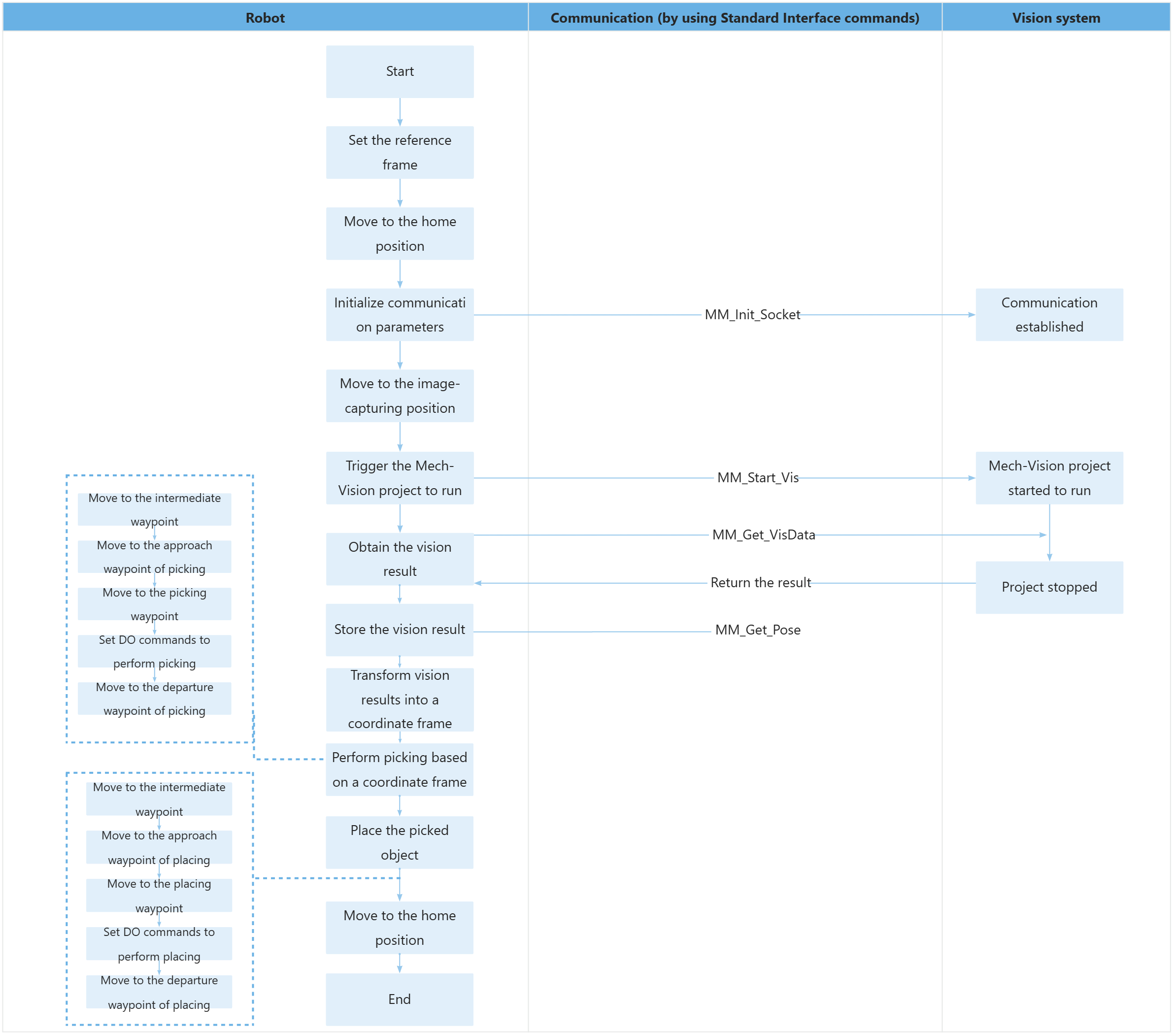
The table below describes the feature of using for loops to obtain all planned paths and perform picking and placing. You can click the hyperlink to the command name to view its detailed description.
| Feature | Code and description | ||
|---|---|---|---|
Set the TCP of the vision point as the user frame |
|
||
Perform picking and placing |
|