Example program 2: MM_S2_Viz_Basic
Program Introduction
You can navigate to the installation directory of Mech-Vision and Mech-Viz and find the file by using the Communication Component/Robot_Interface/TOPSTAR/MM_S2_Viz_Basic path.
Description |
The robot triggers the Mech-Viz project to run, and then obtains the planned path for picking and placing. |
File Name |
You can navigate to the installation directory of Mech-Vision and Mech-Viz and find the file by using the |
Project |
Mech-Vision and Mech-Viz projects |
Prerequisites |
|
| This example program is provided for reference only. Before using the program, please modify the program according to the actual scenario. |
Program Description
This part describes the MM_S2_Viz_Basic example program.
    — This is a LUA program.
    require("MM_Module")
    IP_Address = "192.168.1.8"
    Server_Port = 50000
    Time_Out = 60
    --initialize communication parameters (initialization is required only once)
    MM_Init_Socket(IP_Address,Server_Port,Time_Out)
    --close socket connection
    MM_Close_Socket()
    --open socket connection
    MM_Open_Socket()
    --trigger  Mech-Viz project
    TOP_Status = MM_Start_Viz(2)
    print("Vision system status code:",TOP_Status)
    --check whether the Mech-Vision project has been triggered successfully
    if TOP_Status ~= 2103 then
        print("Abnormal vision system status!!!",TOP_Status)
        Pause()
    end
    --Set branch
    TOP_Status = MM_Set_Branch(1,1)
    print("Vision system status code:",TOP_Status)
    --check whether the branch has been set successfully
    if TOP_Status ~= 2105 then
        print("Failed to set the branch!!!",TOP_Status)
        Pause()
    end
    --get planned path
    TOP_Status,TOP_Last_Data,TOP_Pos_Num,TOP_VisPosNum=MM_Get_VizData(1)
    print("Planned path:",TOP_Status,TOP_Last_Data,TOP_Pos_Num)
    --check whether planned path has been got from Mech-Viz successfully
    if TOP_Status ~= 2100 then
        print("Failed to get the planned data!!!",TOP_Status)
        Pause()
    end
    --save waypoints of the planned path to local variables one by one
    MM_Get_JPR(1,10,20,30)
    MM_Get_JPR(2,11,21,31)
    MM_Get_JPR(3,12,22,32)
    --move to picking waypoint
    MovJ(JPR[10],{cnt = -1})
    --Mov grabbing point
    MovJ(JPR[11],{cnt = -1})
    --add object grasping logic here, such as "setdo DO_1, 1;"
    Pause()
    --move to departure waypoint of picking
    MovJ(JPR[12],{cnt = -1})
The workflow corresponding to the above example program code is shown in the figure below.
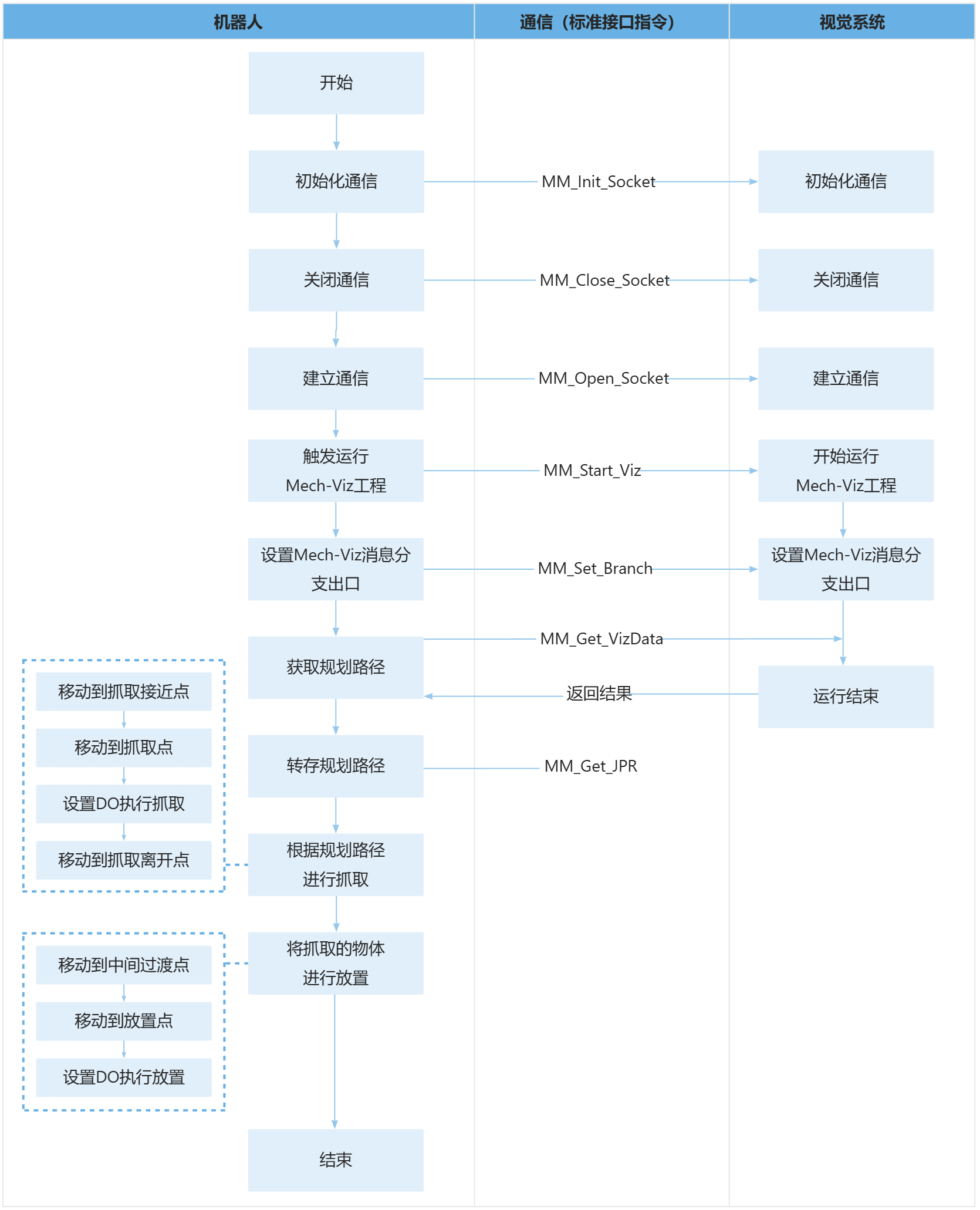
The table below explains the above program. You can click the hyperlink to the command name to view its detailed description.
| Feature | Code and description | ||
|---|---|---|---|
Include the MM_Module header file |
|
||
Initialize communication parameters |
Close the communication first, then reconnect to ensure no project is currently connected. |
||
Start VIZ and return the status code |
|
||
Print the status code and verify |
|
||
Set the Exit Port for the Branch by Msg Step in Mech-Viz |
|
||
Print the status code and verify |
|
||
Obtain the planned path |
The entire statement stores the TCP, label, and tool ID of the first vision point in the specified registers. |
||
Print the status code and verify |
|
||
Store the planned path |
|
||
Move to the approach waypoint of picking |
|
||
Move to the picking waypoint |
The robot moves to the approach waypoint of picking. |
||
Set DO commands to perform placing |
After the robot moves to the picking waypoint, you can set a DO command (such as setdo DO_1, 1;) to control the robot to use the tool to perform picking. Please set DO commands based on the actual situation.
|
||
Move the robot to the departure waypoint of placing |
The robot moves to position above the picking waypoint and reaches the departure waypoint of picking.
|