Example Program 4: MMS4VISUser
Program Introduction
Description |
The robot triggers the Mech-Vision project to run, and then obtains the vision result for picking and placing the object. |
||
File Name |
You can navigate to the installation directory of Mech-Vision and Mech-Viz and find the file by using the |
||
Project |
Mech-Vision project
|
||
Prerequisites |
|
| This example program is provided for reference only. Before using the program, please modify the program according to the actual scenario. |
Program Description
This part describes the MMS4VISUser example program.
  #Include "MMMODULE"
  MM_DROP_COM()
  Mcomnum = 7
  MM_INIT_COM(Mcomnum)
  Tool P_NTool
  PMTool=(+0.00,+0.00,+0.00,+0.00,+0.00,+0.00)
  Tool PMTool
  MM_SET_MOD(1,1,MM_Status)
  If MM_Status <> 1107 Then
    Hlt
  EndIf
  MM_START_VIS(1,0,1,JntSend,MM_Status)
  If MM_Status <> 1102 Then
    Hlt
  EndIf
  Dim MM_Result(10, 8)
  Dim MM_CustInfo(10,15)
  MM_GET_CUST (1,MM_Status,MM_VisionPt_Num,MM_CustInfo_Num,MM_Result,MM_CustInfo)
  If MM_Status <> 1100 Then
    Hlt
  EndIf
  Dim MM_CustData(10, 15)
  MM_GET_CUSTP(MM_Result,MM_CustInfo_Num,MM_CustInfo,1,PPick_pre, MM_Label1,MM_CustData)
  MM_GET_CUSTP(MM_Result,MM_CustInfo_Num,MM_CustInfo,2,PPick,MM_Label2,MM_CustData)
  MM_GET_CUSTP(MM_Result,MM_CustInfo_Num,MM_CustInfo,3,PPick_after,MM_Label3,MM_CustData)
  MM_DROP_COM()
  Mov PPick_pre
  Fine 0,P
  Mvs PPick
  Hlt
  Mvs PPick_after
The workflow corresponding to the above example program code is shown in the figure below.
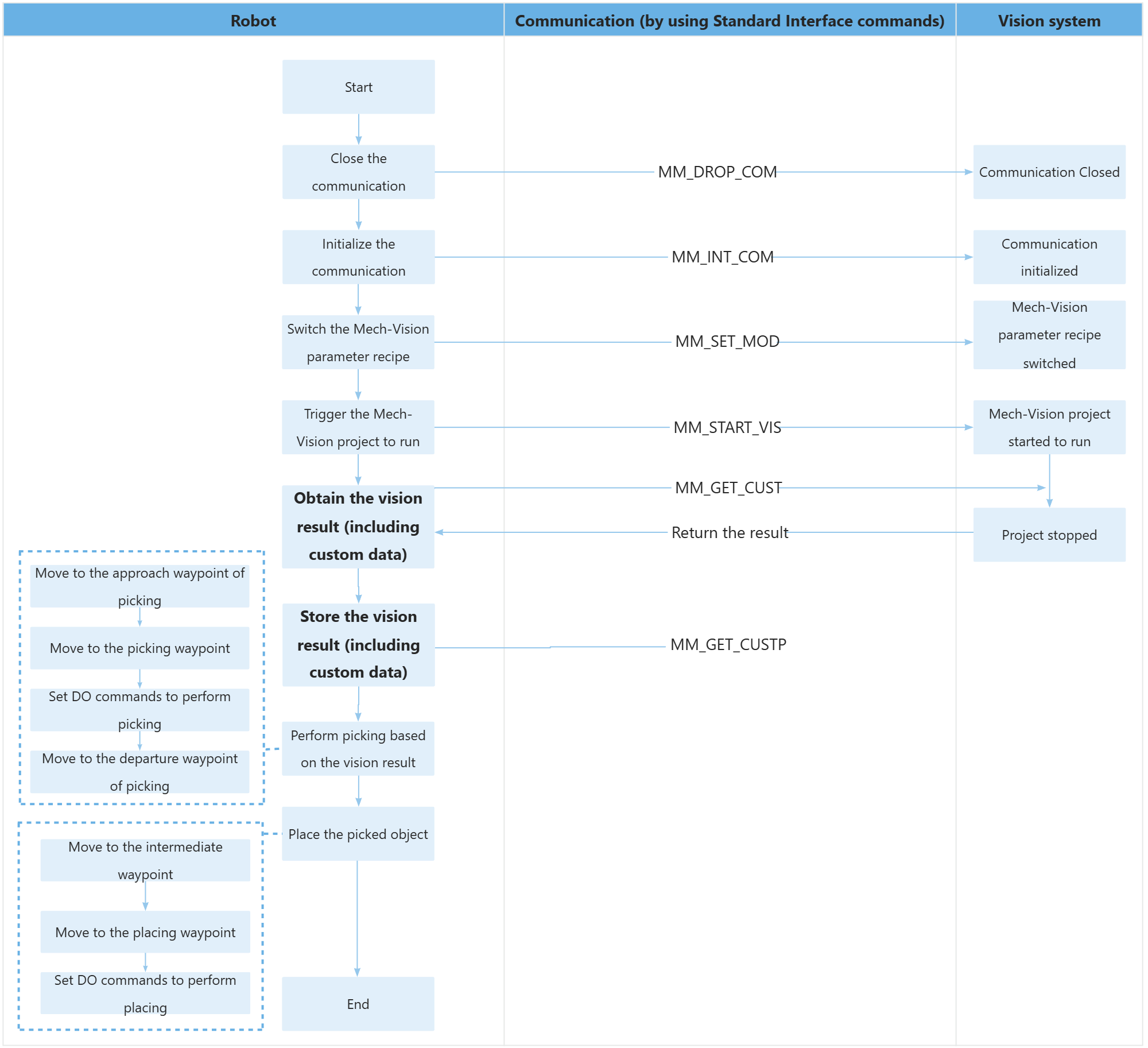
The table below explains the above program. You can click the hyperlink to the command name to view its detailed description.
| Feature | Code and description | ||
|---|---|---|---|
Include the MM_Module header file |
|
||
Initialize communication parameters |
Close the communication first, then reconnect to ensure no project is currently connected. |
||
Reset the control points to their initial values and declare the tool variables |
|
||
Switch the Mech-Vision system’s parameter recipe and verify the status code. |
|
||
Trigger the Mech-Vision project to run and verify the status code. |
The entire statement indicates that the robot triggers the vision system to run the Mech-Vision project with an ID of 1 and expects the Mech-Vision project to return all vision points.
|
||
Define and declare the storage containers |
|
||
Obtain the vision result (including the custom data) |
The entire statement indicates that the robot obtains the vision result from the Mech-Vision project with an ID of 1. The vision result includes custom data.
|
||
Define and declare the storage containers |
|
||
Store the vision result (including the custom data) |
The entire statement stores the TCP, label, and tool ID of the first vision point in the specified variables. |
||
Disconnect the communication. |
|
||
Move to the approach waypoint of picking |
Move to the grasp approach point and set absolute positioning for arrival. |
||
Move to the picking waypoint |
The robot moves from the approach waypoint of picking to the picking waypoint linearly.
|
||
Move to the departure waypoint of picking |
The robot moves to position above the picking waypoint and reaches the departure waypoint of picking.
|