Example Program 19: MM_S19_Vis_As_Uframe
Program Introduction
Description |
The robot triggers the Mech-Vision project to run, obtains the vision result, sets the vision result as the user frame, and then performs picking and placing. |
File path |
You can navigate to the installation directory of Mech-Vision and Mech-Viz, and find the file by using the |
Project |
Mech-Vision project |
Prerequisites |
|
| This example program is provided for reference only. Before using the program, please modify the program according to the actual scenario. |
Program Description
This part describes the MM_S19_Vis_As_Uframe example program.
| The only difference between the MM_S22_Vis_As_Uframe example program and the MM_S1_Vis_Basic example program is that the vision result will be used as the user frame (for example target object frame) for picking. As such, only the feature of parsing labels is described in the following part. For information about the parts of MM_S19_Vis_As_Uframe that are consistent with those of MM_S1_Vis_Basic, see Example Program 1: MM_S1_Vis_Basic. |
NOP
'--------------------------------
'FUNCTION: trigger Mech-Vision
'project and get vision result
'Mech-Mind, 2026-2-24
'--------------------------------
'clear I50 to I69
CLEAR I050 20
'initialize p variables
SUB P070 P070
SUB P071 P071
'set 100mm to z of P070
SETE P070 (3) 100000
'move to robot home position
MOVJ C00000 VJ=50.00
'initialize communication
'parameters (initialization is required only once)
CALL JOB:MM_INIT_SOCKET ARGF"192.168.110.72;50000;2"
'move to image-capturing position
MOVJ C00001 VJ=50.00 PL=0
'open socket connection
CALL JOB:MM_OPEN_SOCKET
'trigger NO.1 Mech-Vision project
CALL JOB:MM_START_VIS ARGF"1;0;2;30;80"
IFTHENEXP I080<>1102
	'add error handling logic here
	 PAUSE
ENDIF
'get vision result from NO.1
'Mech-Vision project
CALL JOB:MM_GET_VISDATA ARGF"1;51;52"
'check whether vision result has
'been got from Mech-Vision
'successfully
IFTHENEXP I052<>1100
	'add error handling logic here
	'according to different error
	'codes
	'e.g.: I052=1003 means no point
	'cloud in ROI
	'e.g.: I052=1002 means no
	'vision result
	 PAUSE
ENDIF
'close socket connection
CALL JOB:MM_CLOSE_SOCKET
'save first vision point data to
PAUSE
'local variables
CALL JOB:MM_GET_POSE ARGF"1;71;61;62"
'Convert visual point to user pos
MFRAME UF#(10) P071 BF
'move to intermediate waypoint of
'picking
MOVJ C00002 VJ=50.00
'move to approach waypoint of
'picking
SFTON P070
MOVL P080 V=166.6 PL=0
SFTOF
'move to picking waypoint
MOVL P080 V=50.0 PL=0
'add object grasping logic here,
'such as DOUT OT#(1) ON
PAUSE
'move to departure waypoint of
'picking
SFTON P070
MOVL P080 V=166.6 PL=0
SFTOF
'move to intermediate waypoint of
'placing
MOVJ C00003 VJ=50.00
END
The workflow corresponding to the above example program code is shown in the figure below.
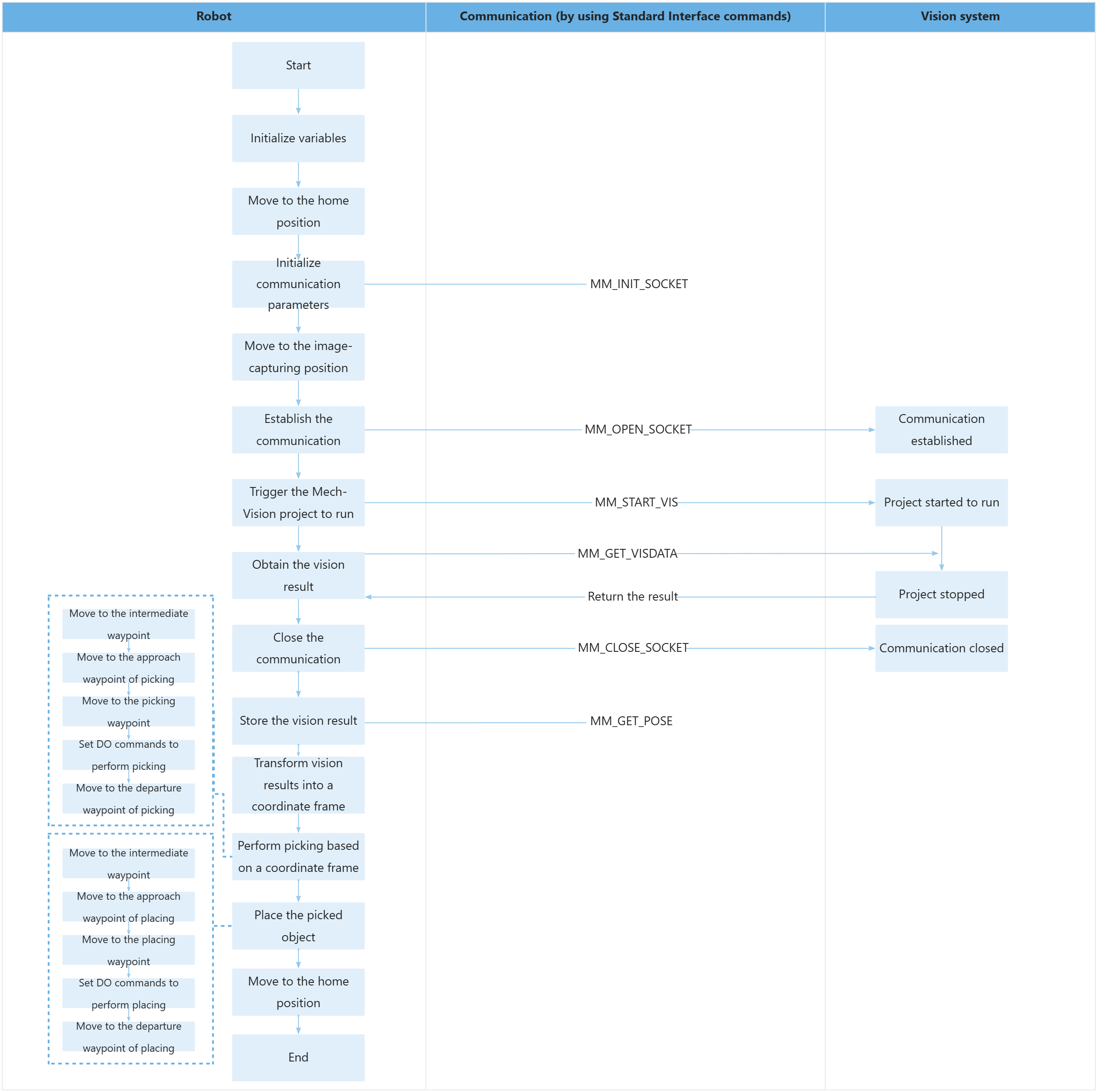
The table below describes the feature of parsing labels. You can click the hyperlink to the command name to view its detailed description.
| Feature | Code and description |
|---|---|
Transform vision points into the User Frame |
|