Example Program 21: MM_S21_Vis_As_Uframe
Program Introduction
Description |
The robot triggers the Mech-Vision project to run, obtains the vision result, sets the vision result as the target object frame, and then performs picking and placing. |
||
File path |
You can navigate to the installation directory of Mech-Vision and Mech-Viz, and find the file by using the
|
||
Project |
Mech-Vision project |
||
Prerequisites |
|
| This example program is provided for reference only. Before using the program, please modify the program according to the actual scenario. |
Program Description
This part describes the MM_S21_Vis_As_Uframe example program.
| The only difference between the MM_S21_Vis_As_Uframe example program and the MM_S1_Vis_Basic example program is that the vision result will be used as the user frame (for example target object frame) for picking. As such, only the feature of switching the parameter recipe is described in the following section. For information about the parts of MM_S21_Vis_As_Uframe that are consistent with those of MM_S1_Vis_Basic, see Example Program 1: MM_S1_Vis_Basic. |
MODULE MM_S21_Vis_As_Uframe
    !----------------------------------------------------------
    ! FUNCTION: trigger Mech-Vision project and get vision result
    ! Mech-Mind, 2026-1-28
    !----------------------------------------------------------
    !define local num variables
    LOCAL VAR num pose_num:=0;
    LOCAL VAR num status:=0;
    LOCAL VAR num label:=0;
    LOCAL VAR num toolid:=0;
    !define local joint&pose variables
    LOCAL CONST jointtarget home:=[[0,0,0,0,90,0],[9E+9,9E+9,9E+9,9E+9,9E+9,9E+9]];
    LOCAL CONST jointtarget snap_jps:=[[0,0,0,0,90,0],[9E+9,9E+9,9E+9,9E+9,9E+9,9E+9]];
    LOCAL PERS robtarget camera_capture:=[[380.58,24.66,583.22],[0.00392748,-0.815898,0.578164,-0.00464691],[0,0,-2,0],[9E+09,9E+09,9E+09,9E+09,9E+09,9E+09]];
    LOCAL PERS robtarget pick_waypoint:=[[502.38,26.91,592.51],[0.00179326,-0.458155,0.888868,-0.0019068],[0,-1,-1,0],[9E+09,9E+09,9E+09,9E+09,9E+09,9E+09]];
    LOCAL PERS robtarget pickpoint:=[[0,0,0],[1,0,0,0],[0,-1,-1,0],[9E+09,9E+09,9E+09,9E+09,9E+09,9E+09]];
    LOCAL PERS robtarget Wobjpoint:=[[0,0,0],[1,0,0,0],[0,0,0,0],[9E+09,9E+09,9E+09,9E+09,9E+09,9E+09]];
    LOCAL PERS robtarget drop_waypoint:=[[302.00,0.00,558.00],[0,0,-1,0],[0,0,0,0],[9E+9,9E+9,9E+9,9E+9,9E+9,9E+9]];
    LOCAL PERS robtarget drop:=[[302.00,0.00,558.00],[0,0,-1,0],[0,0,0,0],[9E+9,9E+9,9E+9,9E+9,9E+9,9E+9]];
    !define LOCAL tooldata variables
    LOCAL PERS tooldata gripper1:=[TRUE,[[0,0,0],[1,0,0,0]],[0.001,[0,0,0.001],[1,0,0,0],0,0,0]];
    !define LOCAL wobjdata variables
    TASK PERS wobjdata MM_Wobj:=[FALSE,TRUE,"",[[0,0,0],[1,0,0,0]],[[639.64,-59.7632,41.2964],[0.0326084,-0.429607,0.901024,0.0503118]]];

    PROC Sample_21()
        !set the acceleration parameters
        AccSet 50,50;
        !set the velocity parameters
        VelSet 50,1000;
        !move to robot home position
        MoveAbsJ home\NoEOffs,v3000,fine,gripper1\WObj:=MM_Wobj;
        !initialize communication parameters (initialization is required only once)
        MM_Init_Socket "127.0.0.1", 50000, 300;
        !move to image-capturing position
        MoveL camera_capture,v1000,fine,gripper1;
        !open socket connection
        MM_Open_Socket status;
        IF status=3099 THEN
            TPWrite "MM: Communication Error";
            STOP;
        ENDIF
        !trigger NO.1 Mech-Vision project
        MM_Start_Vis 1,0,2,snap_jps,status;
        IF status<>1102 THEN
            !add error handling logic here according to different error codes
            TPWrite "MM: Status Error";
            STOP;
        ENDIF
        !get vision result from NO.1 Mech-Vision project
        stop;
        MM_Get_VisData 1,pose_num,status;
        !check whether vision result has been got from Mech-Vision successfully
        IF status<>1100 THEN
            !add error handling logic here according to different error codes
            !e.g.: status=1003 means no point cloud in ROI
            !e.g.: status=1002 means no vision result
            Stop;
        ENDIF
        !close socket connection
        MM_Close_Socket;
        !save first vision point data to local variables
        MM_Get_Pose 1,Wobjpoint,label,toolid;
        !Convert the visual points to the workpiece coordinates
        MM_Wobj.oframe.trans:=Wobjpoint.trans;
        MM_Wobj.oframe.rot:=Wobjpoint.rot;
        !move to intermediate waypoint of picking
        MoveJ pick_waypoint,v1000,z50,gripper1;
        !move to approach waypoint of picking
        MoveL RelTool(pickpoint,0,0,-100), v1000, fine, gripper1\WObj:=MM_Wobj;
        !move to picking waypoint
        MoveL pickpoint, v300, fine, gripper1\WObj:=MM_Wobj;
        !add object grasping logic here, such as "setdo DO_1, 1;"
        Stop;
        !move to departure waypoint of picking
        MoveL RelTool(pickpoint,0,0,-100), v1000, fine, gripper1\WObj:=MM_Wobj;
        !move to intermediate waypoint of placing
        MoveJ drop_waypoint,v1000,z50,gripper1;
        !move to approach waypoint of placing
        MoveL RelTool(drop,0,0,-100),v1000,fine,gripper1;
        !move to placing waypoint
        MoveL drop,v300,fine,gripper1;
        !add object releasing logic here, such as "setdo DO_1, 0;"
        Stop;
        !move to departure waypoint of placing
        MoveL RelTool(drop,0,0,-100),v1000,fine,gripper1;
        !move back to robot home position
        MoveAbsJ home\NoEOffs,v3000,fine,gripper1;
    ENDPROC
ENDMODULE
The workflow corresponding to the above example program code is shown in the figure below.
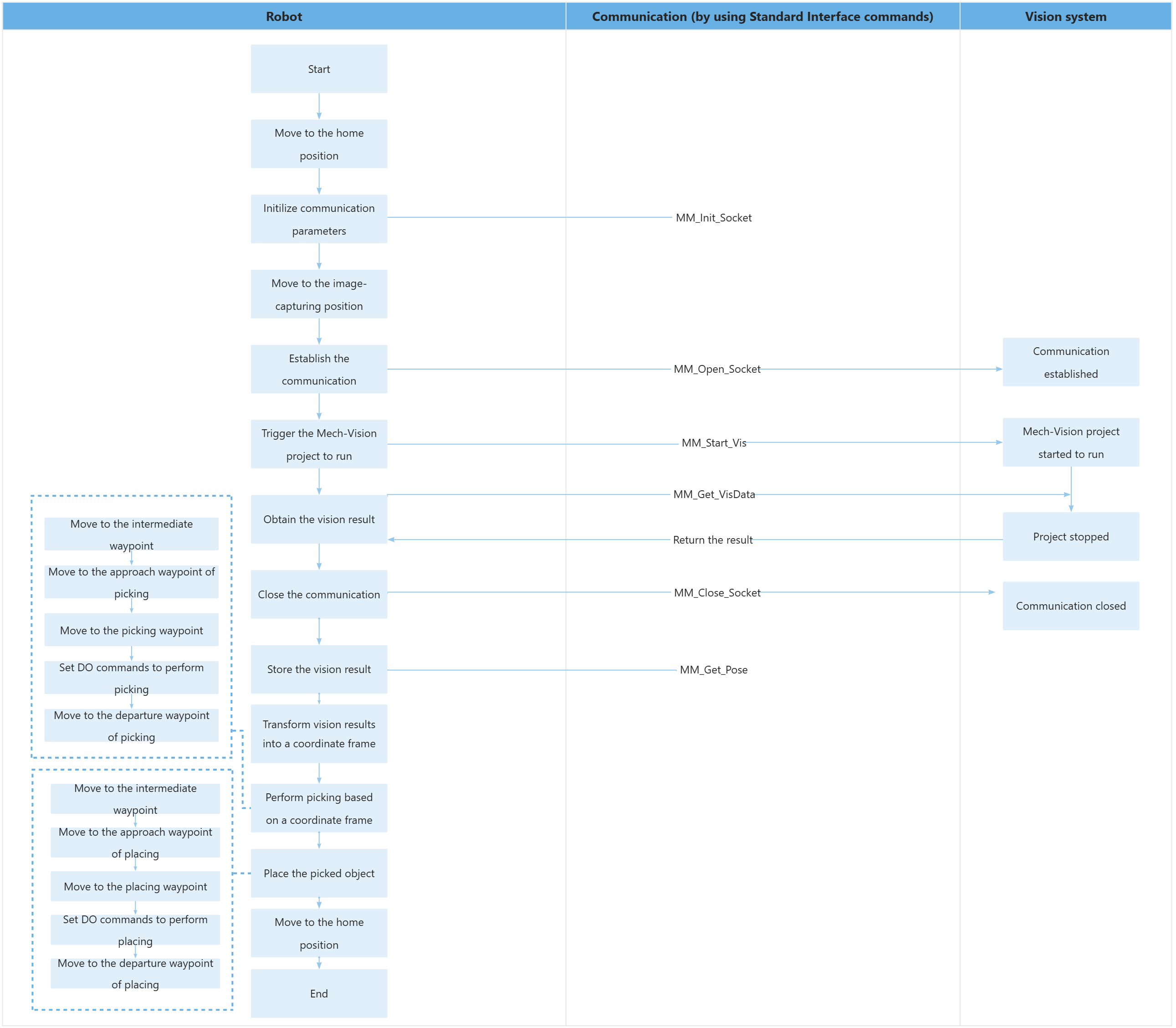
The table below describes the feature of using for loops to obtain all planned paths and perform picking and placing. You can click the hyperlink to the command name to view its detailed description.
| Feature | Code and description | ||
|---|---|---|---|
Define variables |
Wobjpoint is used to store the vision point obtained from Mech-Vision. pickpoint is used to store the picking pose in the target object frame. |
||
Store the TCP of the vision point and assign it to MM_Wobj in the target object frame |
First, store the vision result obtained using the MM_Get_Pose command into the |
||
Perform picking and placing |
|