Windows Security Prevents Software from Running Normally

You are currently viewing the documentation for the latest version (3.0.1). To access a different version, click the "Switch version" button located in the upper-right corner of the page.

■ If you are not sure which version of the product you are currently using, please feel free to contact Mech-Mind Technical Support.

Symptom

When using Windows 11, the following issue may occur:

When training a model in Mech-DLK, the training fails with an unknown error.

Possible Cause

After updating Windows Defender security patches, Windows may mistakenly identify Mech-DLK as unsafe and block it from running. This issue is unrelated to the software version.

Solution

Temporarily disable the Smart App Control feature as follows:
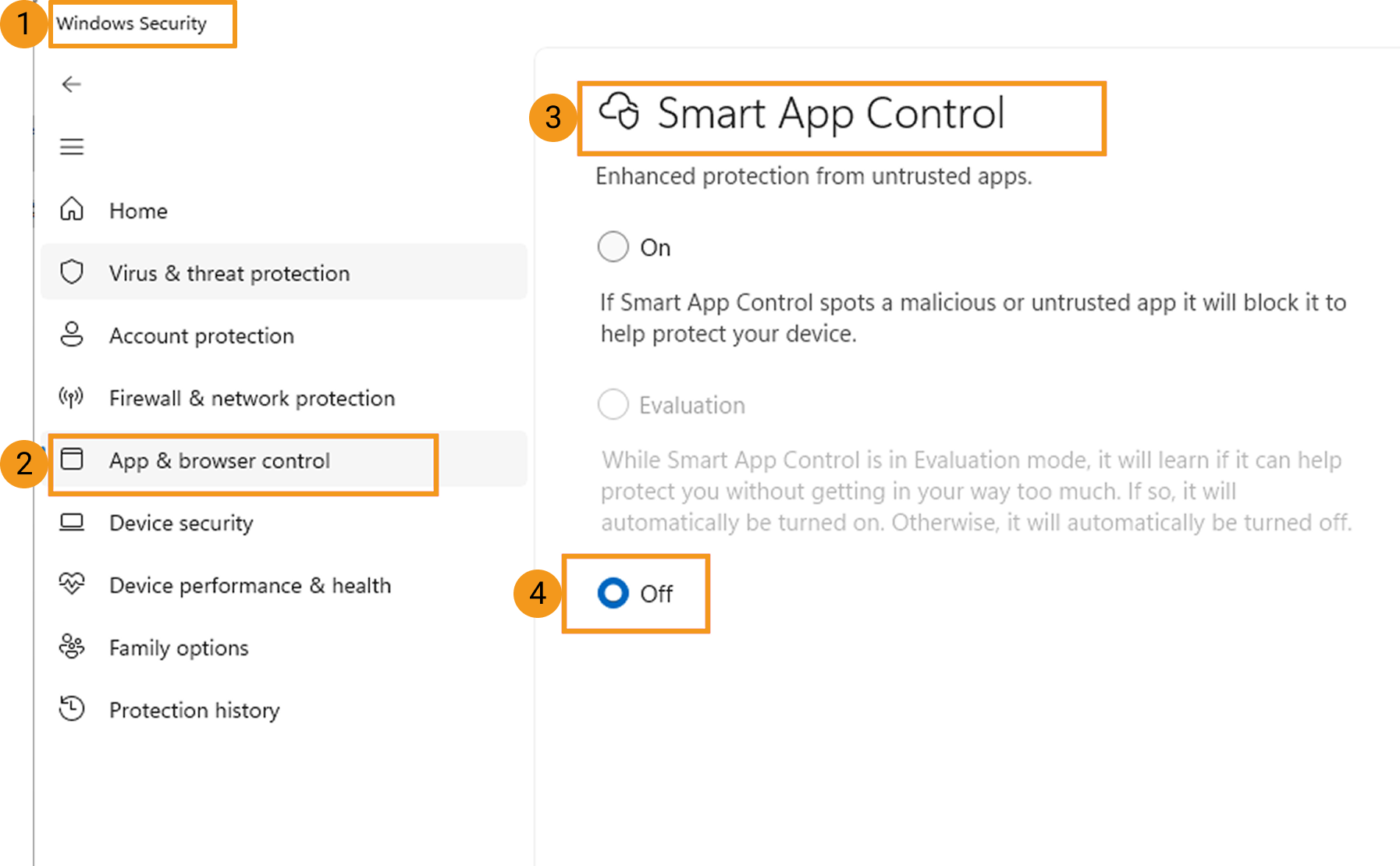
smart app control
  1. Open Windows Security and select App & browser control.

  2. In the Smart App Control page, select Off.

Is this page helpful?

You can give a feedback in any of the following ways:

We Value Your Privacy

We use cookies to provide you with the best possible experience on our website. By continuing to use the site, you acknowledge that you agree to the use of cookies. If you decline, a single cookie will be used to ensure you're not tracked or remembered when you visit this website.