Configure Filtering Rules
In the Validation tab, click Filtering Rule Settings to configure filtering rules for the model. The Object-Bin Segmentation module supports configuring morphological transformation as needed.
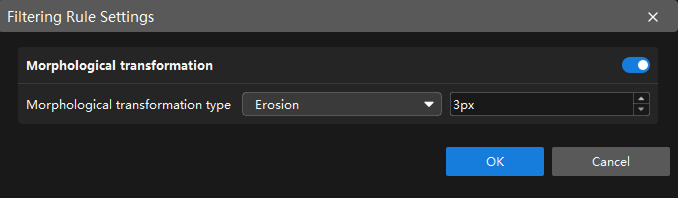
|
After the configuration takes effect, validation results change accordingly, and the related settings also take effect in the exported model. |
Morphological Transformation
When morphological transformation is enabled, morphological processing can be applied to the mask to improve the boundary quality and connectivity of the target region.
| Parameter | Description |
|---|---|
Morphological transformation |
Once enabled, morphological processing is applied to the mask. |
Morphological transformation type |
Four morphological operations are supported: Erosion, Dilation, Opening, and Closing. For morphological processing, the default kernel size is 3 px.
|
After completing the configuration, click OK to make the configuration take effect.