Configure Filtering Rules
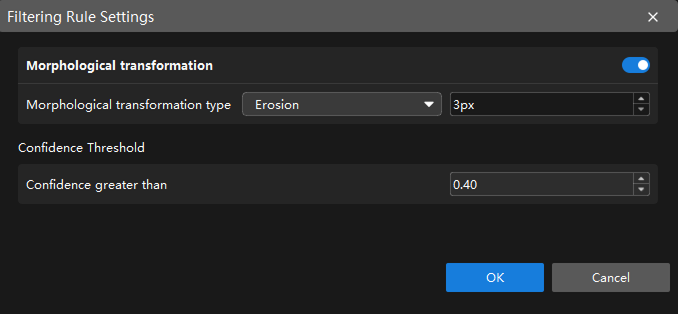
In the Validation tab, click Filtering Rule Settings to configure filtering rules for the model. The Instance Segmentation module supports configuring Morphological transformation and Confidence Threshold as needed.
|
After the configuration takes effect, validation results change accordingly, and the related settings also take effect in the exported model. |
Morphological Transformation
When morphological transformation is enabled, morphological processing can be applied to the mask to improve the boundary quality and connectivity of the target region.
| Parameter | Description |
|---|---|
Morphological transformation |
Once enabled, morphological processing is applied to the mask. |
Morphological transformation type |
Four morphological operations are supported: Erosion, Dilation, Opening, and Closing. For morphological processing, the default kernel size is 3 px.
|
Confidence Threshold
Confidence refers to the accuracy of labeling results. A higher confidence indicates more accurate labeling results. The inference result is retained only when its confidence exceeds this threshold.
You can set the confidence threshold by this step:
Set the threshold according to the actual requirement (default value: 0.4).
| Setting the confidence too high may result in a lower number of displayed labels. |
After completing the configuration, click OK to make the configuration take effect.