Extract 3D Points in Cuboid
Function
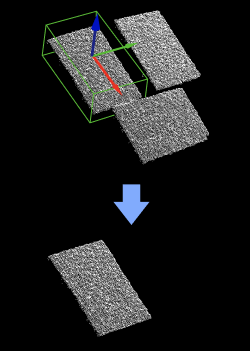
Extract point clouds inside specified cuboids and discard the point clouds outside the cuboids.
Usage Scenario
A general point cloud extraction Step. No fixed usage scenarios. The dimensions of the cuboids can be input from the port or set by parameters.
Input and Output
Input
| Input port | Data type | Description |
|---|---|---|
Point Clouds |
PointCloud/XYZNormal[] |
Point clouds in the input list of this port will have points extracted. |
Box Poses |
Pose[] |
Cuboid center poses used to determine the positions and orientations of the cuboids. |
Half Lengths on X-Axis of Boxes |
Number[] |
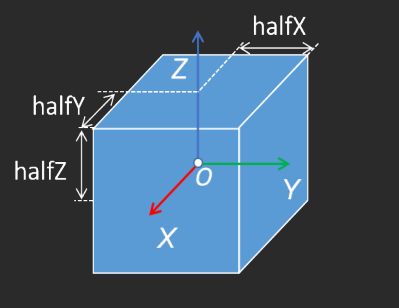
Optional input. Specifies the extent of the cuboid extraction region along the X-axis. Starting from the cuboid center pose, the Step extends this distance in both the positive and negative X-axis directions. For example, a value of 100 mm gives a total cuboid length of 200 mm along the X-axis. If this port is not connected, the value set in the corresponding parameter is used. |
Half Lengths on Y-Axis of Boxes |
Number[] |
Optional input. Specifies the extent of the cuboid extraction region along the Y-axis. Starting from the cuboid center pose, the Step extends this distance in both the positive and negative Y-axis directions. For example, a value of 100 mm gives a total cuboid length of 200 mm along the Y-axis. If this port is not connected, the value set in the corresponding parameter is used. |
Half Lengths on Z-Axis of Boxes |
Number[] |
Optional input. Specifies the extent of the cuboid extraction region along the Z-axis. Starting from the cuboid center pose, the Step extends this distance in both the positive and negative Z-axis directions. For example, a value of 100 mm gives a total cuboid length of 200 mm along the Z-axis. If this port is not connected, the value set in the corresponding parameter is used. |
Parameter Description
Box Dimensions’ Settings
| Parameter | Description | Illustration |
|---|---|---|
Half Length of Box on X-Axis |
Parameter description: Specifies the extent of the cuboid extraction region along the X-axis. Starting from the cuboid center pose, the Step extends this distance in both the positive and negative X-axis directions. For example, a value of 100 mm gives a total cuboid length of 200 mm along the X-axis. This parameter takes effect when the Half Lengths on X-Axis of Boxes input port is not connected. Default value: 100.000 |
|
Half Length of Box on Y-Axis |
Parameter description: Specifies the extent of the cuboid extraction region along the Y-axis. Starting from the cuboid center pose, the Step extends this distance in both the positive and negative Y-axis directions. For example, a value of 100 mm gives a total cuboid length of 200 mm along the Y-axis. This parameter takes effect when the Half Lengths on Y-Axis of Boxes input port is not connected. Default value: 100.000 |
|
Half Length of Box on Z-Axis |
Parameter description: Specifies the extent of the cuboid extraction region along the Z-axis. Starting from the cuboid center pose, the Step extends this distance in both the positive and negative Z-axis directions. For example, a value of 100 mm gives a total cuboid length of 200 mm along the Z-axis. This parameter takes effect when the Half Lengths on Z-Axis of Boxes input port is not connected. Default value: 100.000 |
|
Usage Settings for Input Clouds
| Parameter | Description |
|---|---|
Input Point Cloud Usage |
Description: This parameter is used to set the correspondence between the input point cloud list and the cuboid center pose list. The Step will generate a cuboid based on the cuboid center pose and extract the points in the corresponding point cloud that are within the cuboid range. Default value: OneToOne Value list:
|