Evaluate Values in List
Description
When the returned result of an output item is a list, use this Step to determine whether each measured value in the list is within the acceptable range and locate the NG values.
Basic Concepts
List and index
-
List
A list is a structured collection of data consisting of multiple measured values. Each measured value has a fixed position in the list.
-
Index
The index indicates the position of the measured value in a list, starting from 1 and increasing sequentially.

Input Description
The input of this Step should be a one-dimensional list of numbers (Number []). If the numerical list has more than one dimension, try using the Extract Data Step or the Decrease Dimension by Merging operation to lower the data dimensionality and ensure the Step runs properly.
Parameter Description
First, select the Evaluation Mode to determine how to evaluate whether each value in a list is within the respective valid range. You can choose Custom or Incremental:
-
In this case, set a valid range for each measured value in the list to determine whether each value is qualified (OK).
-
In this case, set the valid range for the first measured value (index 1), and the valid ranges for the remaining values in the list will increment on this basis to determine whether each value is qualified (OK).
Once an evaluation mode is selected, you can set the relevant parameters accordingly.
Custom
Set the following parameters when the “Evaluation Mode” is set to Custom.
| Parameter | Description | ||
|---|---|---|---|
Number of Measured Values |
The number of measured values in the list input into the Step.
|
||
Set Acceptable Ranges |
Set an individual valid range for each value in the list. Click the Open the editor button to set a Lower limit and Upper limit for each value in the list to determine their respective valid range. The lower and upper limits are all marked by the index of the values in the list. 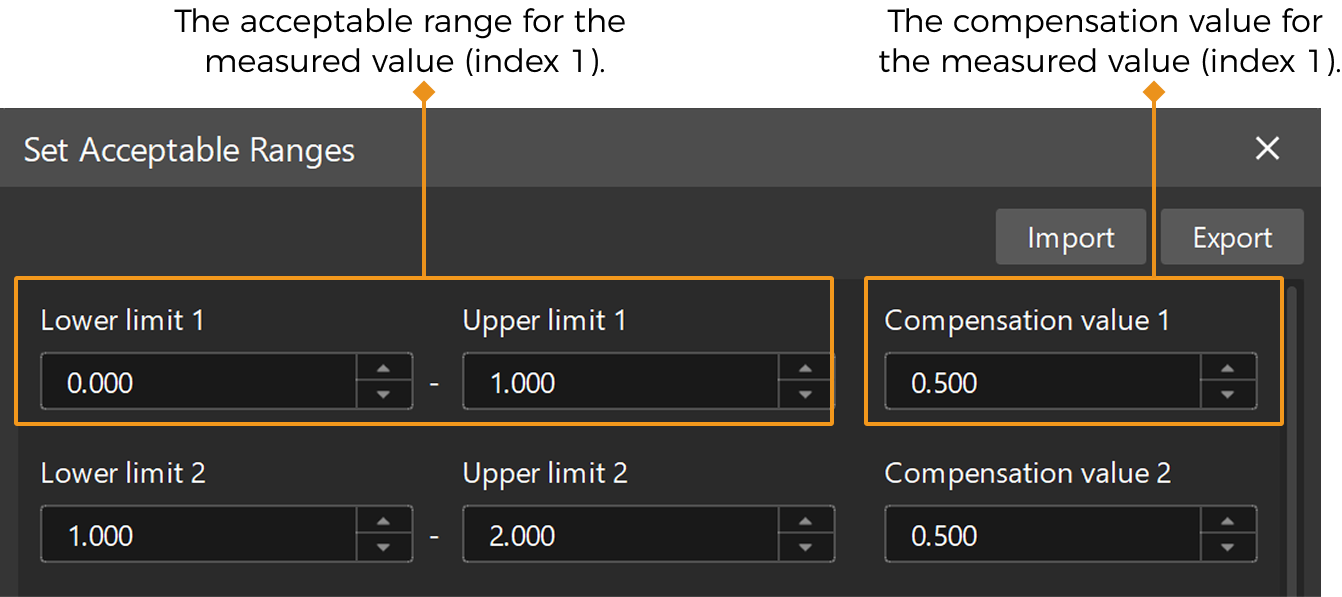
|
Incremental
Set the following parameters when the “Evaluation Mode” is set to Incremental.
| Parameter | Description | ||
|---|---|---|---|
Number of Measured Values |
The number of measured values in the list input into the Step.
|
||
Lower Limit |
The lower limit of the acceptable range for the measured value. For example, Lower limit 1 indicates the lower limit of the measured value with an index of 1. |
||
Upper Limit |
The upper limit of the acceptable range for the measured value. For example, Upper limit 1 indicates the upper limit of the measured value with an index of 1. |
||
Increment |
Apply the increment to determine the acceptable ranges for subsequent values on the basis of the acceptable range of the first measured value. |
||
Compensation value |
The compensation value set for the measured value. For example, Compensation value 1 indicates the compensation value for a measured value with an index of 1. |
Output Description
Select the output items, and the corresponding data will be output after the Step is run. You can select the output according to the actual measurement requirements.
|
If you select an expandable output item, you must expand it by clicking ▶, and then set the Lower Limit and Upper Limit values to determine the acceptable range. If the output value falls within the acceptable range, the measurement item is judged as passing (OK), or else it is judged as failing (NG). |
| Output item | Description |
|---|---|
List |
The list input into the Step. |
Compensated List |
The list obtained by applying the defined compensation values to each value in the input list. |
NG Count |
The number of measured values in the list judged as NG. |
OK Count |
The number of measured values in the list judged as OK. |
NG Index |
The indices of NG measured values in the list. |
NG Value |
The NG measured values in the list. |
Min NG Index |
The index of the minimum NG value. |
Min NG Value |
The minimum NG value. |
Max NG Index |
The index of the maximum NG value. |
Max NG Value |
The maximum NG value. |
Troubleshooting
|